Blog
/
Amazon Sponsored Brands: Cost, Setup & Best Practices
Amazon Sponsored Brands: Cost, Setup & Best Practices
Nivesh J.
Key Takeaways
Sponsored Brands ads are CPC or vCPM ads with your logo, headline, and multiple products, shown above and within Amazon search results.
Amazon sets no minimum spend but recommends budgeting at least $10 per day per campaign.
Segment branded, category, and competitor keywords into separate campaigns, because each needs a different ACoS target.
Judge Sponsored Brands on new-to-brand metrics, not ROAS alone.
Atom11 is retail-aware. It connects your ads to inventory, pricing, organic rank, and buy box, so automation reacts to business signals and not just ad data.
Amazon Sponsored Brand Ads are PPC campaigns that promote your brand, products, or Store across Amazon search results and other eligible placements. They support multiple creative formats, including product collections, video, and Store-focused ads, with targeting options such as keywords, products, and categories. This guide explains how Sponsored Brand Ads work, their pricing and bidding model, available ad formats, targeting options, campaign setup, and optimisation strategies. It also covers common campaign mistakes and how tools such as Atom11 can help automate monitoring, bidding, and performance management.
What Are Amazon Sponsored Brand Ads?

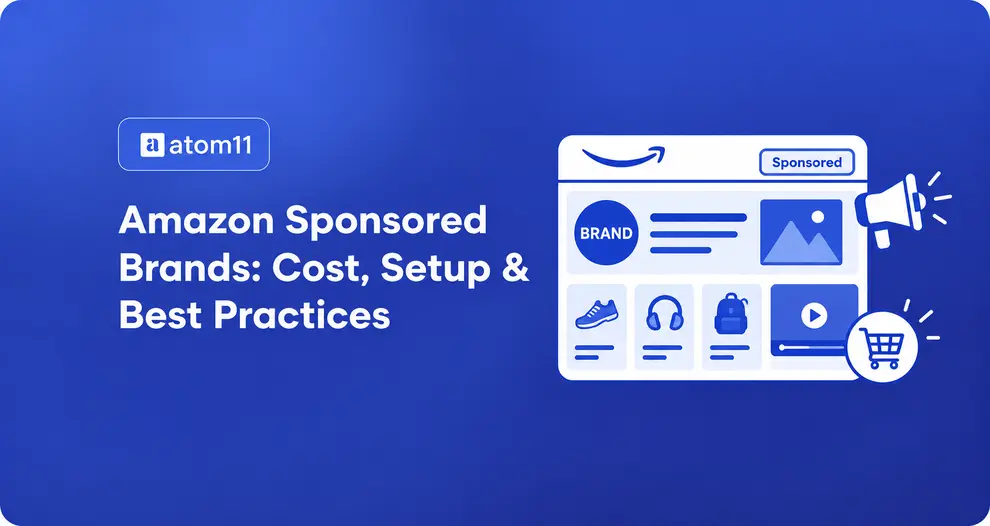
Amazon Sponsored Brands are customizable ads that feature your brand logo, a headline, a video or lifestyle image, and multiple products. They appear on top of and within shopping results, on product detail pages, and on the homepage.
How they differ from Sponsored Products
Sponsored Products promote a single listing and look like a normal result.
Sponsored Brands promote your brand and several products at once, usually in more prominent placements.
Sponsored Brands send shoppers to a Brand Store, a custom landing page, or a product page.
Think of Sponsored Products as capturing demand, and Sponsored Brands as shaping which brand the shopper considers.
Who Can Run Sponsored Brands Ads?
Amazon lists Brand Registry sellers, vendors, and agencies as eligible. Amazon's guide also tags the format for book authors. If you are a reseller without Brand Registry, you cannot run these ads, which is why Sponsored Brands are mainly a tool for brand owners and private-label sellers.
Sponsored Brands Ad Formats and Placements
Format | What shoppers see | Best for |
Collection | Logo, headline, lifestyle image, and several products | Category discovery and cross-selling |
Store spotlight | Up to three Brand Store sub-pages | Driving traffic to your Store |
Video | A 6 to 45 second auto-playing video | Showing a product in use |
Collection ads
Collection ads show your logo, a headline, a lifestyle image, and several products together in a single ad. Because shoppers see a small selection of your catalog at once, this format suits category discovery and cross-selling. If you turn on automatic product optimization, Amazon swaps in the products most relevant to each shopper query, so keep the headline about your overall value and selection rather than one product.
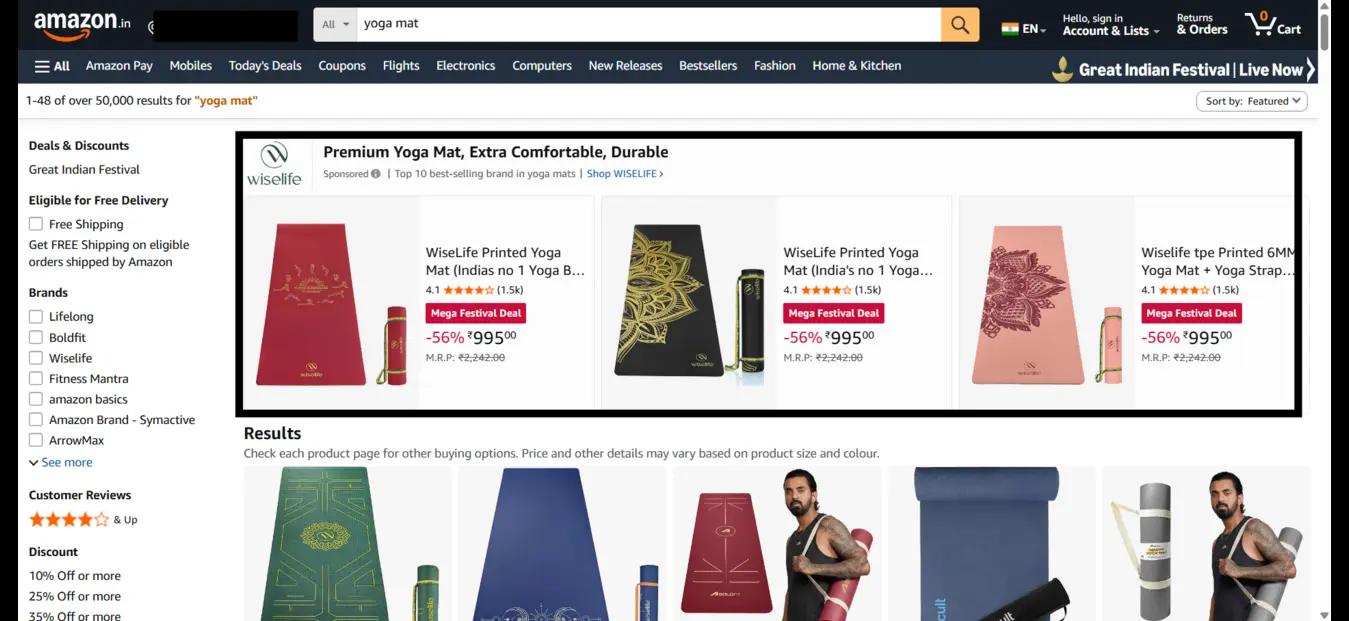
Source: Amazon.com, screenshot by the Atom11 team, October 2026.
Store spotlight ads
Store spotlight ads feature up to three of your Brand Store sub-pages, so shoppers land inside your Store instead of on a single listing. That makes this the natural format when your goal is driving traffic to your Store. It needs a Brand Store with at least three sub-pages, each with a unique product, so confirm your Store is built out before you choose it.
Video ads
Video ads are 6 to 45 second auto-playing videos, which makes them the best fit for showing a product in use. Video has its own placement and auction, so it does not compete with your other self-service campaigns.

Source: Amazon.com, screenshot by the Atom11 team, October 2026.
Where Sponsored Brands ads appear
Sponsored Brands ads appear on top of and within shopping results, on product detail pages, and on the homepage, on both mobile and desktop. The placements above and within search results are usually the most prominent, which is why these ads shape which brand a shopper considers.
Format rules from Amazon's guide:
Store spotlight needs a Brand Store with at least three sub-pages, each with a unique product.
Video has its own placement and auction, so it does not compete with your other self-service campaigns.
Collection ads can use automatic product optimization, which swaps in the products most relevant to each shopper query.
Practical note on headlines: if you let Amazon pick products dynamically, keep the headline about your overall value and selection. A headline naming one product looks wrong when other products show.
How Much Do Sponsored Brand Ads Cost?
There is no minimum spend, with two pricing models:
CPC: you pay per click.
vCPM: you pay per 1,000 viewable impressions.
Your actual cost depends on your bid plus other factors. Amazon recommends budgeting at least $10 per day so ads keep running through the day. Third-party estimates for average CPC vary widely by category and competition, so treat them as rough ranges and check your own search term reports.
How to Set Up a Sponsored Brands Campaign
Register and sign in to Amazon Ads, then click Create campaign and choose Sponsored Brands.
Name the campaign and set a budget. Amazon suggests running with no end date and pausing when needed, and budgeting at least $10 a day.
Pick an ad format (collection, Store spotlight, or video).
Choose a landing page: Brand Store, product detail page, or custom landing page.
Choose targeting: keywords or products (categories and specific ASINs). Each campaign uses one type.
Add negative targeting to block irrelevant queries and pages.
Upload creative and submit. Amazon says review takes up to 72 hours.
Setup happens inside Amazon Ads. Once campaigns are live, Atom11 helps you manage them:
Build faster: bulk campaign creation and bulk keyword and negative additions save time when you split branded, generic, and competitor campaigns.
Control bids and budgets: rule-based bid and budget automation, plus dayparting by hour and day.
Cut waste: harvesting moves winning search terms into manual campaigns, and negation blocks the ones that waste spend.
Protect stock: the inventory optimizer pauses ads when stock is low and restores them after restocking.
Prepare for sales events: version control saves your bids and budgets before Prime Day or Black Friday so you can roll back.
See what worked: the performance monitor shows whether an automation helped, and the Root Cause Analyzer and Neo explain sales drops.
Build Sponsored Brand Campaigns Around Search Intent
The right targeting structure starts with why shoppers are searching, not simply which keywords are easiest to group. Separate branded, category, and competitor terms into distinct campaigns so you can set the right bids, budgets, and ACoS targets for each intent. This makes it easier to protect branded demand, acquire new customers, and control conquesting spend.
Keywords
Amazon recommends at least 25 keywords per campaign, mixing broad, phrase, and exact match. It also notes that more than a quarter of shoppers shop across multiple brands, so you need to compete on both branded and category searches.
Segment by intent, not by convenience. Split campaigns so each has its own ACoS target:
Campaign type | Example query | Typical goal |
Branded | "your brand + product" | Defend your name, accept low ACoS |
Generic/category | "running shoes for men" | Win new customers, accept higher ACoS |
Competitor | "competitor brand name" | Conquest, tightly capped bids |
Branded campaigns
Branded campaigns target queries that include your brand name, such as "your brand + product." These shoppers were already looking for you, so the goal is to defend your name from competitors rather than to find new customers. Accept a low ACoS target here, since you are protecting demand you have already earned.
Generic and category campaigns
Generic and category campaigns target searches where the shopper has not picked a brand yet, such as "running shoes for men." The goal is to win new customers, so accept a higher ACoS than on branded terms. You are paying to introduce your brand, and this is where most new-to-brand customers come from.
Competitor campaigns
Competitor campaigns target queries that contain a rival's brand name. The goal is conquest: showing up in front of shoppers who set out to find someone else. Because these clicks are harder to convert, keep bids tightly capped so conquesting spend does not run ahead of results.
Mixing these in one campaign hides which searches are profitable.
Product targeting
Use individual ASIN targeting for cross-selling and loyalty. Use category targeting for broad awareness.
Create Sponsored Brand Ads That Earn the Click
Creative quality directly affects how effectively Sponsored Brand Ads turn impressions into visits and product discovery. Your logo, imagery, headline, CTA, and ad format should work together to communicate the product value quickly, especially on mobile. The goal is not just to make the ad look better, but to identify which creative elements improve engagement and conversion. Use these practices to build compliant creatives and test performance systematically.
Logo: use your registered brand logo that meets Amazon's creative policy, or the ad will be paused.
Lifestyle imagery: Jungle Scout reports that lifestyle images in mobile Sponsored Brands ads can lift click-through rate by 40% over standard product images.
Headline plus CTA: keep it benefit-led, for example "Learn more," and call out new or seasonal items.
Test one variable at a time. Clone the campaign, change only the headline, and compare. Then test bigger variables, such as custom vs. lifestyle images or collection vs. Store spotlight.
Measuring Success: Why ROAS Alone Misleads
High ROAS shouldn't be the primary success metric for Sponsored Brands, because it targets shoppers who are still browsing. Track these instead:
Metric | What it tells you |
Impressions and CTR | Whether your creative earns attention |
New-to-brand orders and sales | How many first-time buyers you won in the last 12 months |
ACoS (spend ÷ sales) | Efficiency against your margin |
TACoS (spend ÷ total sales) | Whether ads are lifting your whole business |
A ratio many advertisers aim for is a TACoS of 10% or lower, but your margins decide the right number.
Once you are watching new-to-brand sales, ACoS and TACoS across dozens of campaigns, keeping those numbers healthy becomes the harder part, and that is where most brands start to struggle.
Why Sponsored Brands Get Hard to Manage at Scale
The metrics above only help if you can act on them quickly. Sponsored Brands rarely live alone. Each brand typically runs separate campaigns by format, match type, branded vs. generic intent, and product line, so every metric you track multiplies across many campaigns. That creates four recurring problems:
Wasted spend hides in volume. The more search terms you have, the harder it is to spot the ones that burn budget, even when your ACoS looks fine overall.
Ads keep running on stock-outs. Native tools do not weigh your inventory when bidding, so you can pay for clicks on products you can't ship.
Event changes are hard to reverse. Raising bids for Prime Day is easy. Restoring the exact earlier state afterward is not.
Automation is a black box. You often can't tell whether a rule helped or hurt your new-to-brand and TACoS results.
These are the problems retail-aware software is built to solve. The next section shows how Atom11 handles each one.
How Atom11 Fits Into Sponsored Brands Management
The four problems above share a root cause: Amazon's console shows ad data in isolation, so you can't see how stock, pricing, or organic rank affect your campaigns. Atom11 is a retail-aware Amazon PPC platform that integrates ads with Seller Central signals such as inventory, pricing, organic rank, and buy box. It is built for that gap. Here is how it works in practice.
One dashboard for ads and retail data
Atom11's overview page breaks spend down by ad type, campaign type, placement, search term type (branded, competition, generic), and match type. Expanding any of these shows how it performs, so you can see at a glance whether branded or generic terms are carrying your results. If you run several brands or client accounts, the agency view lists them all in one place.
Automation you control
Atom11 uses rule-based automation, where you set the logic and the software applies it:
Bid optimizer: raises or lowers bids based on performance.
Harvesting and negation: moves winning search terms from auto into manual campaigns and blocks the ones that waste spend. This directly tackles the "wasted spend hides in volume" problem.
Placement optimizer: adjusts bids by placement.
Dayparting: schedules bids and budgets by hour and day, with controls for how conflicts are handled when you edit manually.
Protection against stock-outs and event risk
Inventory optimizer: pauses advertised ASINs when stock runs low and re-enables them once stock is replenished.
Version control: saves a snapshot of your bids and budgets before Prime Day or Black Friday, so you can roll back to the exact earlier state afterward.
Clarity on what works
Performance monitor: shows how campaigns behaved after an automation ran, so you can keep the rule or roll it back. This replaces the black box with a clear before-and-after view.
Root Cause Analyzer: compares two time periods and highlights which metrics changed, such as spend, page views, or conversion, and which to ignore.
Neo, Atom11's AI analyst: answers questions in plain language, for example why sales fell for a specific parent ASIN.
Bulk work and audiences
Bulk campaign creation, keyword additions, negations, and audience changes cut down repetitive setup. Atom11 also supports Amazon Marketing Cloud reports and audience building.
Conclusion
Sponsored Brands move shoppers from searching to considering your brand, and the sellers who invest most in them tend to be the biggest. Start with a clear structure (separate branded, generic, and competitor campaigns), measure new-to-brand customers, and test creative one change at a time. As campaigns multiply, the bottleneck becomes attention, not budget. Atom11 helps by tying ads to inventory and retail signals and showing what each automation did. If you want to see how that would look on your account, contact us to book a walkthrough.
FAQs
Are Amazon Sponsored Brand ads worth it?
For brand owners, usually yes, especially when judged on new-to-brand customers and not ROAS alone. Results depend on category competition and margins.
How much do Sponsored Brand ads cost?
Amazon has no minimum spend. You pay per click or per 1,000 viewable impressions, and your cost depends on your bid and competition. Amazon suggests at least $10 per day per campaign.
Where do Sponsored Brand ads appear?
On top of and within shopping results, on product detail pages, and on the homepage, on mobile and desktop.
What is the difference between Sponsored Brands and Sponsored Products?
Sponsored Products promote single listings. Sponsored Brands show your logo, headline, and multiple products.
Can software automate Sponsored Brands?
es. Tools like Atom11 offer rule-based bid, budget, harvesting, and inventory automation, plus dashboards to monitor results.
