Blog
/
Amazon Seller Central vs Vendor Central: Which Model Fits Your Brand?
Amazon Seller Central vs Vendor Central: Which Fits?
Kajal Sharma
Key Takeaways
Seller Central : You sell to shoppers, set the price, and own inventory until it sells.
Vendor Central : You sell wholesale to Amazon, and Amazon sets the retail price.
Access: anyone can open Seller Central. Vendor Central is invitation only.
Cash flow: Seller Central pays out on a short cycle. Vendor Central pays on negotiated invoice terms.
Ads work on both, but your margin, Buy Box situation, and inventory control change how you should bid.
Many brands run both, which works only with clear ASIN ownership rules.
Amazon Seller Central vs Vendor Central is a business model decision, not a software choice. It decides who sets your price, who holds your inventory, how fast you get paid, and how much data you see.
Pick wrong and you either fight for margin you cannot control, or run a marketplace operation you were not ready for. This guide compares both models, then shows how the choice changes your advertising.
What Is the Difference Between Seller Central and Vendor Central?
The core difference in Amazon Seller Central vs Vendor Central is who sells to the shopper. In Seller Central, you do. In Vendor Central, Amazon does.
Think of Seller Central as renting a shop in a mall. You run it, set prices, and keep the takings after the mall's fees. Vendor Central is a wholesale account with the mall itself. You supply stock, and the mall prices and sells it.
What Is Amazon Seller Central?
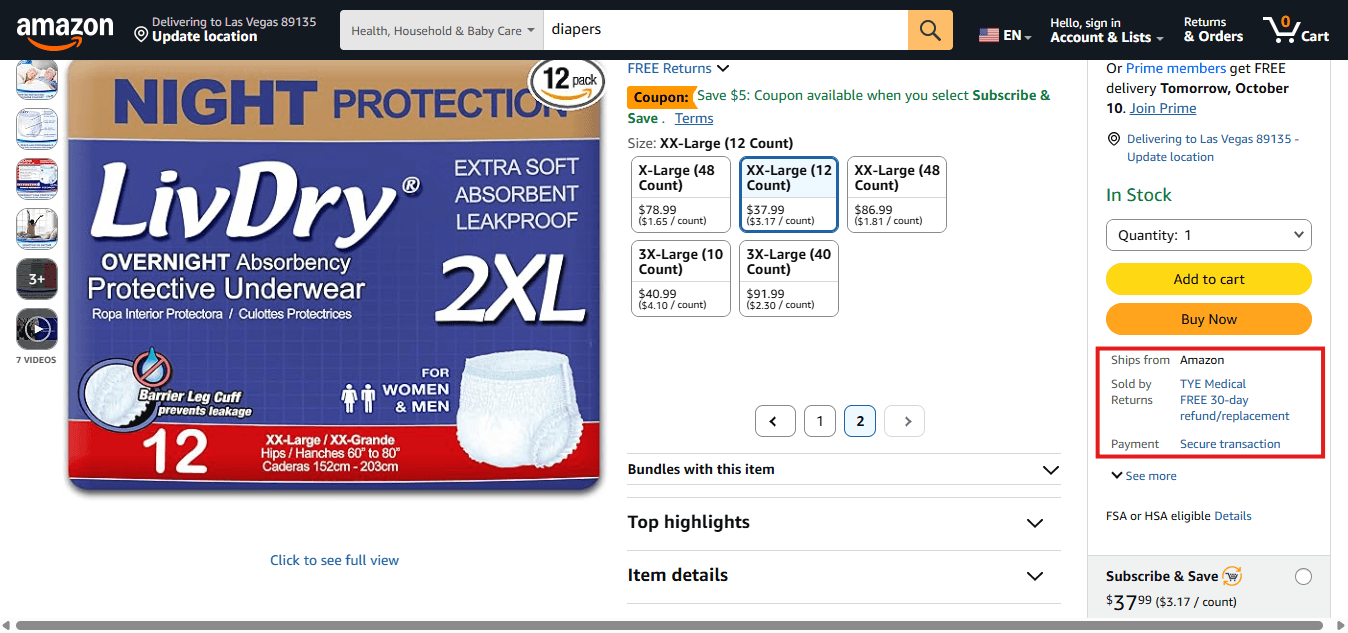
Seller Central is the portal for third-party (3P) sellers. You create listings, set prices, choose how to fulfill orders, handle returns policy, and run advertising.
You can fulfill with FBA, where Amazon stores and ships, or FBM, where you or your 3PL do. Seller Fulfilled Prime sits between the two. Registration is open to any business that completes Amazon's seller onboarding.
Example: Imagine you sell a skincare brand on Amazon. Through Seller Central, you create product listings, set the retail price at $25, manage inventory, and run Sponsored Products ads. You can use Fulfillment by Amazon (FBA) to let Amazon handle storage and shipping, or fulfill orders yourself. After deducting Amazon's fees and advertising costs, your remaining revenue depends on your selling price and operating expenses.
What Is Amazon Vendor Central ?

Vendor Central is the portal for first-party (1P) suppliers. Amazon's buying team sends purchase orders, you ship stock to Amazon, and you invoice for it. Amazon then lists, prices, and sells the product as the retailer.
Access is by invitation only. Amazon publishes no application route, so the usual path is to build demand on Seller Central first and wait for Amazon's vendor team to reach out.
Example: Suppose your skincare brand becomes popular, and Amazon invites you to become a vendor. Instead of selling individual products directly to shoppers, you supply 1,000 units to Amazon at an agreed wholesale price of $12 per unit. Amazon purchases the inventory through a purchase order, then lists and sells the products to customers at its chosen retail price. You earn the agreed wholesale amount, subject to applicable deductions and contract terms, while Amazon manages the retail sale.
Amazon Seller Central vs Vendor Central: Side-by-Side Comparison
Table 1: Seller Central vs Vendor Central at a glance
Factor | Seller Central (3P) | Vendor Central (1P) |
Access | Open to registered businesses | Invitation only |
Who sells to the shopper | You | Amazon |
Retail pricing | You set it | Amazon sets it |
Fulfillment | FBA, FBM, or Seller Fulfilled Prime | Amazon, through purchase orders |
Payment | Regular payouts, roughly every 14 days | Invoice terms, commonly net 30 to net 90 |
Advertising | Sponsored Products, Brands, Display, DSP, subject to eligibility | Same families of ads, through the vendor account, subject to eligibility |
Data | Detailed traffic, sales, and customer reports | Retail Analytics, with less customer-level detail |
Brand control | Direct control of listings and offers | Amazon owns the retail offer; you manage content and catalog |
Benefits of Amazon Seller Central
Amazon Seller Central gives brands more control over how they sell products, manage inventory, and grow their business on Amazon. It is particularly useful for businesses that want to manage their own pricing, test new products, and build a direct presence in the marketplace.
Key benefits include:
Control over retail pricing: Set your product prices and adjust them based on demand, competition, and profit margins.
Flexible fulfillment options: Choose Fulfillment by Amazon (FBA), Fulfillment by Merchant (FBM), or eligible Seller Fulfilled Prime programs based on your operational needs.
Access to sales data: Use available sales, traffic, and advertising reports to understand product performance and identify growth opportunities.
Greater inventory control: Decide how much stock to maintain and when to replenish it.
Direct marketplace presence: Manage product listings, brand content, promotions, and eligible advertising campaigns through your seller account.
Example: A skincare brand launches a new moisturizer on Amazon for $25. Through Seller Central, it can test different prices, monitor conversion rates, adjust advertising bids, and replenish inventory based on demand. This flexibility helps the brand identify a profitable selling strategy before expanding its product range.
Amazon Seller Central: Pros and Cons
Pros of Seller Central
Open registration: Eligible businesses can register without waiting for an invitation to join Vendor Central.
Pricing flexibility: You control your offer price, making it easier to respond to competitors and manage margins.
Choice of fulfillment: Select the fulfillment method that best suits your products, order volume, and logistics capabilities.
More direct operational control: Manage listings, inventory, and advertising from your seller account.
Useful performance insights: Access seller reports to evaluate sales trends, customer demand, and advertising results.
Cons of Seller Central
Multiple operating costs: Referral fees, fulfillment charges, storage fees, returns, and advertising expenses can reduce profitability.
Greater management responsibility: You must oversee pricing, inventory planning, listing quality, and other seller operations.
Fulfillment complexity: If you use FBM, you or your logistics partner must meet shipping and customer-service requirements. FBA reduces this workload but introduces additional fees.
Ongoing advertising management: You need to monitor campaign performance, optimize bids, and manage budgets to avoid inefficient spending.
Inventory risk: You remain responsible for planning stock levels and managing the costs associated with excess inventory or stockouts.
Benefits of Amazon Vendor Central
Amazon Vendor Central allows brands to sell products directly to Amazon as a first-party (1P) supplier. Instead of fulfilling individual customer orders as the seller, your business supplies products to Amazon through purchase orders, and Amazon resells them to shoppers.
This model can suit established manufacturers and brands that prefer wholesale relationships and want Amazon to handle more of the retail process.
Key benefits include:
Bulk purchasing: Supply products to Amazon through purchase orders rather than managing every individual customer sale.
Simplified retail operations: Amazon handles the retail transaction and customer-facing fulfillment, while your business focuses on supplying inventory and meeting vendor requirements.
Amazon-backed retail presence: Products are typically displayed as sold by Amazon, which may increase shopper confidence.
Access to vendor advertising: Eligible vendors can use Amazon Ads solutions to promote their products and reach relevant shoppers.
Enhanced product content: Eligible vendors can use A+ Content and other available merchandising features to improve product presentation.
Potential promotional opportunities: Depending on eligibility and program terms, vendors may access programs such as Subscribe & Save and Amazon Vine.
Example: A household goods manufacturer receives an invitation to join Vendor Central. Amazon places a purchase order for 2,000 units of its cleaning product at an agreed wholesale price of $8 per unit. The manufacturer supplies the inventory and invoices Amazon under the agreed terms. Amazon then sells the products to shoppers at its chosen retail price. The manufacturer's revenue is based on the wholesale arrangement, subject to applicable deductions and contract terms.
Amazon Vendor Central: Pros and Cons
Pros of Vendor Central
Wholesale sales model: Sell products to Amazon in bulk through purchase orders rather than processing each retail sale yourself.
Less direct retail management: Amazon manages the customer-facing sale and fulfillment of purchased inventory.
Potentially broader advertising options: Eligible vendors can access advertising and promotional opportunities suited to their account and products.
Established retail presentation: The product is presented as sold by Amazon, which can help reassure some shoppers.
Suitable for established suppliers: Manufacturers and distributors with reliable production capacity may benefit from predictable purchase-order workflows when Amazon's ordering patterns align with their supply plans.
Cons of Vendor Central
Invitation-only access: Businesses cannot simply open a Vendor Central account whenever they choose. Amazon determines which suppliers it invites.
Limited retail price control: Amazon sets the final retail price, which may affect your pricing strategy across other sales channels.
Longer payment cycles: Payment depends on negotiated invoice terms, potentially creating working-capital pressure.
Chargebacks and deductions: Missing shipping, labeling, packaging, or compliance requirements can result in deductions from payments.
Dependence on Amazon's orders: Amazon determines purchase-order quantities and timing. Reduced orders can leave suppliers with excess inventory or lower revenue.
Less control over the customer experience: Amazon manages the retail offer and fulfillment, limiting your direct control over how the product is sold to shoppers.
Seller Central vs. Vendor Central: Which Is Right for Your Business?
The right model depends on how much control your business needs, how you manage inventory, and whether your margins can support the costs of each arrangement.
Choose Seller Central if you want control over pricing, flexible fulfillment options, direct management of marketplace offers, and access to seller performance data.
Choose Vendor Central if Amazon has invited you, your business can support wholesale purchase orders, and the agreed pricing and payment terms work for your margins and cash flow.
Consider a hybrid model if your business qualifies for both and wants to use different approaches for different products. Establish clear product ownership and monitor pricing, inventory, and advertising overlap across accounts.
Before making a decision, calculate your expected profit after fees, fulfillment costs, advertising expenses, wholesale deductions, and payment delays. The model with the highest sales volume is not necessarily the one that delivers the strongest profit.
How Do the Costs and Fees Compare?
In the Amazon Seller Central vs Vendor Central comparison, the two models charge you in different places. Seller Central shows fees line by line. Vendor Central hides them inside the terms you sign.
Seller Central: Plan, Referral and FBA Fees
Seller Central costs fall into four groups:
Plan fee. The Individual plan charges per item sold. The Professional plan charges a monthly fee. Advertising requires the Professional plan.
Referral fee. A percentage of each sale, set by category.
FBA fees. Fulfillment fees based on size and weight, plus storage and aged-inventory charges.
Other costs. Returns, removals, and advertising spend.
Rates change by category and over time, so check Amazon's current selling fee schedule before you model margin.
Vendor Central: Wholesale Margin, Co-op and Chargebacks
Vendor Central has no plan fee. The cost is the margin you give up.
Wholesale margin. You earn the wholesale cost, not the retail price.
Allowances and co-op. Vendor agreements often include promotional allowances and marketing contributions.
Chargebacks. Amazon deducts for compliance misses such as labeling, shipping, or lead-time errors.
Longer terms. You finance Amazon's stock until invoices are paid.
Table 2: Cash-flow timeline (illustrative, simplified)
This timeline ignores fees, returns, and reserves. Actual timing depends on your settlement cycle and the terms you negotiate.
Point in time | Seller Central (3P) | Vendor Central (1P) |
Day 0 | You send stock to FBA or list it | Amazon issues a purchase order, and you ship |
Days 1 to 14 | Shoppers buy, and sales accrue | You invoice after delivery |
Around day 14 to 28 | First payout arrives | You are still waiting |
Day 30 | Second payout arrives | Payment arrives only if you agreed net 30 |
Day 60 to 90 | Several payouts received, cash reinvested | Payment arrives if you agreed net 60 or 90 |
The point of the table is the gap. A brand on 3P can reorder from cash already received. A brand on 1P often reorders before the last invoice is paid.
Who Controls Pricing, Inventory and the Buy Box?
Control point | Seller Central (3P) | Vendor Central (1P) |
Retail price | Yours | Amazon's. You set wholesale cost and may suggest a list price |
Promotions | Yours to run | Often negotiated, and Amazon decides the final offer |
Inventory | You decide how much to send and when | Amazon decides purchase order quantities |
Stockout risk | Yours | Shared, and driven by Amazon's ordering |
Buy Box (Featured Offer) | You compete with other offers | Amazon is usually the default seller |
Pricing control matters most in Amazon Seller Central vs Vendor Central. On 1P, Amazon can discount your product, and that lower price can spread to your other channels. If you protect brand pricing tightly, this one point can decide the whole question.
Inventory control cuts the other way. On 3P, a stockout is your problem. On 1P, you depend on purchase orders, and gaps in ordering can leave listings without stock.
Do not assume the Buy Box is safe on 1P. Third-party sellers can still list on your ASIN. Brand Registry and a clean distribution policy help you manage that.
How Do Advertising and Data Access Differ?
Both sides of Amazon Seller Central vs Vendor Central can use Amazon Ads. The console feels similar. The economics behind it do not.
Which Amazon Ad Types Can Sellers and Vendors Use?
As Per Amazon Ads' own FAQ, eligibility looks like this:
Ad type | Professional sellers | Retail vendors |
Sponsored Products | Yes, for listings eligible for the Featured Offer | Yes |
Sponsored Brands | Yes, with Brand Registry | Yes |
Display ads | Yes, with Brand Registry | Yes |
Amazon DSP | Through Amazon Ads, by eligibility | Through Amazon Ads, by eligibility |
Vendors who do not sell products directly on Amazon are not eligible for display ads. Our guides to the types of Amazon ads and Amazon DSP cover each format.
How Does Optimization Change Between 1P and 3P?
Your margin sets your break-even ACoS, and your margin differs by model.
3P: break-even ACoS comes from retail price minus referral, fulfillment, and other fees.
1P: break-even ACoS comes from wholesale margin minus allowances and deductions. It is often tighter.
Reporting: 3P sellers read sales from Seller Central. Vendors read ordered and shipped revenue from Retail Analytics, so ad sales and revenue reports do not always line up.
Retail signals: both models waste money when ads run on products with no stock or no Buy Box.
Retail-aware rules close that gap. Pause ads when inventory runs low, pause when the Buy Box is lost, and adjust bids by organic rank. Our case study on a US reseller avoiding stockouts by pausing ads shows the idea in practice.
For the metrics behind these decisions, read our guide to ACoS vs TACoS and our Amazon ads reporting guide.
Can You Run Both? The Hybrid 1P/3P Model
Yes. Many brands sell core, high-volume items through Vendor Central, and use Seller Central for new launches, bundles, and products Amazon does not buy.
The hybrid model works when each ASIN has one owner. Without that rule, four problems show up:
Self-competition. The same ASIN can carry both a 1P and a 3P offer.
Price conflicts. Amazon's retail price can undercut your 3P price.
Split data. Reports sit in two places, and ad analysis gets messy.
Ad overlap. Two accounts bidding on the same terms can inflate CPC.
Set ASIN ownership up front, and review ads across both accounts together. Our Black Friday guide covers planning peak events across a mixed catalog.
How to Choose: A 5-Question Checklist
Answer these in order to settle Amazon Seller Central vs Vendor Central for your brand. Each answer pushes you toward one model.
Have you been invited to Vendor Central? If not, the choice is made. Start on Seller Central.
Can you carry 60 to 90 days of receivables? If not, Vendor Central strains cash flow.
How tightly must you control price? If tightly, choose Seller Central.
Do you want to run operations? If you have no appetite for fulfillment and customer service, Vendor Central looks better.
Do the wholesale economics work after allowances and deductions? Model them with real numbers. If margin collapses, stay on 3P or go hybrid.
Your answers | Likely fit |
Not invited, limited cash, price-sensitive | Seller Central |
Invited, strong cash, low operations appetite | Vendor Central |
Invited, mixed catalog, different margin by product | Hybrid |
How Atom11 Supports Sellers, Vendors and Agencies
Whichever side of Amazon Seller Central vs Vendor Central you land on, Atom11 helps. It is retail-aware Amazon PPC software. It connects advertising data with retail signals like inventory, pricing, Buy Box, and search rank, so your ad rules reflect the business and not only the click.
Atom11 Features Built for Seller Central and Vendor Central Advertisers
Here is what the platform does day to day, whichever model you run.
Inventory-Aware Advertising
Pauses ads when stock runs low and resumes them when inventory is replenished. You stop paying for clicks on products you cannot ship.
Buy Box-Aware Advertising
Pauses ads when the Buy Box is lost and resumes them when it is won back. This matters most for vendors, where Amazon controls the offer.
Rank-Aware Bidding
Raises or lowers keyword bids based on organic search rank. Spend goes where it supports rank, not where it duplicates it.
Bid Optimization
Rule-based bid changes driven by performance. You set the logic and Atom11 applies it across campaigns.
Keyword Harvesting and Negation

Moves converting search terms from auto campaigns into manual campaigns, and negates the ones that do not convert. Your campaigns keep learning without a weekly spreadsheet session.
Hourly Dayparting

Schedules bids and budgets by hour and day of the week, using Amazon Marketing Stream data. You spend more at peak hours and less in dead ones.
Bulk Actions

Create hundreds of campaigns, ad groups, and targets in one pass, and edit bids, budgets, and states in bulk. A preview shows the exact new values before anything goes live.
Performance Monitor
Shows pre- and post-automation performance for each keyword. You can audit what every rule did, and roll back what did not work.
Version Control
Saves a version of your bids and budgets before a peak event like Prime Day, and restores it afterward. One click undoes a big change.
Root Cause Analyzer and Neo

Compares two time periods and shows which metrics explain a sales change. Neo, the AI analyst, answers questions like why sales dropped for a specific parent ASIN.
Conclusion
Amazon Seller Central vs Vendor Central comes down to control versus convenience. Seller Central gives you pricing power, faster cash, and richer data, in exchange for more operational work. Vendor Central takes work off your plate, in exchange for margin, price control, and slower payment.
Our take: start on Seller Central unless Amazon has invited you and the wholesale math survives allowances and chargebacks. Treat Vendor Central as an upgrade for specific products, not a default. If you go hybrid, give every ASIN one owner.
Whichever model you pick, tie advertising to inventory, Buy Box, and margin. Every ad dollar then has a reason to exist.
FAQs
Is Vendor Central better than Seller Central?
Neither is better in general. Vendor Central reduces operations and gives Amazon-fulfilled convenience. Seller Central gives control of price, cash flow, and data. Model both with your real margins.
How do I get invited to Vendor Central?
There is no public application. Amazon's vendor team decides, and it publishes no criteria. Building consistent sales and brand demand on Seller Central is the common route. Some established brands also get approached directly.
Can I sell both at the same time?
Yes. Many brands do. Assign each ASIN to one model where you can, and watch for price conflicts and ad overlap.
Does Vendor Central cost money?
There is no plan fee, but there are costs. You give up retail margin, and your terms may include allowances, co-op, and chargebacks. Advertising is extra, and you also carry the cost of waiting for payment.
Can I move from Vendor Central to Seller Central?
It is possible, but it needs planning. Check your vendor agreement, coordinate with your Amazon vendor contact, and plan inventory, pricing, and listing ownership before you switch. Some brands keep both instead of moving entirely.
