Blog
/
How to Automate Amazon Sponsored Products Campaigns
How to Automate Amazon Sponsored Products Campaigns
Neha Bhuchar
Key Takeaways
To automate Amazon Sponsored Products campaigns, pair Amazon's automatic targeting for discovery with rules for bids, budgets, harvesting and negatives, or hand the whole loop to Amazon's newer Full Funnel Campaigns.
Automate repeatable execution. Keep strategy human: campaign structure, launch plans and ACoS targets.
Every rule needs four parts: a trigger, a data threshold, an action and a guardrail.
Inventory and Buy Box status matter as much as ACoS. A bid rule that ignores a stockout keeps paying for clicks that cannot convert.
Review your rules on a fixed cadence, or they will keep firing after your goals change.
Most sellers looking to automate Amazon Sponsored Products have one of two goals: they want to get automatic campaigns running, or they want to stop spending every morning adjusting bids by hand.
The good news is that you do not have to automate everything at once. The most effective approach is to automate repetitive tasks while keeping strategy and decision making under your control.
This guide walks through the process step by step: launch an automatic campaign for discovery, set up rules for bids and budgets, harvest winning search terms, optimize placements, understand where Amazon's own AI driven campaign types now fit, and build a simple review routine to keep your automation on track.
What Does It Mean to Automate Sponsored Products?
To automate Sponsored Products is to let native controls, bulk sheets or software run repetitive campaign work for you. That covers bids, budgets, keyword harvesting, negatives, placements and reporting.
The phrase also points to a campaign type. Amazon's automatic targeting matches your ad to relevant searches and product pages without you picking keywords. It becomes the discovery layer that feeds every rule you build later.
What to Automate and What to Keep Manual
Think of automation as a fast, tireless junior analyst. It executes rules well. It cannot judge a launch, a margin squeeze or a supply delay.
A useful test is to sort every recurring task into three buckets: automate, supervise or own.
Bucket | Examples | Why |
Automate | Bid changes on ACoS thresholds, budget pacing, search term harvesting, negatives | Repetitive, rule shaped, high volume |
Supervise | Dayparting, placement modifiers, machine learning bidding | Works, but needs review and enough history |
Own | Campaign structure, launch strategy, ACoS targets, branded versus non branded split | Depends on margin, goals and context |
Launches deserve special care. A launch often runs at a deliberately high ACoS to build rank, and a generic bid rule will "fix" that by cutting bids.
How to Automate Sponsored Products With the Amazon Ads API
If you have developer resources, you can automate Sponsored Products through the Amazon Ads API instead of the console. It suits agencies and larger brands that want to create and update campaigns programmatically. The API gives you full control, but you also own the rule logic, error handling and monitoring.
Before you make your first call, you need three things:
API access token: authorizes your requests to the Amazon Ads API.
Profile ID: identifies the advertising account you are working in.
A clear campaign structure: know how you will group campaigns, ad groups and products before you build anything.
Amazon's auto campaign guide walks through the core workflow. Confirm current endpoint paths in the documentation, since the API changes over time.
Create the campaign: send a POST request to /adsApi/v1/create/campaigns with autoCreationSettings.autoCreateTargets enabled, so Amazon creates the automatic targets.
Add ad groups and ads: create ad groups through /adsApi/v1/create/adGroups, then assign product ads through /adsApi/v1/create/ads.
Manage targets: refine targets with PUT /adsApi/v1/update/targets, and add exclusions through the negative targeting endpoints.
The API handles execution, not judgment. You still need thresholds, guardrails and a review routine, which the steps below cover. Teams that do not want to build and maintain that logic themselves usually layer automation software on top.
Amazon Ads Agent and AI Tools for Sponsored Products
Amazon now offers AI tools inside its own advertising platform. The Amazon Ads Agent is a conversational assistant that lets you plan and adjust campaigns in plain language instead of clicking through menus. For Sponsored Products, it helps in three ways.
Conversational targeting: describe your target audience in natural language and get AI driven keyword and category recommendations.
AI guidance: Amazon flags optimization opportunities across bids, budgets and targeting structure, and lets you apply them in one click.
Rule based bidding: on established campaigns, you can set automated rules that adjust bids toward a target return on ad spend.
These tools speed up setup and surface ideas quickly. Treat their suggestions as recommendations to review, not decisions to accept blindly. They work from advertising data, so they will not know about a stockout, a Buy Box loss or a launch plan unless you factor those in yourself.
Amazon has quantified one piece of this directly. Advertisers using the Ads Agent's natural language targeting recommendations saw more than 25 percent additional unique customers while lowering cost per impression by more than 10 percent on average, according to Amazon's own announcement. That is a meaningful enough gap that it is worth testing the conversational targeting suggestions on at least one campaign before dismissing them as generic AI recommendations.
Full Funnel Campaigns: Where Full Automation Now Sits
Full Funnel Campaigns are Amazon's newest automation layer, announced at unBoxed in September 2026, and they sit a level above the rule based approach the rest of this guide covers. Rather than automating individual levers inside a Sponsored Products campaign, a Full Funnel Campaign combines sponsored ads, display, video and streaming TV into a single campaign that Amazon's AI plans, executes and continuously optimizes end to end.
You set the budget, the products, and the creative. Amazon's system handles targeting, format mix and ongoing optimization across all four formats from there, on the logic that shared signals across formats let upper funnel investment improve lower funnel performance, rather than each format being planned and measured in isolation the way Sponsored Products, Sponsored Display and DSP traditionally have been.
This is not a replacement for the rule based Sponsored Products automation covered in the rest of this article, it is a different point on the same spectrum. Amazon itself frames this as a choice rather than a mandate: advertisers can use manual campaign building tools, let Amazon's AI optimize on their behalf through something like Full Funnel Campaigns, or mix both depending on the goal. A brand running a tightly controlled Sponsored Products account with custom rules and a brand handing an entire campaign to Full Funnel automation are both automating, they are just choosing different amounts of control to give up in exchange for less manual work.
For most sellers still building out Sponsored Products fundamentals, the step by step rule based approach below remains the more practical starting point, since it keeps the guardrails, thresholds and inventory awareness in your own hands. Full Funnel Campaigns are worth testing once that foundation is in place and you are ready to hand broader format and budget decisions to Amazon's own optimization layer.
Step 1: Launch an Automatic Targeting Campaign
Start here if you are new to Sponsored Products or launching a new ASIN. It is the first move when you automate Amazon Sponsored Products campaigns. Automatic campaigns need little setup and show which search terms and product pages convert.
The Four Match Groups
Amazon's guide to targeting with Sponsored Products lists four automatic targeting groups:
Close match: searches closely related to your product.
Loose match: searches loosely related to it.
Substitutes: detail pages of similar products.
Complements: detail pages of products that go with yours.
You can set one default bid or bid per group. Separate bids give you far more control. Bid up the groups that convert and bid down the ones that waste spend.
Starting Budget, Bidding Strategy and Patience
A common rule of thumb is a modest daily budget, such as $10 to $20, and 50 to 100 clicks, or about a week, before you optimize. Scale that to your category and CPCs. Amazon's minimum daily budget requirement for a Sponsored Products campaign is $1, though that floor is rarely workable in practice, it exists mainly to prevent an empty budget field rather than to suggest a realistic starting point. Name campaigns consistently, for example "Auto, Product, Date," so reports stay readable. Our Amazon campaign naming convention guide shows a fuller system.
On bidding, Amazon recommends dynamic bids, up and down, to maximize performance. Amazon says it can raise or lower a bid by up to 100 percent in real time. If you optimize for return on ad spend, Amazon suggests dynamic down only.
Down only is the safer start. Move to up and down once you have conversion data and a margin buffer. For more on the trade offs, read our bidding strategies on Amazon guide.
Step 2: Set Up Rule Based Bid Automation
Rule based Sponsored Products automation replaces repeated manual checks with if then logic you control. It is where most time savings come from. Good rules also sit on top of a sound Amazon ad optimization process, not in place of one.
The Four Parts of a Good Rule
Every rule should carry four parts:
Trigger: ACoS is above target.
Data threshold: at least 14 days of data, and a minimum click count.
Action: reduce the bid by 10 percent.
Guardrail: exclude launch campaigns and cap bids at your max.
Skip the data threshold and you will cut good keywords on a bad week. Skip the guardrail and one rule will fight another.
A guardrail is not only a numeric ceiling. Amazon's own Sponsored Ads policies govern what a campaign or listing can and cannot do, and a rule that pushes a bid or placement aggressively without checking policy status can end up scaling spend on a listing or campaign that is about to be paused for a compliance issue. Building a policy status check into your review routine, not just an ACoS and inventory check, closes a gap most rule sets leave open.
Three Core Rules to Start With
These are working thresholds, not Amazon rules. Adjust them to your margins.
Rule | Example | Guardrail |
Bid reduction | ACoS above target for 14 days: cut bid 10 percent | Minimum clicks and spend first |
Bid increase | ACoS well below target for 14 days: raise bid 10 percent | Check inventory and CVR; cap at max bid |
Spend without sales | Spend passes your threshold with no order: pause or flag | Factor in product price and target ACoS |
Step 3: Automate Keyword Harvesting and Negatives
Harvesting is where Sponsored Products automation pays off fastest. It moves proven search terms from your automatic campaign into manual exact match, where you control the bid.
A workable trigger is a term with three or more orders and an above average conversion rate. Keep a weekly human check before changes go live.
When you harvest, also add the term as a negative in the automatic campaign. Otherwise the two campaigns bid against each other. Our search term negation guide explains which terms to block.
A Worked Example: Auto Campaign to Exact Match
Say one search term in your automatic campaign shows 50 clicks, 5 orders, $270 in sales and $75 in spend. Your target ACoS is 30 percent.
CVR is 5 ÷ 50 = 10 percent.
AOV is $270 ÷ 5 = $54.
CPC is $75 ÷ 50 = $1.50.
ACoS is $75 ÷ $270 = 27.8 percent.
Revenue per click is $270 ÷ 50 = $5.40, so the max bid at target is $5.40 × 0.30 = $1.62.
Harvest the term to exact match at $1.50 and add it as a negative exact in the automatic campaign. Note that a plus 10 percent bid rule would push the bid to $1.65, above the $1.62 ceiling. That is why the rule needs a cap. You can run the same math on any keyword with our Amazon PPC real bid calculator.
Step 4: Automate Budgets and Dayparting
When you automate Sponsored Products budgets, group campaigns by goal first: branded defense, non branded growth and launch. Then set rules per group. Give launch campaigns a budget floor so a rule never starves them.
For dayparting, do not apply a blanket overnight cut. Check hourly conversion data and weekday versus weekend patterns first, because your buyers may shop at odd hours. Our Amazon PPC dayparting guide walks through the data to pull.
Step 5: Manage Placement Bids
Sponsored Products placement rules adjust bids for Top of Search, Rest of Search and Product Pages. Amazon lets you adjust each placement by up to 900 percent, so small steps matter.
Change modifiers gradually and review them monthly. Reset after Prime Day or Black Friday so a sale week pattern does not become permanent. Our Amazon ads placement guide covers how to read placement reports.
Step 6: Monitor With a Simple Review Cadence
Sponsored Products automation without review drifts. A short, fixed routine catches it early. For what to track, see our Amazon ads reporting guide.
Frequency | What to check |
Daily, 5 minutes | Budget outages, CPC spikes, spend without sales |
Weekly, 30 minutes | Bid changes, harvested terms awaiting approval, new negatives |
Monthly, 2 hours | Whether ACoS thresholds and rules still match your goals, and whether any policy flags need attention |
If a rule keeps firing without improving ACoS or sales, rewrite it. Also watch ACoS and TACoS together, so you do not optimize ads at the expense of total sales.
Common Sponsored Products Automation Mistakes
Sponsored Products automation saves time, but it wastes spend faster when the setup is weak.
Automating a messy account. Separate branded, non branded and launch campaigns first.
Pausing keywords too early. Set minimum clicks, spend and campaign age thresholds.
Optimizing only for ACoS. Review TACoS and campaign purpose too.
One rule for every campaign. Launch, branded and competitor campaigns need different logic.
Ignoring stock. Short term ACoS spikes during a stockout can trigger rules that cut your best keywords.
Ignoring policy status. A rule that keeps scaling spend on a listing with an unresolved policy flag is scaling spend toward a pause, not a result.
Black box changes. Use tools that show what changed, why and when.
How Atom11 Automates Sponsored Products
Atom11 is retail aware Amazon Ads software built by ex Amazonians. You can automate Amazon Sponsored Products campaigns with rules you control, plus retail data that ad only tools ignore. Explore the Amazon PPC automation platform or the full Sponsored Ads product.
Rules That See Inventory and Buy Box
Atom11 rules can use inventory, pricing, Buy Box and organic rank alongside ad performance. A bid rule can react to a stockout instead of just reading ACoS. One US reseller avoided stockouts by pausing ads automatically.
Bid, Budget and Placement Optimizers
Automation runs on performance as well as time of day. Atom11 includes a bid optimizer, budget rules, a placement optimizer and a portfolio budget optimizer. An inventory optimizer pauses advertised ASINs to avoid out of stock spend. Hourly bid changes use Amazon Marketing Stream data.
Harvesting, Negation and Bulk Actions

Atom11 harvests converting search terms from automatic into manual campaigns, then negates them at the source. Bulk actions handle campaign creation, keyword additions and negatives. Agencies running many accounts can see how this scales on the agency page.
Dayparting With Conflict Controls
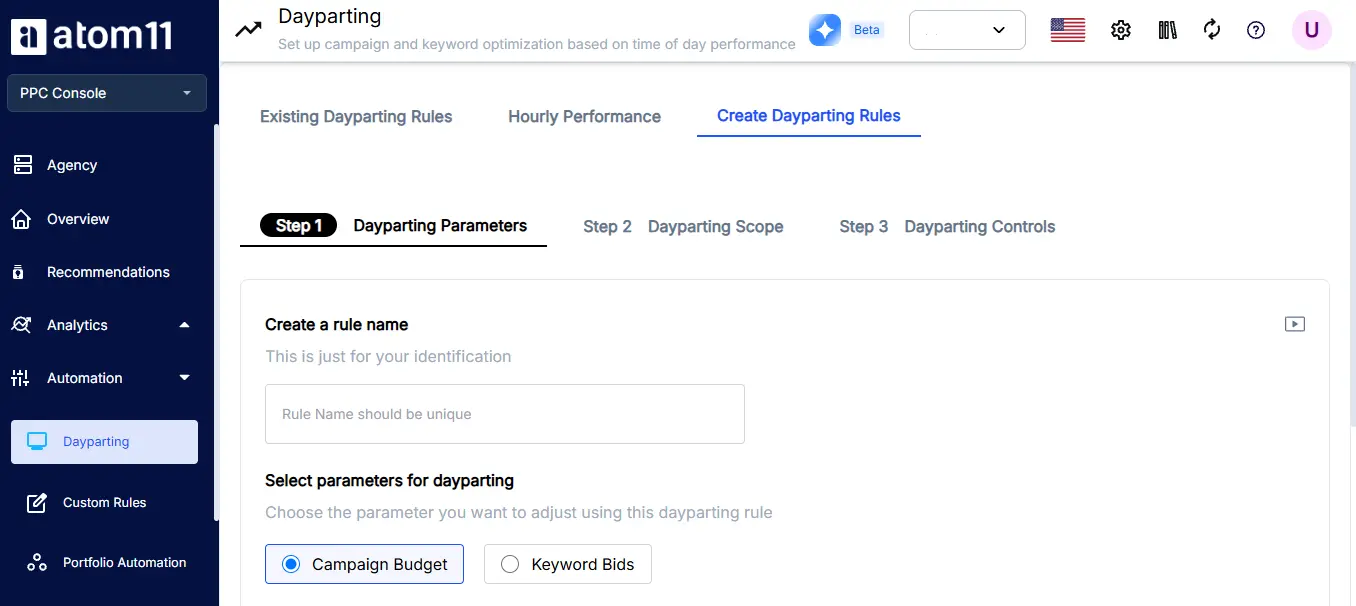
Raise or lower bids and budgets by hour and day of week. Conflict controls decide what happens if you change a bid manually while dayparting is on. Nothing gets overwritten by surprise.
Performance Monitor and Version Control
The Performance Monitor shows how each automation affects results, which solves the black box problem. Version control saves your bids, budgets and modifiers so you can roll back after Prime Day in one step.
Neo for Diagnosis
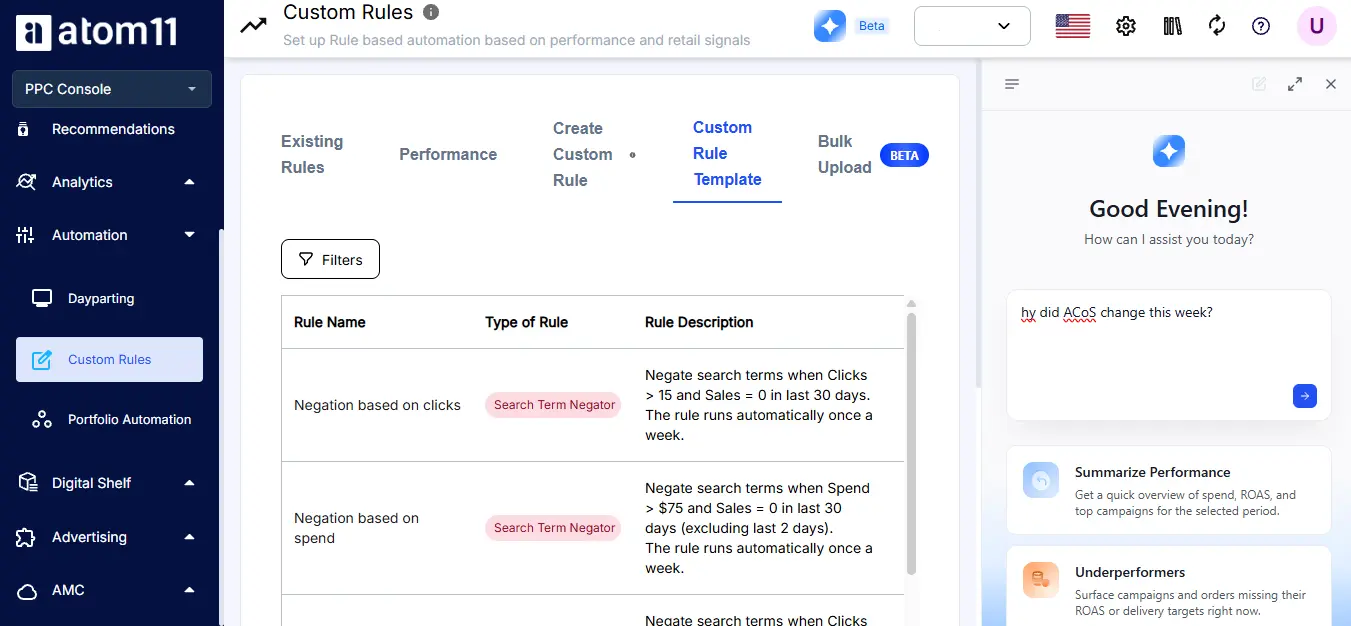
Ask Neo, Atom11's AI analyst, plain language questions like "why did ACoS change this week" and skip the report pulling. One brand cut analytics time by 93 percent using Neo. More than 2,000 brands and agencies in 18 plus countries run their Amazon advertising on Atom11.
Ready to see it on your account? Book an Atom11 demo.
Conclusion
Automating Amazon Sponsored Products works best when you automate the repetitive work without giving up control of the strategy. Start with an automatic campaign to discover what converts, add bid rules with clear thresholds and guardrails, harvest proven search terms into manual campaigns, and then optimize budgets and placements based on real performance data. Where you land on the spectrum between hands on rule based control and Amazon's newer Full Funnel automation depends on how much of that judgment you are ready to hand off, not on which option is objectively better.
The biggest risk is not choosing the wrong automation rule, it is letting a rule run indefinitely after your goals, inventory or campaign performance have changed. Review your rules regularly, adjust them when the data calls for it, and keep strategic decisions in human hands.
With the right balance, automation can reduce daily bid management while helping you scale campaigns more consistently. If you want automation that can also factor in inventory and Buy Box status, book an Atom11 demo.
FAQs
What does it mean to automate Amazon Sponsored Products campaigns?
It means using native controls, bulk sheets or software to run bids, budgets, harvesting and negatives by rule instead of by hand. It can also mean launching Amazon's automatic targeting campaigns for discovery, or handing broader campaign decisions to Amazon's Full Funnel Campaigns.
What are Amazon automatic targeting campaigns?
They are Sponsored Products campaigns where Amazon matches your ad to relevant searches and product pages. They suit discovery and new ASIN launches.
What are the four automatic targeting match groups?
Close match and loose match cover related search terms. Substitutes and complements place your ad on the detail pages of similar or complementary products. Review each group's results before raising bids.
What is the minimum daily budget for a Sponsored Products campaign?
Amazon's technical minimum is $1 a day, but that floor exists to prevent an empty field rather than to suggest a workable budget. A more realistic starting point is $10 to $20 a day for most categories, adjusted to your CPCs
What are Full Funnel Campaigns and how are they different from rule based automation?
Full Funnel Campaigns are Amazon's newer AI managed campaign type that combines sponsored ads, display, video and streaming TV into one campaign that Amazon plans and optimizes continuously. Rule based automation, covered throughout this guide, keeps a Sponsored Products campaign under your own thresholds and guardrails. They sit on the same spectrum, not in competition with each other.
