Blog
/
Amazon Ads API Guide: How to Get Access, Make Your First Call and Automate Sponsored Ads and DSP (2026)
Amazon Ads API Guide: How to Get Access, Make Your First Call and Automate Sponsored Ads and DSP (2026)
Kajal Sharma
The Amazon Ads API is Amazon's REST API for managing advertising programmatically. With it, brands, agencies and software providers can create and edit campaigns, change bids and budgets, pull performance reports and run Amazon DSP campaigns from their own code instead of clicking through the console. Access is free, but you must apply and be approved, and every request needs three credentials: a Login with Amazon client ID, an access token and an advertising profile ID.
That is the short answer. The rest of this guide covers how the API is structured, how the new Amazon Ads API v1 differs from the older v2 and v3 endpoints, the exact onboarding steps (including one setting you cannot undo), working code for authentication and reporting, how the API handles Amazon DSP, and the formulas we use to plan call volume, pacing and bid automation.
Why does this matter now? Amazon's advertising business keeps getting bigger and more crowded. Advertising services revenue reached $19.8 billion in Q2 2026, up 26% year over year, according to Amazon's own quarterly filing. More advertisers in the same auctions means the teams who react fastest, and report most accurately, win. Manual console work does not scale to that pace. The API does.
Key Takeaways
The Amazon Ads API is free to use. You only pay for ad spend and whatever it costs you to build or buy software on top of it.
Onboarding has three steps: create a Login with Amazon (LwA) application, apply for API access as a Partner or a Direct Advertiser, then assign API access to your LwA application. Approval usually takes up to one business day.
Every call needs a client ID, an access token (valid for 60 minutes) and a profile ID that identifies one advertiser in one marketplace.
Amazon Ads API v1 is the newest version. Despite the lower number, it replaces the product specific v2 and v3 APIs with one common model across Sponsored Products, Sponsored Brands, Sponsored Display, Sponsored TV and Amazon DSP.
Reporting is asynchronous: you request a report, poll its status, then download a compressed file. For near real time data, use Amazon Marketing Stream.
Amazon DSP campaigns, ad groups, targets and creatives can be managed through the API, which makes bulk DSP operations and cross order pacing possible.
Plan for rate limits from day one. Handle HTTP 429 with exponential backoff and jitter.
Atom11’s Amazon PPC Software helps brands and agencies get what the API can do without writing or maintaining the integration themselves.
What Is the Amazon Ads API?
The Amazon Ads API (often still called the Amazon Advertising API) is a programmatic interface that connects your software directly to Amazon Ads accounts. In Amazon's words, it enables Amazon advertisers and partners to programmatically manage advertising operations and retrieve performance data.
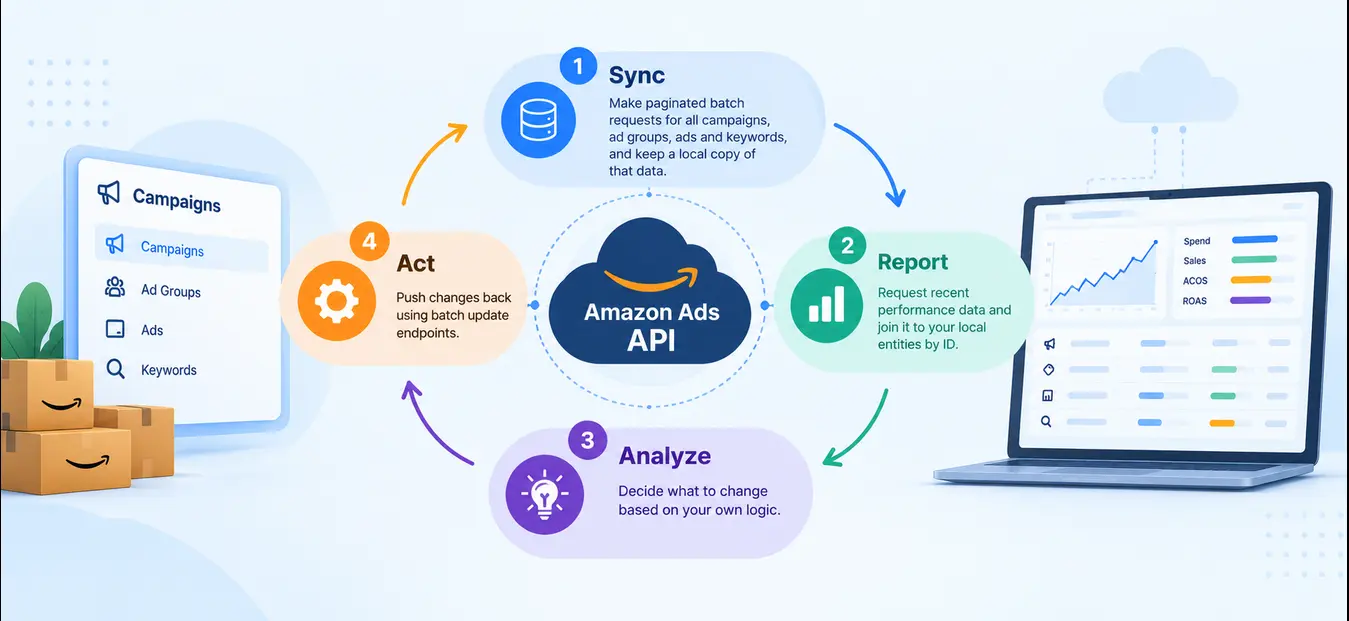
Amazon describes the typical integration as a loop of four operations:
Sync: Make paginated batch requests for all campaigns, ad groups, ads and keywords, and keep a local copy of that data.
Report: Request recent performance data and join it to your local entities by ID.
Analyze: Decide what to change based on your own logic.
Act: Push changes back using batch update endpoints.
That loop is the backbone of almost every Amazon PPC tool, bid optimizer, reporting dashboard and DSP management platform on the market.
Who uses the Amazon Ads API?
Amazon lists three typical user groups:
Advertising solution providers who build tools and license them to agencies and advertisers.
Agencies with in house engineering teams managing a large volume of campaigns.
Advertisers with their own engineers running a significant volume of campaigns directly.
An important point many guides skip: if you only want to use a tool that runs on the API, you do not need to apply for API access yourself. Amazon states that advertisers looking to work with a third party tool that uses the API do not need to request API access. You simply authorize the tool through Login with Amazon.
Amazon Ads API vs Selling Partner API vs Product Advertising API
Search results for "Amazon API" mix up three very different products. Choosing the wrong one wastes weeks of approval time.
Amazon Ads API | Selling Partner API (SP API) | Product Advertising API (PA API) | |
Purpose | Manage and report on ads | Manage selling operations | Pull product data for affiliate sites |
Main users | Advertisers, agencies, ad tech providers | Sellers, vendors, ecommerce software | Amazon Associates (affiliates) |
Typical data | Campaigns, bids, budgets, ad performance, DSP | Orders, inventory, listings, fees, pricing | Product titles, prices, images, reviews |
Access via | Amazon Ads (LwA client plus Ads API application) | Seller Central or Vendor Central developer registration | Amazon Associates account |
Cost | Free | Free, with some fees for certain uses | Free, tied to affiliate sales performance |
The Product Advertising API is an affiliate tool and has nothing to do with running ads. The SP API and the Ads API are complementary: SP API tells you what is in stock and what it costs, the Ads API tells you what your advertising is doing. The most effective automation connects the two, for example pausing ads on an ASIN that is about to stock out. Note that the two APIs have separate approval processes, so apply for both at the same time if you need both.
What You Can Do With the Amazon Ads API
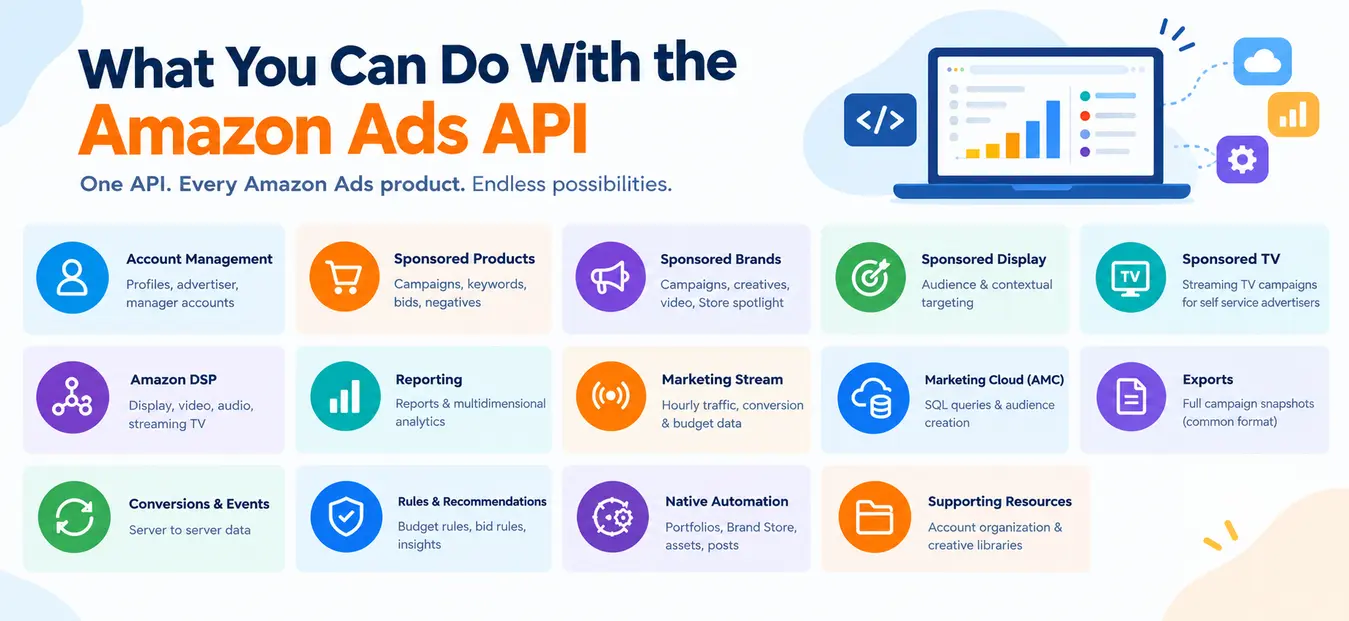
The API is not one endpoint. It is a family of resources that maps to almost every Amazon Ads product. The developer guides group them roughly as follows:
Area | What it covers | Typical use |
Account management | Profiles, advertiser accounts, manager accounts | Discover which accounts a user can manage |
Sponsored Products | Campaigns, ad groups, product ads, keyword, product and auto targeting, negatives, bid and budget recommendations | Bid automation, search term harvesting, negation |
Sponsored Brands | Campaigns, creatives, video, Store spotlight | Bulk creative and campaign management |
Sponsored Display | Audience and contextual targeting | Retargeting at scale |
Sponsored TV | Streaming TV campaigns for self service advertisers | Upper funnel automation |
Amazon DSP | Campaigns (orders), ad groups (line items), targets, creatives, audiences, deals | Programmatic display, video, audio and streaming TV |
Reporting | Asynchronous reports, plus the new multidimensional Reporting API | Dashboards, attribution, analytics |
Amazon Marketing Stream | Hourly push of traffic, conversion and budget data | Dayparting, intraday budget control |
Amazon Marketing Cloud (AMC) | Clean room SQL queries and audience creation | Path to purchase, incrementality, custom audiences |
Exports | Full snapshots of campaign structure in a common format | Fast account sync (replacing the older snapshots APIs) |
Conversions and events | Server to server conversion data | Off Amazon measurement and audiences |
Rules, budget usage, recommendations | Budget rules, rule based bidding, budget usage, insights | Native automation without your own logic |
Portfolios, Brand Store, assets, posts | Supporting resources | Account organization and creative libraries |
Two newer additions are worth knowing. The Advanced Tools Center now lists an Amazon Ads MCP server in open beta for teams building AI agents, and a new Reporting API that offers multidimensional, cross account and cross ad product reporting with standardized metrics. Amazon announced the new Reporting API and Amazon Marketing Stream v2 as generally available in September 2026.
Amazon Ads API v1 vs v2 and v3: The Versioning Confusion Explained
This trips up almost every new developer. Older Amazon Ads endpoints carry labels like /v2/profiles and Sponsored Products "version 3". Then Amazon launched something called v1. Is v1 older?
No. Amazon Ads API v1 is the newest version. Amazon calls it a reimagined approach to the Ads API, designed to provide a seamless experience across all Amazon advertising products through a common model, and recommends it for anyone new to the API. An Amazon maintainer clarified on the official GitHub docs repository that the old v2 and v3 APIs were product specific with separate version numbers, while v1 is a complete architectural reboot, so the numbering starts fresh.
What changes in practice:
Legacy APIs (v2, v3) | Amazon Ads API v1 | |
Structure | Separate endpoints and schemas per ad product | One campaign, ad group, target and ad model for every product |
Switching products | Rewrite code per product | Change the |
Field names, enums, errors | Vary by product | Consistent across products |
DSP | Separate DSP endpoints | Included in the same model |
Status | Still widely used and supported | Recommended for new integrations; some resources still in beta |
Our practical advice: build new integrations on v1, but check feature coverage for each ad product before you commit. Some resources are still in closed or open beta, and during a beta Amazon warns that breaking changes may occur. Your existing LwA client ID works for beta resources once you are allowlisted, so you do not need a new application.
How the Amazon Ads API Works
Before writing any code, it helps to understand the identity model, because most early errors come from getting it wrong.
The three credentials
According to the getting started guide, most requests require:
Client ID of your Login with Amazon application. This identifies your software.
Access token that represents permission for your application to act on behalf of a user account. This identifies who authorized you. It expires after 60 minutes and is renewed with a refresh token.
Profile ID for one advertising account in one marketplace. This identifies which account you are acting on.
A useful mental model: the client ID is your company badge, the access token is a visitor pass signed by the account owner, and the profile ID is the room number. A valid badge and pass still get rejected at the wrong door.
How a request is built
Every call to the API carries the same headers:
Amazon-Advertising-API-ClientId: amzn1.application-oa2-client.xxxxxxxx
Authorization: Bearer Atza|xxxxxxxx
Amazon-Advertising-API-Scope: 1234567890123456
Content-Type: application/json (or a resource specific media type)
The Amazon-Advertising-API-Scope header holds the profile ID. Amazon DSP calls also use an advertiser account ID header (covered in the DSP section).
Regional endpoints
You must call the host that matches the marketplace of the profile. Calling the North America host with a European profile returns errors that look like permission problems but are really routing problems.
Region | API host | Marketplaces |
North America |
| US, Canada, Mexico, Brazil |
Europe |
| UK, France, Italy, Spain, Germany, Netherlands, UAE, Poland, Turkey, Egypt, Saudi Arabia, Sweden, Belgium, India, South Africa |
Far East |
| Japan, Australia, Singapore |
Source: Amazon Ads API overview. Note that India and the UAE sit on the European host, which surprises many teams building for those markets.
How to Get Amazon Ads API Access (Step by Step)
Amazon's onboarding overview breaks access into three steps. None of them requires deep technical skill.
Step 1: Create a Login with Amazon application
Sign in to the Amazon Developer Console with an Amazon Developer account and create a Login with Amazon security profile. Record the client ID and client secret, and add an allowed return URL (your redirect URI). This step is free and needs no approval.
Use an email address your organization controls long term, such as a shared developer mailbox, not a personal inbox. You will see why in Step 3.
Step 2: Apply for API access
How you apply depends on which category your business fits:
Partner: You build software or provide services that manage advertising on behalf of others. Apply through the Amazon Ads Partner Network console: go to API Applications, choose Request API Access, complete the form and link the LwA application you created.
Direct Advertiser: You will use the API only for your own advertising accounts. Apply through the direct advertiser form on the Amazon Ads API page, signing in with the same email used for your Amazon Developer account.
The form asks how you intend to use the API and requires you to accept the Amazon Ads API License Agreement and Data Protection Policy. Amazon says review can take up to one business day.
Tips that improve approval odds (from our experience helping teams apply):
Describe concrete use cases ("daily bid optimization for 40 Sponsored Products accounts" beats "advertising automation").
Use a company domain email that matches your business name. Free mail addresses invite extra questions.
Explain how you store and protect advertiser data, since the Data Protection Policy is part of the review.
If you are an agency building internal tools only, the Direct Advertiser path may not fit, because you manage other businesses' accounts. Read the category definitions carefully before you submit.
Step 3: Assign API access to your LwA application
Once approved, you follow the link in the approval email to associate your API permission with your LwA application. Amazon gives a clear warning here: this association cannot be changed once it is set. If a former employee's personal account owns the LwA application, you may be locked out of your own integration. Decide which account owns the application before you click.
How to Make Your First Amazon Ads API Call
With an approved LwA client, you need to collect the three credentials. Amazon's getting started walkthrough uses three steps. Amazon also offers an official Postman collection if you prefer a visual interface over cURL.
Step 1: Create an authorization grant
Send the advertising account user to the Login with Amazon consent page for the right region:
https://www.amazon.com/ap/oa?client_id=YOUR_CLIENT_ID&scope=advertising::campaign_management&response_type=code&redirect_uri=YOUR_REDIRECT_URI
For Europe use https://eu.account.amazon.com/ap/oa and for the Far East use https://apac.account.amazon.com/ap/oa. After the user approves, Amazon redirects to your URI with a code parameter. That authorization code is short lived (about five minutes), so exchange it immediately.
Step 2: Exchange the code for access and refresh tokens
The response contains an access_token (valid for 3,600 seconds) and a refresh_token. Store the refresh token securely. It is how you get new access tokens without asking the user to log in again. The EU token host is https://api.amazon.co.uk/auth/o2/token and the Far East host is https://api.amazon.co.jp/auth/o2/token.
To refresh:
Step 3: Retrieve your profiles
curl https://advertising-api.amazon.com/v2/profiles \
-H "Amazon-Advertising-API-ClientId: YOUR_CLIENT_ID" \
-H "Authorization: Bearer YOUR_ACCESS_TOKEN"
Each profile in the response has a profileId, a countryCode and an accountInfo.type (seller, vendor or agency). One brand selling in five countries has five profiles. Pass the right one in the scope header on every subsequent call.
Your first real request: list enabled Sponsored Products campaigns
curl -X POST https://advertising-api.amazon.com/sp/campaigns/list \
-H "Amazon-Advertising-API-ClientId: YOUR_CLIENT_ID" \
-H "Authorization: Bearer YOUR_ACCESS_TOKEN" \
-H "Amazon-Advertising-API-Scope: YOUR_PROFILE_ID" \
-H "Content-Type: application/vnd.spCampaign.v3+json" \
-H "Accept: application/vnd.spCampaign.v3+json" \
-d '{"stateFilter": {"include": ["ENABLED"]}, "maxResults": 100}'
If the response includes a nextToken, pass it in the next request body to page through the rest.
A minimal Python pattern for token handling
Python is the most searched language for this API. Here is a lean pattern that refreshes the token before it expires instead of waiting for a 401:
import time, requests
Testing safely: Amazon provides test accounts for development. Ads created there never show on Amazon, so no fees apply. Build and test write operations there first.
Amazon Ads API Reporting: How to Pull Performance Data
Reporting is where most teams spend the bulk of their API effort. Amazon offers three routes, and picking the right one saves a lot of engineering time.
Route | Data freshness | How it works | Best for |
Asynchronous reports (v3) | Daily, with attribution updates over the following days | Request, poll, download | Daily dashboards, historical analysis |
New Reporting API | Ad hoc | Multidimensional, cross account, cross ad product queries with standardized metrics | Portfolio and agency level reporting |
Amazon Marketing Stream | Hourly push | Data delivered to your AWS account | Dayparting, intraday pacing, budget alerts |
Source: Amazon Ads developer guides and Advanced Tools Center.
The asynchronous report flow
Create the report with
POST /reporting/reports.Poll
GET /reporting/reports/{reportId}untilstatusisCOMPLETED.Download the gzipped JSON file from the
urlfield.
Example request for a daily Sponsored Products campaign report:
Common Sponsored Products report types include spCampaigns, spTargeting, spSearchTerm, spAdvertisedProduct and spPurchasedProduct.
Practitioner notes that save hours:
Poll with patience. Reports can take minutes. Poll every 30 to 60 seconds with backoff rather than hammering the status endpoint.
Re pull recent days. Attributed sales keep updating as the attribution window closes. Re pull at least the last 14 days on every run, not just yesterday, or your dashboards will understate recent ROAS.
Duplicate requests. If you submit an identical report request while one is still processing, the API tells you so and points to the existing report. Reuse it instead of creating a new one.
Respect date limits. Each request covers a limited date range and data is retained for a limited lookback period, so plan historical backfills in chunks and store everything you pull. Our guide on accessing Amazon Ads historical data covers this in detail.
How many report requests does a backfill need?
Report requests = ⌈Days of history ÷ Max days per request⌉ × Report types × Profiles
Example: An agency wants 90 days of history for 3 report types (campaign, targeting, search term) across 40 profiles. With a 31 day window per request: ⌈90 ÷ 31⌉ = 3, so 3 × 3 × 40 = 360 report requests. At an average of 4 minutes from request to download with 10 running in parallel, that is roughly 360 ÷ 10 × 4 = 144 minutes of pipeline time. Knowing this number up front tells you whether to run the backfill overnight and how much concurrency your rate limits can bear.
For metric definitions and how to read these reports, see our Amazon Ads reporting guide. For the hourly feed, see our Amazon Marketing Stream guide.
Managing Campaigns Programmatically
Reporting tells you what happened. Campaign management endpoints let you act on it. The most common automation patterns are:
Bid optimization: Raise or lower keyword and target bids based on ACOS, ROAS or conversion rate.
Search term harvesting: Move converting search terms from auto campaigns into exact match campaigns and add them as negatives in the source.
Negative keyword automation: Negate terms with clicks but no orders after a threshold.
Budget management: Increase budgets on campaigns that run out early while staying profitable; pull back on weak ones.
Dayparting: Change bids and budgets by hour using Marketing Stream data.
Retail aware rules: Pause ads on ASINs that are out of stock or have lost the Buy Box, using SP API data.
A safe proportional bid adjustment
New bid = Current bid × (Target ACOS ÷ Actual ACOS), capped at a maximum change of ±20% per cycle, applied only when the target has enough data (for example, at least 15 clicks and 2 orders in the lookback window).
Example: A keyword bids $1.50. Target ACOS is 25%. Actual ACOS over 14 days is 40% with 60 clicks and 5 orders.
$1.50 × (25 ÷ 40) = $0.94, a 37.5% cut. The cap limits the change to 20%, so the new bid is $1.50 × 0.80 = $1.20. The next cycle moves it further if ACOS is still high.
The cap matters. Without it, one bad week can collapse a bid so far that the keyword stops getting impressions and never generates the data needed to recover. If you are weighing fixed rules against model driven bidding, our comparison of bidding strategies on Amazon goes deeper.
Batch your writes
Most v3 and v1 endpoints accept arrays. Updating 500 keyword bids in five calls of 100 is far kinder to your rate limits than 500 single calls, and the response tells you which items succeeded and which failed, so you can retry only the failures.
Using the Amazon Ads API for Amazon DSP
Amazon DSP is where the API delivers some of its biggest time savings, because DSP setup in a console is slow and repetitive. Amazon made its DSP campaign and creative APIs generally available in January 2025. They let advertisers and partners create, read and update DSP campaigns, ad groups (formerly line items), targets and creatives, and work alongside the existing audiences and deals APIs. Access requires Amazon DSP access in addition to Ads API access.
Amazon highlights three use cases for these APIs:
Local data storage: Batch read all campaign, ad group, target and creative data for every advertiser you manage.
Faster setup: Combine campaign, audience and deal resources to build and activate campaigns quickly.
Automated optimization: Apply custom rules across campaigns, such as adjusting bids and budgets from performance reports, testing new audiences or removing weak ones.
How DSP requests differ
Account scoping: DSP calls are scoped to a DSP advertiser account through the
Amazon-Ads-AccountIdheader, which you get by listing advertising accounts. Many endpoints also expect the profile scope header, and omitting it can produce 400 or 404 errors.Different objects: DSP ad groups carry settings that do not exist in Sponsored Ads, such as budget caps, frequency caps, supply sources, viewability and bid adjustments.
v1 alignment: In the v1 model, DSP uses the same campaign, ad group, target and ad structure as Sponsored Ads, which makes cross product tools much simpler to build.
A simplified example of updating frequency and budget caps on a DSP ad group in v1 looks like this:
Check the current reference for exact enum values before using this in production, since DSP v1 resources are still evolving.
Cross order pacing for DSP
One of the most common DSP jobs is keeping several orders on track toward one monthly budget. The API makes this a calculation instead of a spreadsheet.
Expected spend to date = Monthly budget × (Days elapsed ÷ Days in month)
Pacing ratio = Actual spend to date ÷ Expected spend to date
Required daily spend = (Monthly budget minus Actual spend to date) ÷ Days remaining
Example: A brand has a $60,000 monthly DSP budget across four orders. On day 12 of a 30 day month, actual spend is $19,500.
Expected spend = $60,000 × (12 ÷ 30) = $24,000. Pacing ratio = 19,500 ÷ 24,000 = 0.81, so the account is underpacing by 19%. Required daily spend for the rest of the month = ($60,000 minus $19,500) ÷ 18 = $2,250 per day, up from an average of $1,625 so far. A script can then distribute that daily target across orders based on each order's ROAS or KPI, raise budget caps on ad groups delivering above 95%, and flag ad groups that cannot absorb more spend.
For DSP strategy beyond the API itself, see our Amazon DSP primer.
Build it yourself or use a DSP platform built on the API
Building DSP automation in house makes sense if you have engineers, a DSP seat and very specific logic. For most brands and agencies, the faster path is a platform that already handles authentication, rate limits, data sync and the DSP object model.
Whichever platform you evaluate, look for bulk creation of orders and ad groups, pacing across orders toward one budget, frequency caps by audience, AMC audience activation, and reporting that puts DSP and Sponsored Ads side by side with promoted, halo and total metrics.
Atom11 is one example of an Amazon Ads API based platform built for this. Its Amazon DSP module lets teams bulk create orders and ad groups, pace multiple orders toward a monthly target, set frequency caps per audience, activate AMC audiences and report on DSP and Sponsored Ads in one view. For agencies juggling many DSP advertisers, removing manual setup and spreadsheet pacing is usually where the biggest time savings come from. Compare a few options against your own workflow before committing.
Rate Limits, Errors and Troubleshooting
The Amazon Ads API throttles requests to protect the platform. Limits vary by endpoint and can change dynamically, so do not hard code a fixed number. When you exceed a limit, the API returns HTTP 429 Too Many Requests, often with a Retry-After header telling you how long to wait.
Exponential backoff with jitter
Wait time = min(Max wait, Base delay × 2^Attempt) + Random jitter
Example: Base delay 1 second, max wait 60 seconds, jitter between 0 and 1 second. Attempt 0: about 1 second. Attempt 1: about 2 seconds. Attempt 2: about 4 seconds. Attempt 3: about 8 seconds. Attempt 6 and beyond: capped at 60 seconds.
If a Retry-After value is present, use it instead. The jitter matters when you run many workers: without it, all your workers retry at the same instant and get throttled again together.
Common errors and what they usually mean
Status | Usual cause | Fix |
400 Bad Request | Malformed body, wrong media type, invalid enum | Check the |
401 Unauthorized | Expired or invalid access token | Refresh the token; refresh proactively before 60 minutes |
403 Forbidden | Profile not authorized for this user, or API access not assigned to the LwA client | Recheck the authorization grant and Step 3 of onboarding |
404 Not Found | Wrong regional host, wrong profile, or missing scope header | Match the host to the profile's marketplace |
422 Unprocessable | Business rule violated (bid below minimum, budget too low) | Read the error detail and validate before sending |
429 Too Many Requests | Rate limit hit | Back off with jitter; batch requests |
5xx | Temporary server problem | Retry with backoff; alert if it persists |
Amazon also offers an API integration dashboard inside the Advanced Tools Center to monitor call success rates and error patterns across your integration.
Best Practices for a Production Amazon Ads API Integration
These are the practices that separate a weekend prototype from an integration you can trust with real ad spend.
Treat tokens as secrets. Store client secrets and refresh tokens in a secrets manager, encrypt them at rest, and never log them.
Refresh early. Renew access tokens around the 55 minute mark so long jobs never fail halfway.
Keep a local copy. Follow Amazon's recommended pattern: sync entities in batches, store them, then join reports by ID. Avoid reading the whole account on every run.
Use exports, not snapshots. Amazon's export APIs return campaign structure in a common format across sponsored ads products and are replacing the deprecated snapshots APIs.
Re pull the attribution window. Refresh at least the last 14 days of report data daily.
Batch writes and log every change. Record who or what changed each bid and budget, the old value and the new value. Auditability matters when a client asks why spend jumped.
Build guardrails above automation. Hard caps on bids, budgets and daily change percentages stop a bug from becoming an expensive incident.
Test in test accounts. Run every new write operation in a test account before production.
Watch release notes and deprecations. The API changes often. Subscribe to Amazon's release notes and plan migrations (for example, legacy endpoints moving to v1) before deadlines.
Monitor health. Track success rate, latency, 429 counts and report completion times. Use the integration dashboard alongside your own monitoring.
Build, Buy or Connect: Choosing Your Approach
Not every team should write its own integration. Here is how the options compare.
Approach | Best for | Effort | Trade offs |
Build in house | Large advertisers and agencies with engineers and unique logic | High: onboarding, auth, sync, reporting, monitoring, ongoing maintenance | Full control; you own every API change |
Data connector or ETL tool | Teams that mainly need data in a warehouse or BI tool | Low | Great for reporting; usually no campaign management |
Ad management platform built on the API | Brands and agencies that want automation, DSP and reporting without engineering | Low to medium | Faster time to value; logic depends on the vendor |
AI assistants through MCP | Analysts who want to question their ad data in plain language | Low | Best for analysis and insight; pair with guardrails for any write actions |
Is building worth it?
Monthly cost to build = (Initial build hours ÷ Amortization months + Monthly maintenance hours) × Hourly engineering cost
Example: An initial build of 400 hours amortized over 24 months, plus 30 hours a month of maintenance, at $60 per hour: (400 ÷ 24 + 30) × $60 = (16.7 + 30) × $60 = $2,800 per month. Compare that with the subscription cost of a platform that covers your needs, and remember the build estimate rarely includes DSP, AMC and Marketing Stream support.
On the MCP side, Amazon's own MCP server is in open beta, and some ad tech platforms offer their own MCP connections (Atom11's MCP is one) so teams can pull Amazon Ads data into AI assistants for analysis. Whichever route you take, the Amazon Ads API sits underneath it.
How Atom11 Makes Working With the Amazon Ads API Easier
Everything in this guide (token refresh, regional hosts, report polling, rate limit handling, retail data joins, DSP pacing) is work someone has to build and then maintain every time Amazon changes an endpoint. Atom11 is an Amazon Ads Partner platform built on the Amazon Ads API, and its features take on much of that work. Brands and agencies get what the API can do without writing or maintaining the integration themselves.
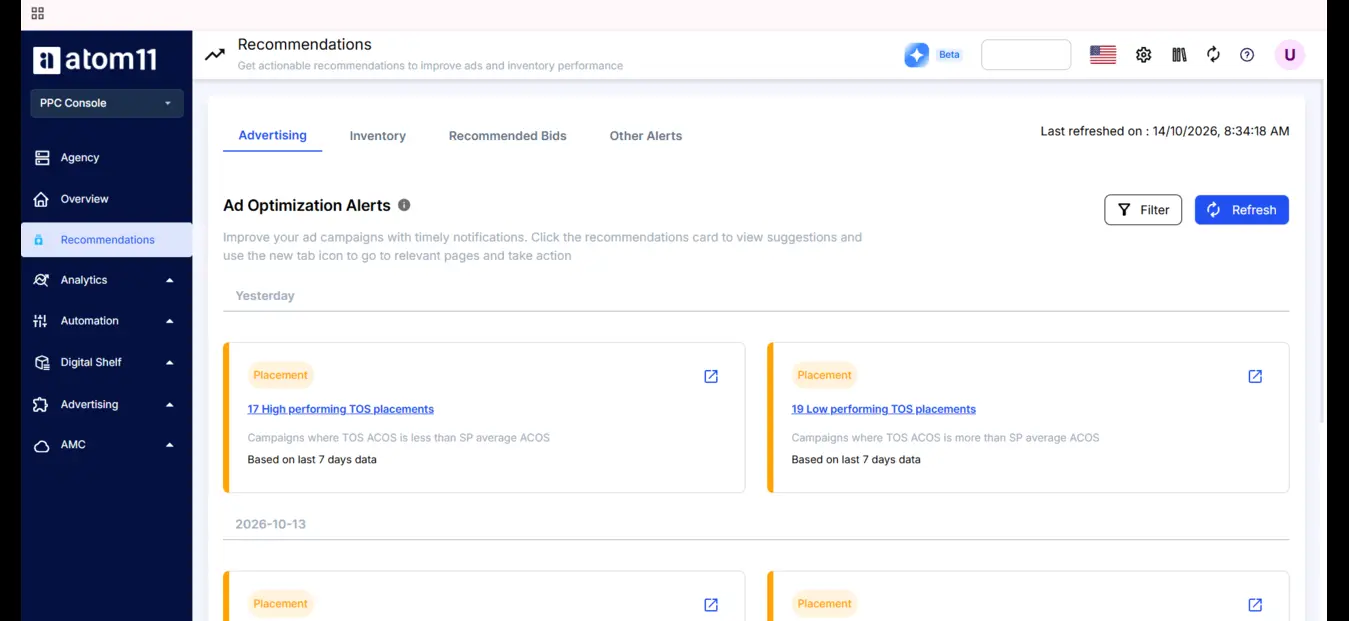
Here is how the API tasks covered above map to what the platform handles:
What you would build on the API | How Atom11 handles it |
LwA authorization, token refresh, profile and regional host management | Connect accounts once through Login with Amazon; authentication, profiles and marketplaces are managed for you |
Bid rules with caps and minimum data thresholds | Rule based bid optimization on the metrics and lookback windows you choose |
Search term harvesting and negation scripts | Automated keyword harvesting from auto to manual campaigns, plus negation of terms that spend without converting |
Hourly bid and budget changes from Marketing Stream data | Dayparting for both bids and budgets by hour and day of week, with rules for handling conflicts when someone makes manual edits |
Joining Ads API data with SP API inventory and pricing | Retail aware automation that pauses ads when stock runs low and turns them back on after replenishment, and uses Buy Box, pricing and organic rank data |
Batch writes for bulk changes | Bulk campaign creation, keyword additions, negations and edits across campaigns |
Change logs and rollback | Version control that saves bids and budgets so you can roll back, for example after Prime Day or BFCM, plus a performance monitor that shows how each automation affected results |
DSP orders, ad groups, frequency caps and cross order pacing | An Amazon DSP module for bulk creating orders and ad groups, pacing several orders toward a monthly budget, setting frequency caps per audience and activating AMC audiences |
Report pipelines, warehouses and dashboards | One dashboard for ads, retail and pricing data, side by side DSP and Sponsored Ads reporting, period comparison, and exports to Power BI, Google Sheets and Looker |
Root cause analysis across many data sources | An AI copilot, Neo, that compares periods across ad and retail signals to explain why sales or ACOS changed, plus Atom11 MCP for querying live account data in AI assistants |
What this means in practice
For brands: you get automation and reporting that would otherwise need a developer, a data pipeline and constant upkeep, while rule based automation keeps you in control of every change.
For agencies: every client account sits in one platform, so the same automations, bulk actions, DSP pacing and reports work across the whole portfolio without separate scripts for each advertiser.
For teams that already have engineers: the platform can handle routine automation and reporting so your developers can spend their time on custom logic that sets you apart.
As with any tool, compare it against your own workflow and requirements before committing. If you want to see how it fits your accounts, you can book a demo.
Conclusion
The Amazon Ads API turns Amazon advertising from a manual console task into software you control. Getting started is simpler than it looks: create a Login with Amazon application, apply as a Partner or Direct Advertiser, assign access carefully (that link is permanent), then collect your client ID, access token and profile ID. From there, the core loop is always the same: sync entities, pull reports, decide, and push batched changes.
Build new work on Amazon Ads API v1 for its common model across Sponsored Ads and DSP, lean on Marketing Stream when you need hourly data, and design for rate limits, token expiry and attribution updates from the start. For Amazon DSP in particular, the API unlocks bulk setup, cross order pacing and frequency control that are painful to manage by hand. Whether you build that yourself or use a platform built on the API depends on your engineering capacity, but the brands and agencies that automate the repetitive work will have more time for the decisions that actually move results.
FAQs
What is the Amazon Ads API?
The Amazon Ads API is Amazon's REST API that lets advertisers, agencies and software providers manage Amazon advertising programmatically. You can create and update campaigns, change bids and budgets, retrieve performance reports and manage Sponsored Products, Sponsored Brands, Sponsored Display, Sponsored TV and Amazon DSP campaigns from your own software.
Is the Amazon Ads API free?
Yes. Amazon Ads does not charge a fee to use the API. You pay only for the advertising you run and for any development, infrastructure or third party software costs. Ads created in test accounts do not run on Amazon, so testing is free as well.
How do I get access to the Amazon Ads API?
Create a Login with Amazon application in the Amazon Developer Console, then apply for API access either as a Partner through the Amazon Ads Partner Network or as a Direct Advertiser through the Amazon Ads API page. After approval, which can take up to one business day, assign API access to your Login with Amazon application.
Is Amazon Ads API v1 the latest version?
Yes. Amazon Ads API v1 is the newest version even though older endpoints are labeled v2 and v3. It is a rebuilt API with one common model for campaigns, ad groups, targets and ads across all ad products, including Amazon DSP. Amazon recommends it for new integrations.
What is the difference between the Amazon Ads API and the SP API?
The Amazon Ads API manages advertising: campaigns, bids, budgets, ad reporting and DSP. The Selling Partner API (SP API) manages selling operations: orders, inventory, listings, pricing and fees. They have separate approval processes, and many advanced tools use both to connect ad decisions with retail data such as stock levels and Buy Box status.
