Blog
/
Amazon Sponsored Brand Video Best Practices: 2026 Guide
Amazon Sponsored Brand Video Best Practices: A 2026 Playbook
Deepika Thakur

Key Takeaways
The core sponsored brand video best practices: show the product in the first two seconds and keep the video to 15-30 seconds.
Sponsored Brands video autoplays on mute, so captions carry your message.
Run keyword and product targeting in separate campaigns so your data stays readable.
Judge results by campaign goal. ROAS alone undersells a brand-discovery ad.
Brands that added video to static Sponsored Brands ads saw 25% higher click-through rates and 10% higher year-over-year sales growth.
Amazon shoppers decide fast, and your video gets only a few seconds of their attention. Sponsored brand video best practices exist to make those seconds count. You need a hook that lands on mute, a campaign built to produce clean data, and metrics that fit your goal.
This playbook covers specs, creative, setup, measurement, and the automation that keeps it all running.
What Are Sponsored Brand Videos on Amazon?
Sponsored Brands video is an Amazon advertising format that uses a 6- to 45-second, autoplaying video to showcase a product or brand while shoppers browse Amazon. The ads can appear in prominent shopping placements and run through their own Sponsored Brands video placement and auction.
Think of it as a moving product demonstration rather than a static ad. A traditional image ad can show shoppers what a product looks like; video can demonstrate how it works, what problem it solves, or what makes it different often within a few seconds.
Sponsored Brands video is one of several types of Amazon ads. Understanding where the format appears, where it sends shoppers, and how it differs from Sponsored Products video is the first step toward building an effective campaign.
Where Can Sponsored Brands Video Ads Appear?
Sponsored Brands video ads can appear at the top of search results, within shopping results, and on relevant product detail pages. When shoppers click the ad, the destination depends on the campaign setup and available campaign goals. Amazon allows Sponsored Brands video campaigns to direct shoppers to a Brand Store or a product detail page.
That distinction matters when planning the campaign. Your video, targeting, and landing page should work together: use a Brand Store when the goal is broader brand or product discovery, and a product detail page when the goal is to move shoppers directly toward a specific product.
Linking to Your Brand Store

Choose your Brand Store when you want shoppers to explore your wider product range rather than focus on a single listing. This approach gives the video a broader brand-discovery role and lets shoppers continue browsing related products after the click.
Amazon specifically recommends the Brand Store as a landing page for Sponsored Brands video campaigns, although the available destination depends on the campaign goal. Video ads linked to a Store can appear both above and below the fold in search results.
Linking to a Product Detail Page

Choose a product detail page when the video is built around one specific product and you want to shorten the path from discovery to purchase. The video can demonstrate the product's key features or use case, while the detail page gives shoppers the information they need to evaluate and buy it.
For these campaigns, Sponsored Brands video can appear in shopping results and on relevant product detail pages, helping you reach shoppers while they are actively researching products.
Sponsored Brand Video Specs to Check Before You Upload
Specs come first in any list of sponsored brand video best practices, because Amazon rejects files that miss them.
Spec | Amazon requirement |
Duration | 6-45 seconds (20 or less highly recommended) |
Dimensions | 1280 x 720, 1920 x 1080 or 3840 x 2160 px |
Aspect ratio | 16:9, square pixel |
File | MP4 or MOV, 500 MB or less |
Video codec | H.264 or H.265, main or baseline profile |
Frame rate | 23.976 to 30 fps, progressive scan |
Video bit rate | 1 Mbps minimum, 4 Mbps or higher recommended |
Audio | AAC, MP3 or PCM, 96 kbps and 44.1 kHz minimum |
Sponsored Brand Video Best Practices for Creative That Stops the Scroll
The guidance behind sponsored brand video best practices is simple: be brief, be clear, and build curiosity instead of explaining everything. Your video only has to earn the click.
Show the Product in the First Two Seconds
Amazon recommends showing the product in the first two seconds and its function within five. Save the brand name and logo for later.
A logo opening wastes your best frames.
Show the Before and After
Amazon suggests picturing the transformation your product delivers. Show the problem, then the fix.
A hair tool that halves styling time proves it faster in a split screen than in a sentence.
Make the Ad Work on Mute
Videos start without sound, and the mute toggle only appears if your video has audio. Amazon's own research found muted click-through rates rise noticeably once viewers watch more than 5 seconds.
Add closed captions and keep text to one short phrase at a time. Avoid the lower right corner, which Amazon flags as an unsafe area.
Aim for 15-30 Seconds
Amazon's creative guide calls 15-30 seconds optimal, while the spec sheet says 20 or less is highly recommended. Target around 20 and test from there.
End With a Logo and a Clear CTA
Place your logo at the start or end. Close with a short CTA such as "Learn more" or "See details," which Amazon suggests.
Finish on an end card with your brand name and logo.
Example: A 20-Second Storyboard
Here is how the five tips above fit into one video. The product is a hypothetical insulated travel mug, and the timings are illustrative.
Time | On screen | Caption |
0-2 sec | The mug is tipped upside down in an open bag, with no leak | Leak-proof. Even upside down. |
2-5 sec | Close-up of the lid locking shut | One-click lock |
5-12 sec | Split screen: a leaking mug soaks a laptop; yours leaves it dry | Your bag, still dry |
12-17 sec | Mug beside a car cup holder and a desk | Fits where you need it |
17-20 sec | End card with logo and brand name | Learn more |
The product appears in the first two seconds and its function by the second five. The logo waits until the end card, and every line reads on mute.
Match Your Video Opening to Keyword Intent
This table of sponsored brand video best practices for targeting is practitioner guidance, not an Amazon rule. Use it to plan your first five seconds.
Targeting | Shopper mindset | Open with |
Broad category keyword | Still exploring | The problem, then your fix |
Exact product keyword | Comparing options | A demo of your differentiators |
Competitor ASIN | Looking at a rival | One clear reason to choose you |
Branded keyword | Already knows you | Your story, then the Brand Store |
How to Avoid Sponsored Brand Video Rejection
Avoiding rejection is one of the less glamorous sponsored brand video best practices. Before you submit, check that:
The video suits a general audience and follows Amazon's creative acceptance policies.
On-screen text or voiceover matches the marketplace language.
No letterboxing or pillarboxing bars appear on any side.
Text sits clear of the lower right corner.
The footage shows the product exactly as listed.
Sponsored Brand Video Best Practices for Campaign Setup
Good setup protects your budget while Amazon learns which searches suit your video.
Structure Your Targeting
Amazon lets you target keywords, products and themes, and add negative keywords. Build separate campaigns for keywords and for product targeting.
When a sale lands, you will know which input earned it.
Take a hypothetical brand running two Sponsored Brands video campaigns for the same travel mug, each with a $200 budget over the same period. The figures below are illustrative.
Campaign | Spend | Sales | ACOS | ROAS |
Keyword targeting: "insulated travel mug" | $200 | $600 | 33% | 3.0 |
Product targeting: competitor ASINs | $200 | $300 | 67% | 1.5 |
Because the campaigns are separate, the gap is obvious. Keywords are working, and competitor ASIN targeting is not. The next move is to change the opening of the competitor-targeted video to lead with one clear reason to choose you, rather than pausing the campaign. In a single mixed campaign, the blended 44% ACOS ($400 ÷ $900) would hide that split.
Set Budgets and Bids
There is no minimum spend, so you can test from $10. Pricing is CPC or vCPM depending on your goal.
Start modestly, raise bids gradually, and avoid sweeping changes in the first few days.
How to Optimize Sponsored Brand Video in the First 30 Days
Use this routine to apply sponsored brand video best practices without guessing.
Days 1-3: Confirm approval and watch impressions and top-of-search impression share. Leave bids alone.
Week 1: Pull the search term report and add irrelevant queries as negatives.
Week 2: Compare click-through rate and video view metrics across targeting types.
Week 3: Change one creative variable, such as the first two seconds or the CTA.
Week 4: Move budget to winners, pause losers, and review dayparting for peak hours.
How to Measure Sponsored Brand Video Performance
Measurement closes the loop on every one of these sponsored brand video best practices. Pick metrics that match the goal you chose when you built the campaign.
Match the Metric to the Goal
Goal | Watch these metrics |
Awareness | Impressions, top-of-search impression share |
Consideration | Click-through rate, video view metrics |
Sales | New-to-brand orders, ACOS, ROAS, 14-day attributed sales |
Why ACOS Alone Misleads
Amazon notes that driving first-time purchases often costs more than repeat purchases.
Say a video campaign spends $500 and drives $2,000 in sales. ACOS is 25% ($500 ÷ $2,000) and ROAS is 4.0. If many of those orders came from first-time buyers, 25% may be a bargain.
Read ACOS alongside metrics beyond ACOS.
How Atom11 Helps You Apply Sponsored Brand Video Best Practices at Scale
Creating the video is only half the job. Once a Sponsored Brands video campaign is live, you still need to manage bids, budgets, targeting, inventory, and performance across the account.
Atom11 handles that campaign-management layer. Its Amazon sponsored ads software supports Sponsored Brands and helps automate the repetitive work that becomes difficult to manage as your campaign portfolio grows.
Create and Edit Campaigns in Bulk

Managing Sponsored Brands campaigns one at a time does not scale well. Atom11 lets you build and edit campaigns, ad groups, and targets in bulk, so you can make changes across large sections of an account in one pass.
You can update bids, budgets, and campaign states together, while the preview lets you review proposed changes before they go live. That makes large-scale optimization faster without turning every bulk change into a blind update.
Optimize Bids and Budgets by Hour

Performance can vary significantly throughout the day. Instead of relying on one bid or budget for every hour, Atom11 lets you create dayparting rules for different days and time periods.
The platform uses Amazon Marketing Stream data to help adjust bids and budgets around performance patterns. You can reduce spend during weaker periods and increase bids or budgets when your campaigns have stronger opportunities.
See What Automation Actually Changed
Automation is only useful when you can understand its impact. Atom11's Performance Monitor keeps a record of performance before and after automation, giving you a clearer view of whether a rule actually improved results.
This makes it easier to evaluate changes instead of treating automated optimization as a black box.
Use Neo and Root Cause Analyzer to Diagnose Performance
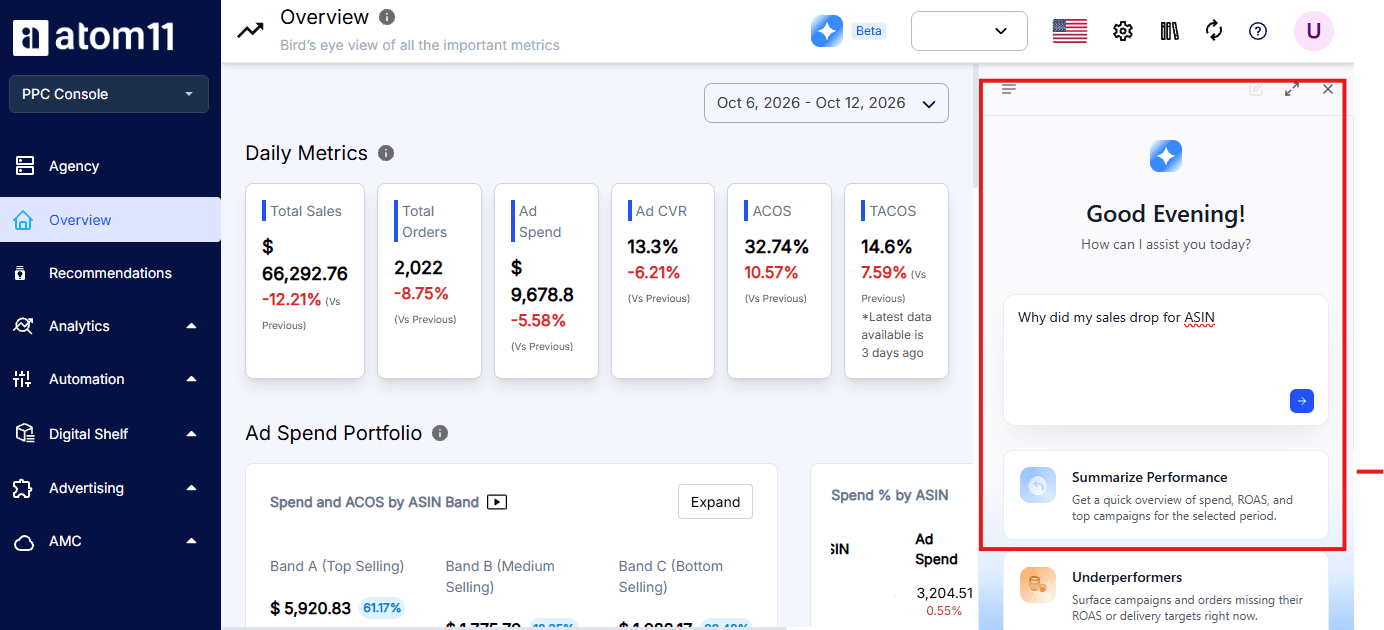
When campaign performance changes, the first question should be why.
Neo compares time periods across 15+ advertising and retail signals to help identify what is driving a change in sales or performance. The Root Cause Analyzer then helps isolate the metrics that moved, so you can focus your attention on the factors that actually matter.
Learn more about Neo.
Keep Ads Aligned With Inventory
A strong Sponsored Brands video campaign cannot generate sales if the product is unavailable. Atom11's inventory-aware automation can pause ads when stock runs low and resume them when inventory is replenished.
That helps prevent ad spend from continuing toward products that shoppers cannot purchase.
Protect Changes With Version Control
Large events such as Prime Day often require aggressive bid and budget changes. Atom11 lets you save a version of your campaign settings before making those changes, giving you a clean point to return to afterward.
Once the event is over, you can roll back to the saved version rather than manually reversing every adjustment.
Conclusion
The best Sponsored Brands video campaigns are not simply the ones with the most polished footage. They are the ones that connect strong creative with disciplined campaign management.
Show the product quickly, make the message work without sound, keep the video focused, and match the landing page and targeting to the campaign goal. Then give the campaign enough structure and clean data to understand what is actually working.
Treat each video as a test rather than a one-time asset. Test the opening, message, targeting, and call to action, measure the result against the campaign objective, and move budget toward the approaches that perform.
For larger Amazon advertising programs, Sponsored Brands video can also become part of a broader full-funnel advertising strategy, where video supports discovery while search, retargeting, and other Amazon ad formats help move shoppers further toward conversion.
FAQs
How long should a sponsored brand video be?
Amazon accepts 6-45 seconds, recommends 15-30 seconds for lasting effect, and says 20 seconds or less is highly recommended. Aim for roughly 20 seconds, put the product in the first two seconds, and test shorter and longer cuts.
Do I need Brand Registry for sponsored brand video?
Yes. Sponsored Brands video is available to registered brand owners. If your brand isn't enrolled yet, enroll in Amazon Brand Registry first, then build the campaign from your Amazon Ads account by choosing the video option.
What are the sponsored brand video specs?
Use an MP4 or MOV file of 500 MB or less, 16:9 at 1280 x 720, 1920 x 1080 or 3840 x 2160, H.264 or H.265, and AAC, MP3 or PCM audio. Duration must be 6-45 seconds.
Can I upload a vertical video?
Amazon's documentation is inconsistent. The ad specs page lists 16:9 only, while a regional guide mentions 9:16. Check your own campaign builder to confirm what your account accepts, and keep a 16:9 version ready regardless.
Why was my sponsored brand video rejected?
Common causes are wrong language for the marketplace, letterboxing bars, content unsuitable for a general audience, and footage that breaks Amazon's creative policies. Review the rejection note, fix that specific issue, and resubmit.
