Blog
/
Amazon Sponsored Products Examples for Every Type and Format
Amazon Sponsored Products Examples for Every Type and Format
Deepika Thakur

Amazon Sponsored Products are PPC ads that promote individual product listings across search results and product detail pages. They can be created using automatic targeting, keyword targeting, or product (ASIN) targeting, with formats and campaign structures suited to different advertising goals.
This guide covers real Sponsored Products examples for each targeting type and format, including search-result and produsct-page placements, campaign setups, keyword and ASIN examples, and the bid and targeting logic behind them.
What Is an Amazon Sponsored Products Ad?
A Sponsored Products ad promotes a single product listing, identified by its ASIN (Amazon Standard Identification Number). You don't write separate ad creative. Amazon builds the ad from your listing: main image, title, price, rating and Prime badge. A small "Sponsored" tag marks it as an ad. You pay only when a shopper clicks (cost per click, or CPC).
Which ad wins an auction depends on your bid and Amazon's estimate of how likely the shopper is to click (estimated click-through rate, eCTR). A higher bid doesn't guarantee a win if the listing converts poorly.
Sponsored Products vs. Sponsored Brands vs. Sponsored Display
Sponsored Products promote a single listing in search results and on product pages, which is why most sellers launch them first. The other two Amazon ad types work differently:
Sponsored Brands: promote your brand and several products with a logo and custom headline, and can send shoppers to a Brand Store.
Sponsored Display: display ads that can remarket to shoppers who viewed your products. See our Sponsored Display guide for targeting, bids and ROI, and what to automate and what to control.
A common path is to use Sponsored Products to learn which keywords and ASINs convert, then add the other two once the listing is profitable.
Sponsored Products Examples by Placement
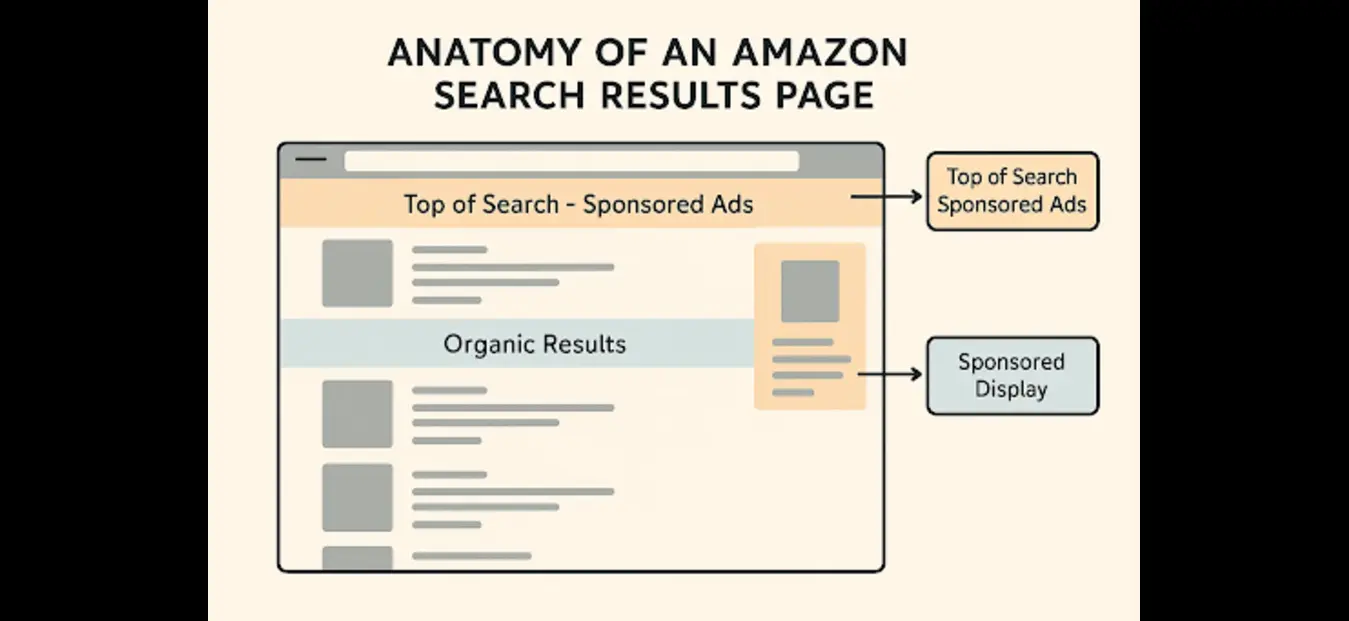
Placement | What shoppers see | Example | Best use |
Search results, top | Tile in the first rows | Search "kitchen scale" and see a sponsored tile before organic results | Highest-intent, highest-competition traffic |
Search results, middle and bottom | Tile interspersed with organic listings | A "running shoes" tile between organic results | Cheaper clicks, wider reach |
Product detail page | Rows such as "Sponsored products related to this item" | A water-bottle page showing a sponsored insulated lid | Capturing shoppers comparing alternatives |
You can raise or lower bids by placement. A common setup is a higher bid for top-of-search on proven keywords and a lower one elsewhere. The right level depends on your own conversion data per placement, so test rather than copy a number.
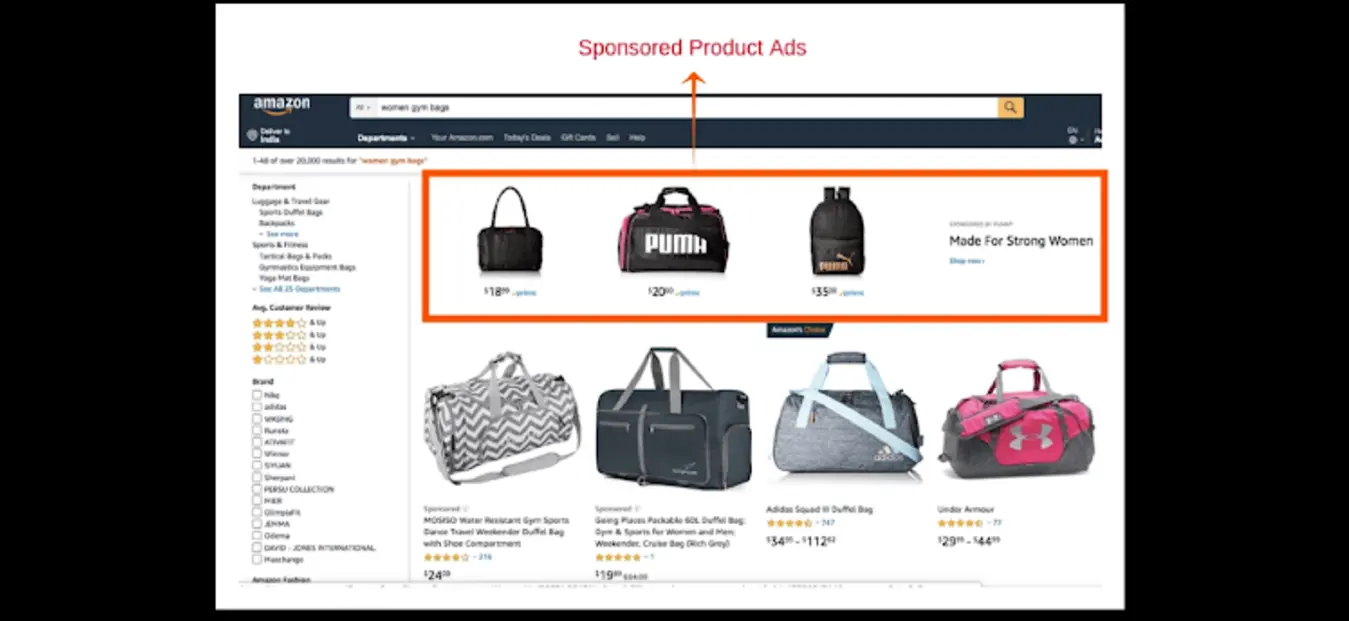
Source: Amazon.com, screenshot by the Atom11 team, October 2026.
Sponsored Products Examples by Targeting Type
1. Automatic targeting
Amazon matches your product to search queries and product pages. It uses four sub-groups:
Close match: shoppers searching terms closely related to your product.
Loose match: searches loosely related to it.
Substitutes: shoppers viewing similar products.
Complements: shoppers viewing products that pair with yours.
Example: A seller of a stainless steel water bottle runs an auto campaign for two weeks. The search-term report reveals buyers searching "gym bottle with straw", a phrase the seller never considered. Auto campaigns are best used for discovery.
2. Manual keyword targeting
You pick the keywords and a match type:
Exact: the precise phrase, e.g. [insulated water bottle 32 oz]. Most control, most efficient.
Phrase: your phrase plus words before or after.
Broad: related terms in any order, which gives the widest reach.
Example: Once "stainless steel water bottle" proves it converts, you bid on it in an exact-match campaign at a controlled bid.
3. Product (ASIN) and category targeting
You target competitor listings or whole categories so your ad appears on their pages.
Example: A new pet-bowl brand targets the ASINs of the three best-selling slow-feeder bowls. It also targets its own other products to promote complements and cross-sell.
4. Negative targeting
Negative keywords and negative products stop your ad from showing on searches and pages that waste spend. Example: the stainless steel water-bottle seller adds "plastic water bottle" as a negative keyword after the search-term report shows clicks that never convert. Add negatives from day one, as covered in our campaign setup guide.
Sponsored Products Examples by Format
Standard product ad. The default tile in search and on product pages. Your listing quality (image, title, price, reviews) does the selling.
Sponsored Products video. A newer format in which short feature clips attach to a product tile, letting shoppers preview features in search results before clicking through. Seller reports on Reddit describe up to five clips per tile. Check Amazon Ads for current eligibility, since availability has been rolling out in stages.
Why listing quality matters here: The ad borrows your listing, so weak images or a thin title waste clicks. Fix the listing before raising bids.
Sponsored Products Bidding Strategies and Placement Adjustments
Every campaign also has a bidding strategy that changes how your bid behaves in each auction:
Dynamic bids, down only: Amazon lowers your bid on clicks that look less likely to convert and never raises it. Suits cost control.
Dynamic bids, up and down: Amazon raises or lowers bids in real time based on the likelihood of a sale. Suits conversion-focused campaigns.
Fixed bids: your bid stays the same whatever the likelihood of conversion, which gives predictability.
The two stack, so a large adjustment on an up-and-down campaign can push the effective bid far above your base bid. Apply one only where your placement report shows it converts.
Setting a Bid That Won't Lose Money
Most beginners guess bids. Work backwards from profit instead.
ACoS = spend ÷ sales. Max CPC = target ACoS × conversion rate × average order value.
Worked example: Your AOV is $40, your conversion rate is 10%, and you can accept a 25% ACoS.
0.25 × 0.10 × $40 = $1.00 max CPC.
At that bid, ten clicks cost $10 and produce about one $40 sale, which is a 25% ACoS. If the market CPC is above $1.00, either improve conversion or accept a thinner margin on that keyword. Rising CPCs punish guesswork.
Also track TACoS (spend ÷ total sales, including organic). Advertisers consider a TACoS of 10% or lower a strong result, because it shows ads are lifting overall sales, not just buying them.
Campaign Structure Examples
Structure | Campaigns | Why it works |
Launch | Auto + broad + product targeting | Finds what shoppers actually search |
Harvest | Move converting search terms into exact-match campaigns | Concentrates spend on proven winners |
Defend | Branded exact-match campaign | Stops competitors from taking your brand searches |
Negate | Add poor search terms as negative keywords | Cuts wasted spend |
Separating discovery from proven keywords means you can see what each costs and returns. One mixed campaign hides that.
Example of Strategies That Worked
The three examples below show the tactics above on Sponsored Products:
1. Household disposables brand: raising bids when a competitor raised its price
What they did: The brand, a top-10 seller in its tissue-paper sub-category, set up price and stock alerts on its three biggest competitors. When one competitor raised its price, an alert arrived by email, and the team raised bids by 30% in one click on that competitor's product-page targeting, across both Sponsored Products and Sponsored Display targeting campaigns. The higher bids ran for about a week and were then lowered.
Result: The target product went from about 8 orders a day at a 19.4% ACoS to about 24 orders a day at a 12.2% ACoS, a 37% ACoS improvement. This covers one product over roughly a week.

2. Large US reseller: pausing ads before products ran out of stock
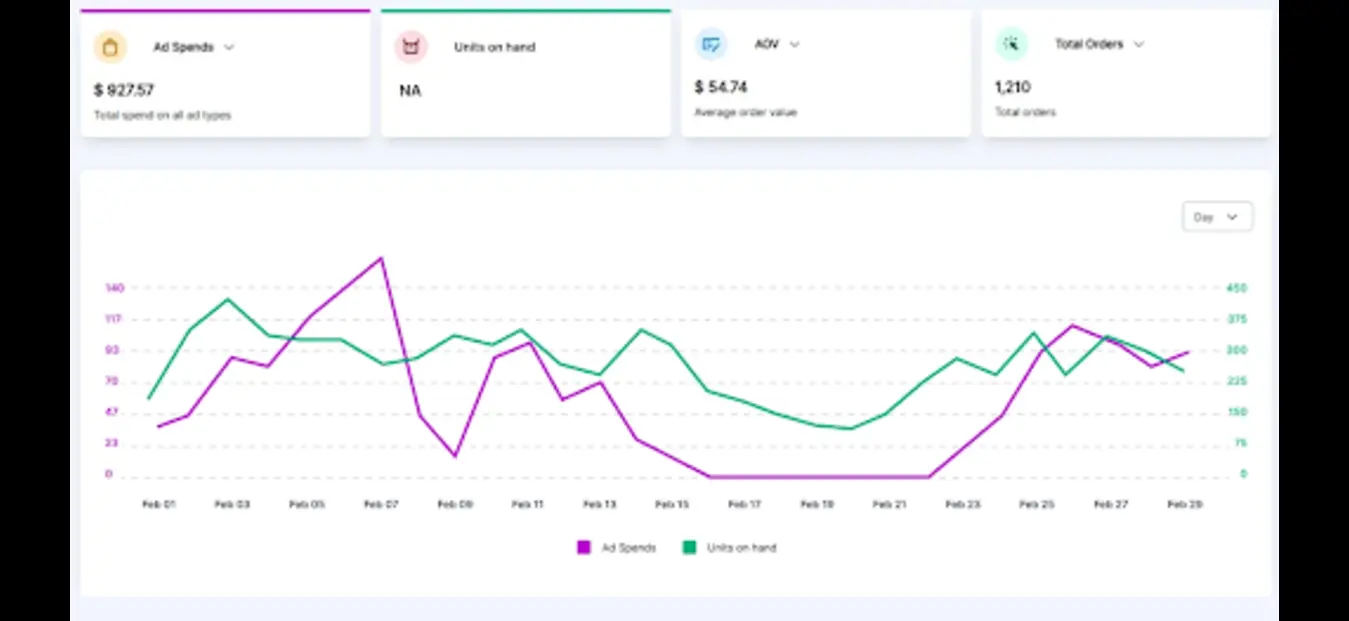
What they did: A US reseller of more than 2,000 consumer packaged goods products had been pausing campaigns by hand when stock ran low, and often did it too late. It set a rule to pause a product's ads when inventory fell below 7 days of supply and to switch them back on once stock was replenished.
Result: On the example product, the pause saved about $65 a day in ad spend and slowed sales velocity enough to avoid a stockout, which protected its sales rank. Ads resumed as soon as stock returned, and the reseller reports zero stockouts since switching.
3. Home cleaning tools brand: lowering ACoS while growing beyond its hero product
What they did: The brand wanted a profitable ACoS and also wanted to grow products beyond its top seller. It adjusted bids and budgets by hour and day using hourly shopping patterns, paused ads automatically on low-stock products, and used search term automation to add negatives and harvest converting terms so it could target broadly without losing its ACoS target. Budgets moved to new focus ASINs without restructuring existing campaigns.
Result: Over six months ACoS improved by 40% while spend increased substantially. Wasted spend fell by more than 30%, organic search ranks improved by 66% as ad sales rose, and the team saved more than 80 operational hours a month.

How Atom11 Manages Sponsored Products Campaigns
Most tools treat Sponsored Products as an ads-only problem. Atom11 is a retail-aware Amazon PPC platform built by ex-Amazonians. It connects your advertising data with Seller Central or Vendor Central signals such as inventory, pricing, buy box and organic rank. Here is how that plays out when you run Sponsored Products.
1. See everything in one dashboard.
The agency view lists every account in one place, which suits agencies and brands with sub-brands. The overview page breaks spend down by campaign type, placement, branded versus competitor versus generic search terms, and match types.
2. Build campaigns in bulk.
Instead of creating campaigns one at a time, you can:
create campaigns in bulk,
add keywords in bulk and add negatives in bulk,
apply audiences across many campaigns in one go.
3. Automate with rules you control.
Bid optimizer: raise or lower bids based on performance.
Search term harvesting: move converting terms from auto into manual campaigns.
Budget rules: increase budgets when a campaign runs out early, reduce them when it underperforms.
Placement optimizer and portfolio budget optimizer: tune where and how budgets are spent.
Dayparting: adjust bids and budgets by hour and day, with controls for conflicts if you change something manually.
4. Let inventory protect your spend.
The inventory optimizer pauses advertised ASINs when stock runs low and re-enables them after replenishment, so you stop paying for clicks you can't fulfil.
5. Check whether automation worked.
The performance monitor shows results before and after each automation, so you can keep or roll back a change instead of trusting a black box.
6. Prepare for sales events
Version control saves your bids and budgets before Prime Day or Black Friday. Afterwards you restore that version in one step.
7. Find out why sales moved.
The Root Cause Analyzer compares two periods and shows which metrics changed and which didn't. In the demo example, falling orders traced back to lower ad spend and fewer page views, so stock and AOV could be ignored. Neo, the AI analyst, answers questions such as "why did sales drop for this parent ASIN?" and "which products are ineligible?"
8. Use Claude with your data.
Atom11 can connect to Claude to ask questions about your account. Write access, so bids and budgets can be changed from Claude, is described as coming soon.
Common Sponsored Products Mistakes
Running one campaign for everything: you can't tell what drives results.
Bidding without margin math: CPC rises while profit disappears.
Never adding negative keywords: irrelevant searches keep draining budget.
Advertising out-of-stock products: you pay for clicks that can't convert.
Judging by ACoS alone: look at TACoS and organic lift too.
Weak listings: better ads can't fix poor images and thin titles.
Conclusion
Sponsored Products come down to three decisions: where the ad appears, how you target it, and how tightly you control bids and budgets. Use auto and product targeting to learn, exact match to scale, and bid math to protect margin. As spend grows, the hard part becomes managing it all without extra headcount or wasted clicks. That is where a retail-aware platform pays off. If you want to see how this looks on your own account, contact Atom11 through their website.
FAQs
What is an example of an Amazon Sponsored Products ad?
A sponsored tile for a kitchen scale appearing in the first rows of a "kitchen scale" search, labelled "Sponsored."
Where do Sponsored Products ads appear?
In search results (top, middle and bottom) and on product detail pages under "Sponsored products related to this item.
What are the targeting types?
Automatic, manual keyword (exact, phrase, broad) and product/ASIN targeting, per Amazon's targeting guide.
Do Sponsored Products need Brand Registry?
Brand Registry isn't generally required for standard Sponsored Products, but eligibility rules change. Confirm in Amazon Ads before launching.
What is a good ACoS?
It depends on your margin. Many sellers target 20–40%. Work out your break-even ACoS from your margins first.
