Blog
/
Amazon Sponsored Products: The Complete Guide to Setup, Bidding, and Optimization
Amazon Sponsored Products: The Complete Guide to Setup, Bidding, and Optimization
Neha Bhuchar

Key Takeaways
Sponsored Products are cost-per-click ads, so you pay only when a shopper clicks.
Ads show only when your product is in stock and wins the Featured Offer, so fix your listing before you raise bids.
Start with automatic targeting to gather data. Then move proven search terms into manual exact-match campaigns and add negatives.
Your maximum profitable bid is target ACoS × conversion rate × average order value.
Check performance at least twice in week one, then optimize on a 30-day rhythm.
Atom11 connects ads with Seller Central signals like inventory and gives you one dashboard to manage automation, version control, and root-cause analysis.
Amazon Sponsored Products are cost-per-click (CPC) ads that promote individual products in Amazon search results and product detail pages. Most Sponsored Products campaigns fail because of the listing behind the ad or the bid setup, not because the ads are bad.
To set them up effectively, choose products with strong listings and sales potential, structure campaigns around relevant keywords or targets, and set bids based on your conversion rate, AOV, and target ACoS. Optimisation then comes from reviewing search terms, conversions, spend, and placement performance and adjusting bids, budgets, and targets accordingly. This guide covers the setup process, bidding strategy, and a practical 30-day optimisation plan.
What Are Amazon Sponsored Products?
Amazon Sponsored Products are cost-per-click (CPC) ads, aka Amazon Sponsored Ads, that promote individual product listings in search results and on product detail pages. They are open to professional sellers, vendors, book vendors, authors, and agencies.
There are three formats:
Ad type | What it promotes | Where it appears | How it targets |
Sponsored Products | A single product listing | Search results and product detail pages | Keywords or products |
Sponsored Brands | Your brand | Usually top of search | Keywords |
Display (formerly Sponsored Display) | Products or brand | On and off Amazon | Audiences and context |
Sponsored Brands use a custom banner with a logo, a tagline, and up to three products, typically at the top of search results. They require Amazon Brand Registry.
Display ads work differently from search ads. They target shoppers based on interests and on-platform behavior rather than keywords, which makes them useful for retargeting. Amazon says Sponsored Display is now part of a wider display ads offering, and existing campaigns keep running.
Sponsored Products are the usual starting point because they need no brand registration, target shoppers already searching, and work for new and established advertisers.
How Amazon Sponsored Products Work
Pay-per-click model: You pay only when a shopper clicks your ad. There are no monthly or upfront fees.
Placement: Ads appear in relevant shopping results, on product pages, and on external partner sites. See Amazon's seller overview for more.
Targeting: You can target keywords, products, or audiences based on purchase intent, or let Amazon match automatically.
Requirements: Products must be in stock, win the Featured Offer, and sit in an eligible category. Adult, used, refurbished, and closed-category products are not eligible.
Who sees your ad? In simple terms, whether your ad appears depends on your bid and how likely the shopper is to click it (estimated click-through rate). A bigger bid does not guarantee placement. Relevance counts too.
Where Ads Appear
Location | What to know |
Top of search results | Highest visibility, often the most competitive |
Within or alongside search results | Broader reach, often at lower cost |
Product detail pages | Reaches shoppers comparing similar items |
Beyond Amazon | Other Amazon-owned sites and third-party destinations |
Before You Launch: The Listing Checklist
Your ad sends shoppers to your detail page, so weak pages waste clicks. Here are some best practices of listing sponsored Amazon Ads:
Element | Amazon's guidance |
Featured Offer | Product must show it (it also requires stock) |
Reviews | Five or more, rated 3.5 stars or higher |
Images | Four or more zoomable images, at least 1,000 px |
Bullets | At least three |
Title | Clear and concise, about 60 characters |
Prime badge | Enroll eligible items in FBA |
A+ Content | Available to vendors and Brand Registry sellers |
Price also affects clicks and conversions, so keep it competitive.
Choose the Right Sponsored Products Targeting
Each targeting option serves a different purpose, from discovering search terms to controlling where your ads appear.
Automatic targeting
Amazon matches your ad to keywords and products for you. It is the fastest way to start and a good way to discover shopper language. Amazon campaigns offers four match types:
Match type | Who sees your ad | Example for "400-count cotton sheets" |
Close match | Shoppers using closely related terms | "cotton sheets" |
Loose match | Shoppers using loosely related terms | "bed sheets" |
Substitutes | Shoppers on similar products' pages | Pages for 300-count sheets |
Complements | Shoppers on complementary products' pages | "queen comforter" |
Manual targeting
Manual campaigns give you control per keyword or product. Keyword match types are:
Exact: the precise search term or close variants. It offers the most control.
Phrase: searches containing your phrase in order.
Broad: wider variations of your terms, useful for discovery.
For product targeting, download the search term report, find your best-selling products, and target them in a manual campaign. Use category targeting to expand a new product. You can also target your own product pages and bid higher there to promote related items.
Negative targeting
Negative keywords and ASINs targeting stop your ad from showing where it does not fit. Amazon's example is a camera lens ad appearing next to an incompatible camera: exclude that ASIN and stop paying for the wrong placement. In the campaign manager, open your ad group, go to negative targeting, and choose "Add keyword" or "Exclude."
Sponsored Products Ads Bidding and Budget Strategy
Your bidding strategy determines how aggressively Amazon can spend, while placement adjustments control where your Sponsored Products ads appear.
Bidding strategies
Strategy | What it does | Best for |
Dynamic bids – down only | Lowers your bid when a click is less likely to convert | Cost control |
Dynamic bids – up and down | Raises or lowers bids using real-time signals | Growth and impressions |
Fixed bids | Uses your exact bid | Predictability |
You can also add placement adjustments of up to 900% across top of search, rest of search, and product pages. Your final CPC never exceeds your maximum adjusted bid.
The Breakeven Bid Formula
Guessing bids is expensive. Use this instead:
ACoS = CPC ÷ (Conversion Rate × Average Order Value)
Rearranged: Max CPC = Target ACoS × Conversion Rate × AOV
Illustrative example: a $40 product converts 10% of clicks and keeps a 30% margin before ads, so breakeven ACoS is 30%.
Max CPC = 0.30 × 0.10 × $40 = $1.20
Check: 1.20÷(40 × 0.10) = 30% ACoS
Bid above $1.20 and you lose money on each sale, unless you count repeat purchases. Products with higher prices can support higher bids. Cheaper ones need lower bids.
How Daily Budgets Work
A daily budget is what you will spend per day, averaged over the month. At $100 a day, you may receive up to $3,000 of clicks in a 30-day month. Budgets are not paced through the day, so a small budget can run out in minutes when demand is high. If a strong campaign runs out early, raise its budget. Reduce overfunded ones.
New professional sellers may also be eligible for up to $1,000 in ad credits in select locations. Check Amazon's terms.
Measuring Performance
Amazon recommends checking metrics at least twice in the first week. Key reports:
Search term report: shopper queries that led to clicks
Targeting report: sales metrics per keyword or product
Advertised product report: performance by ASIN
Placement report: top of search vs other placements
Performance over time: CPC and spend trends
Metric | Formula | What it tells you |
CPC | Spend ÷ clicks | What each click costs |
ROAS | Sales ÷ ad spend | Return per ad dollar |
ACoS | Spend ÷ ad sales | Ad efficiency (inverse of ROAS) |
TACoS | Spend ÷ total sales | Whether ads support the whole business |
ACoS alone can mislead. A high-ACoS launch campaign may lift organic rank, which TACoS shows and ACoS hides.
Amazon also advises running at least two suggested products, keeping campaigns always on, and adding manual campaigns beside automatic ones. Group only same-category ASINs per campaign, and separate high-priced from low-priced items so they do not distort ROAS.
Say you spend $100 and get 100 clicks, $400 in ad sales, and $1,000 in total sales. CPC is $1, ROAS is 4, ACoS is 25%, and TACoS is 10%. If ACoS rises to 40% during a launch but total sales grow, TACoS shows ads are lifting organic sales too. Check the search term report to spot wasted clicks.
Troubleshooting: With zero sales, audit Featured Offer, reviews, and page quality. With few impressions, raise budgets, try "up and down" dynamic bids, or add manual targeting.
New Formats: Video and Prompts
Sponsored Products video campaigns saw 67% higher click-through rate and 9% higher conversion rate than campaigns without video (Amazon internal data, US, June 2026).
Amazon also made Sponsored Products prompts generally available in the US on March 25, 2026. These AI-powered prompts can open a Rufus dialog or answer shoppers on the page. Existing campaigns are enrolled automatically, and clicks are billed under your CPC parameters.
You can review or pause prompts in the Ads Console (Campaign → Ad Group → Ads → Prompts).
Seven Common Sponsored Products Mistakes
Advertising out-of-stock or Featured Offer-less items. You lose ad eligibility, or you pay for clicks that cannot convert.
Mixing price bands in one ad group. One bid then suits neither product.
Never adding negatives. Irrelevant terms quietly drain budget.
Judging by ACoS only. Read TACoS and organic rank alongside it.
Blending branded, competitor, and generic terms. Each performs differently and needs separate analysis.
Letting budgets run dry by mid-morning. Good hours go dark.
Changing bids for Prime Day with no way back. Save the old settings before you change anything.
Most of these are process problems. They get worse as the catalog grows, which is why teams turn to automation.
How Atom11 Helps You Run Sponsored Products
Atom11 is a retail-aware Amazon PPC platform built by ex-Amazonians. It supports sellers, vendors, and agencies, and it works with brands and private-label sellers. Most ad tools see only advertising data. Atom11 also reads inventory, pricing, organic rank, and buy-box signals, and it acts on them. Here is what that looks like across the Sponsored Products workflow.
1. One dashboard for every account
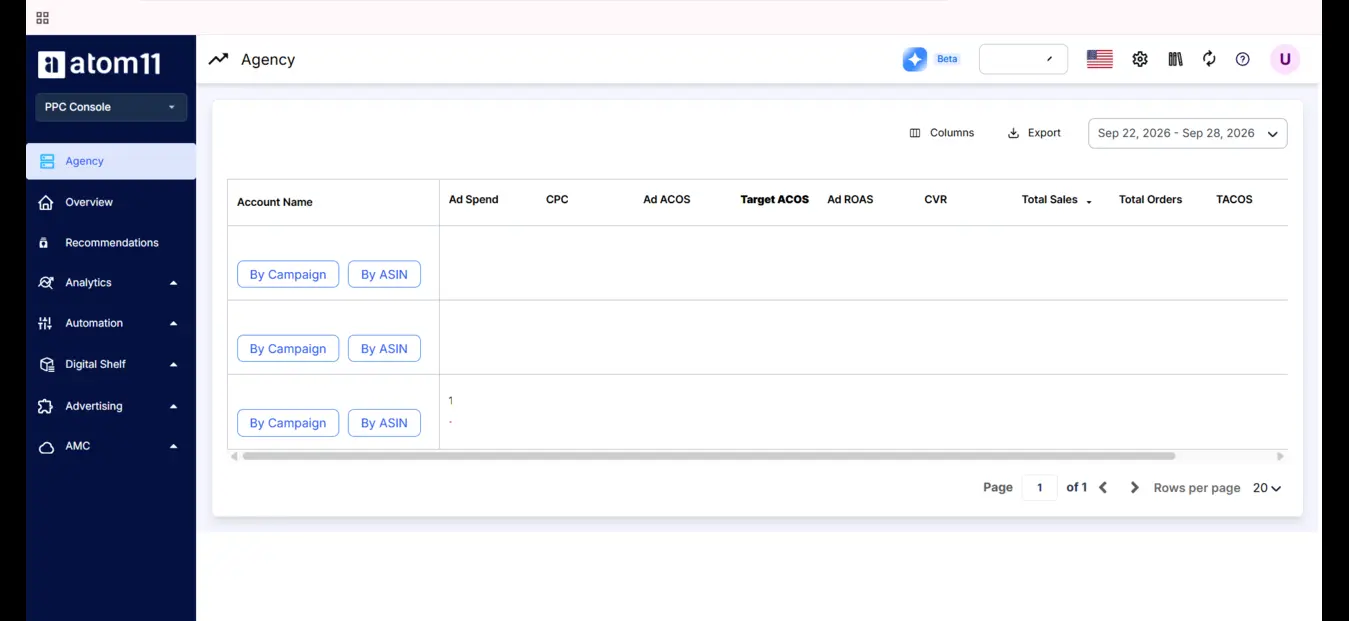
The agency view lists all onboarded accounts in one place, so agencies and multi-brand companies can scan them, change date ranges, and export. The overview page shows your ad spend portfolio: spend by ASIN, campaign type, placement, search term type (branded, competitor, or generic), and target type (broad, phrase, exact, product, auto). Expand any block to see how it performs. This answers the classic question, "Where is my money going, and is it working?"
2. Ads and Seller Central data side by side
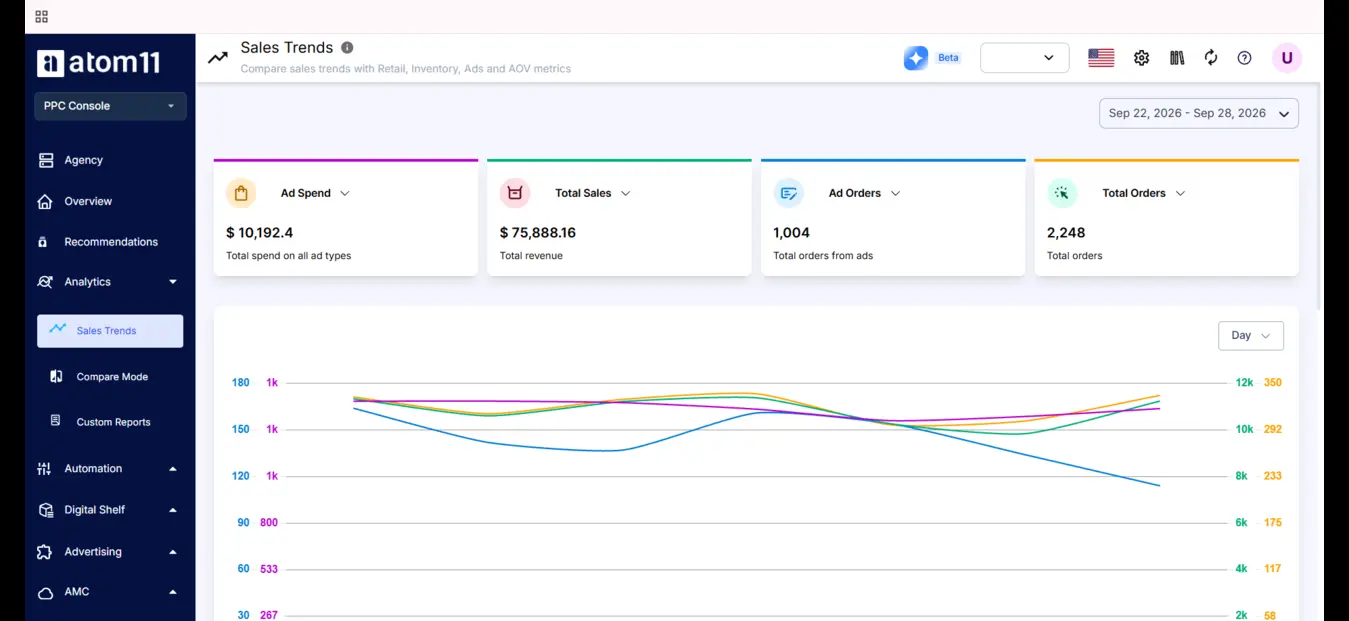
The analytics tab combines advertising, pricing, inventory, and retail data. You can chart ad spend against best-seller rank, total sales, TACoS, or conversion at day, week, or month level, for child or parent ASINs. You can also create labels and tags and view them as time series or cumulative totals.
3. Finding out why performance changed
Scrolling through columns is slow, and you forget the first column by the fifth. Atom11's Compare mode contrasts two periods at ASIN level. The Root Cause Analyzer then highlights which metrics moved and which to ignore. In the demo example, orders dropped because ad spend, ROAS, and page views fell, so you can skip AOV and look only at ads and organic traffic.
Neo, the AI analyst, answers questions in plain language, such as listing ineligible products or explaining why sales dropped for a parent ASIN. Atom11 says Neo compares 15+ ad and retail signals in under 60 seconds.
4. Automation mapped to Sponsored Products problems
Automation | What it does | Problem it solves |
Bid optimizer | Raises or lowers bids by performance | Manual bid drift |
Budget rules | Raises budgets on campaigns running out; cuts poor performers | Early budget exhaustion |
Search term harvesting | Moves converting terms from auto to manual | Missed winners |
Negation | Blocks non-performing terms | Wasted spend |
Inventory optimizer | Pauses advertised ASINs before stock-outs | Paying for clicks with no stock |
Placement optimizer | Adjusts placement bids | Uneven placement performance |
Portfolio budget optimizer | Raises portfolio budgets while portfolio ACoS holds | Underfunded winners |
Dayparting | Schedules bids and budgets by hour and weekday, with conflict-handling controls | Wasted off-peak spend |
Automation raises a fair worry: does it work? The Performance Monitor shows automation impact and lets you roll back changes, so results are visible rather than a black box. Version control saves your bids and budgets before an event like Prime Day, so you can restore them afterward.
5. Bulk work, keywords, and audiences
For actions outside automation, use bulk campaign creation, bulk keyword addition, and bulk negation. The keywords tab shows a max CPC, the bid needed to hit your target cost. You can create or adjust audiences across many campaigns at once. Atom11 also includes Amazon Marketing Cloud tools: drag-and-drop reports, canned reports, custom report requests (about 24 hours), and AMC audiences.
6. Reporting and AI integrations
Custom reporting connects to Power BI, Google Sheets, and Looker. Atom11 also connects to Claude so you can ask questions about your data there. Write access for bid and budget changes is described as coming soon.
Conclusion
Sponsored Products reward preparation: a strong listing, one clear goal, a bid built from margin math, and steady weekly work on search terms, negatives, and budgets. Start automatic, promote proven terms to exact match, and watch ACoS and TACoS together. Add Sponsored Brands and display once the basics work.
As your catalog grows, manual upkeep stops scaling. A retail-aware platform like Atom11 keeps inventory, rank, and ads in one view, automates repetitive work, and shows whether each change helped.
See how Atom11 manages bids, budgets, and inventory-aware automation from one dashboard. Book a demo for a quick walkthrough.
FAQs
What are Amazon Sponsored Products?
Cost-per-click ads that promote single product listings in Amazon search results, on product pages, and on select external sites.
How much do Sponsored Products cost?
There are no monthly or upfront fees. You set a maximum bid per click and a daily budget. Amazon suggests starting around $10 a day.
What is the difference between Sponsored Products and Sponsored Brands?
Sponsored Products promote one listing. Sponsored Brands are banners with a logo, tagline, and up to three products, and require Brand Registry.
Automatic or manual targeting?
Start automatic to discover terms, then run manual campaigns for proven ones.
What is a good ACoS?
Your breakeven ACoS equals your margin before ads. Anything below it earns profit on the sale. Launch campaigns may run higher on purpose.
