Blog
/
All You Need To Know About ASIN Targeting on Amazon
ASIN Targeting: How to Boost Amazon Sales
Neha Bhuchar
Introduced by the platform in 2019, Amazon PPC ASIN targeting is a powerful advertising feature that allows sellers to place ads directly on specific product detail pages. Whether competitor products or complementary items, ASIN targeting helps improve visibility, attract potential buyers, and drive conversions by targeting shoppers already interested in related products. This is an underutilized strategy compared to keyword targeting.
In this guide, we will explore what Amazon ASIN targeting is, why it matters, and how you can use it effectively to boost your sales on Amazon.
What is ASIN Targeting?
ASIN targeting is a feature within Amazon’s advertising platform that enables sellers to direct their ads to specific products using the Amazon Standard Identification Number (ASIN). An ASIN is a unique 10-character alphanumeric code assigned by Amazon to every product listed on its platform
By leveraging Amazon ASIN targeting, you can:
Place your ads on competitor product pages: Attract customers who are already interested in products similar to yours by advertising your products on competitor pages.
Showcase your products alongside complementary items: Promote your products on pages of items that complement yours, encouraging cross-selling opportunities.
Enhance visibility in specific product categories: Target products within specific categories to reach a more focused audience.
This targeted approach ensures that your product ads are seen by shoppers likely to be interested in your products, increasing sales potential.
Why is ASIN Targeting Essential for Amazon Sellers?
Product targeting was introduced to display ads on product detail pages of your ASINs or your competitors’ ASINs. There are three main reasons for doing this:
Cross-selling: Promote complementary products together. For example, advertising pillow covers alongside bedsheets. This strategy helps increase your Average Order Value (AOV) by encouraging customers to purchase additional items.
Upselling: Encourage customers to move from lower-priced products to their upgraded versions with higher prices. By showcasing premium options, you can increase your revenue per sale.
Competitor Targeting: Target competitor ASINs that are better-priced or better-reviewed. This way, you can gain their market share and attract new customers who might be dissatisfied with the competitor’s offering. (Read our step-by-step guide on how to Amazon competitor analysis)
What is Product Targeting on Amazon Ads?
Product targeting lets you focus your Sponsored Products ads on specific products, categories, brands, or features. This ensures your ads appear in front of shoppers most likely interested in your product offerings. atom11's amazon sponsored ads tool adds a layer of rule-based automation on top of ASIN targeting bids adjust automatically based on ACoS, inventory, or Buy Box status per targeted ASIN. You can target:
Specific ASINs: Target individual products for precise advertising.
Categories: Broaden your reach by targeting entire product categories relevant to your products.
Brands: Focus on products from specific brands to capture brand-loyal customers.
Product Features: Target products based on attributes like price range, star ratings, or shipping options.
By utilizing product targeting effectively, you can tailor your Amazon advertising strategy to meet your business goals and reach a more focused audience.
How Does ASIN Targeting Work on Amazon?
ASIN targeting allows you to strategically place your ads on specific product pages. Here’s how it works:
1. Selection of Target ASINs
Identify competitor products or items: Research products that either compete with yours or complement them. Look for direct competitors, complementary products, or high-traffic items.
Choose ASINs that align with your targeting strategy: Select ASINs based on your goals, competitor targeting, cross-selling, or up-selling.
2. Setting Up the Campaign
Use manual targeting for complete control: In the Amazon Advertising Console, create a new Sponsored Products campaign and choose manual targeting.
Input the selected ASINs: Under product targeting, select “Individual products” and add your chosen ASINs. Set your bids based on competitiveness and potential ROI. (Read our blog on bidding strategy for better results)
3. Ad Placement
Your ads appear on the product details page of the targeted ASINs: Once your campaign is live, your ads show up on the product pages of the ASINs you’ve targeted, usually under “Sponsored products related to this item.”
Shoppers browsing these pages see your ad: This increases the chance of click-throughs as customers are already interested in similar items.
4. Customer Interaction
Interested shoppers click on your ad: They are directed to your product page, where they can learn more about your offering.
Increased likelihood of conversions and sales: By reaching a relevant target audience, you boost the chances of turning clicks into purchases, resulting in higher conversion rates.
How to Select the Right Products for ASIN Targeting?
Selecting the right products to target is crucial for the success of your ASIN targeting campaigns. Here’s how to make informed choices:
1. Top-Selling Products
Products with stable, long-term sales potential and strong brand recognition.
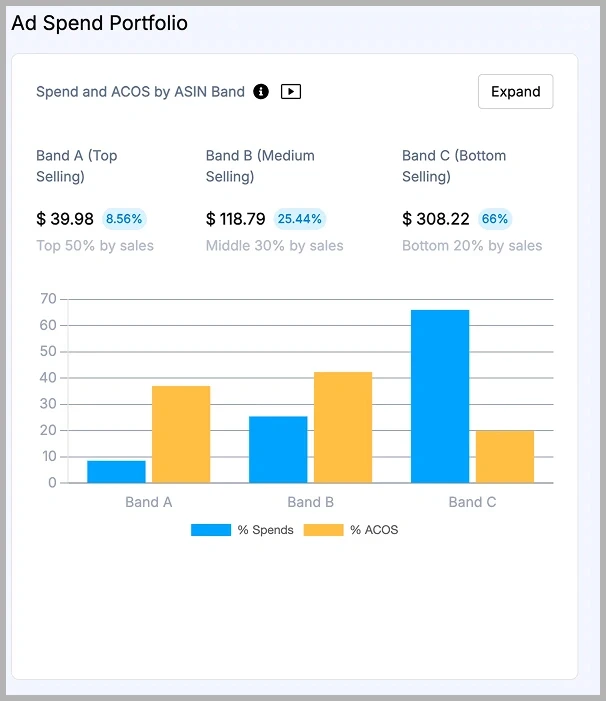
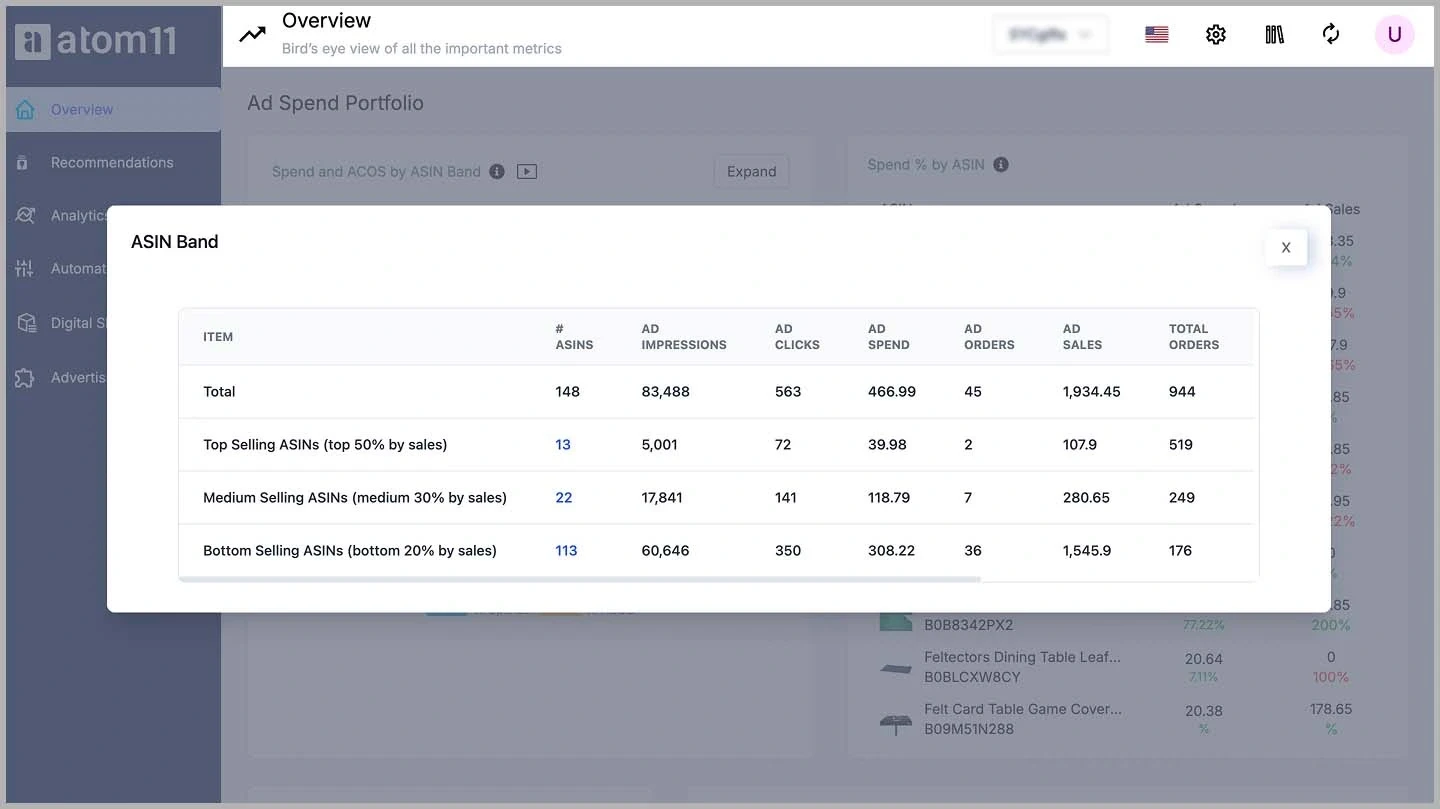
Strategy: Use tools like atom11 and ASIN Fetcher to find top products for your specific keywords or ASIN band.
Benefit: Targeting these ASINs increases your visibility among a large audience.
Customers recognize and trust these products, making them a reliable source of traffic.
2. Upcoming Products
Emerging products with a recent surge in sales due to trends or seasonal demand.
Strategy: Monitor new releases and market trends to identify these products early.
Benefit: Quickly boost sales and visibility of your store by riding the wave of popularity.
Acting fast on trends allows you to capture interest before the market saturates.
3. Potential Products
Products with high traffic but low sales, often due to incomplete information, high pricing, or negative reviews.
Strategy: Target these ASINs to offer customers a better alternative.
Benefit: Capture interested customers by addressing the shortcomings of these products.
You fill the gaps that prevent customers from purchasing those products, attracting them to yours instead.
4. Long-Tail Products
Niche items with consistent, though typically low, demand over a long period.
Strategy: Target these to tap into specific customer segments with less competition.
Benefit: Dominate niche markets and enhance your store’s diversity.
Catering to specific needs induces customer loyalty and steady sales.
To create an effective product targeting strategy in Amazon PPC campaigns, balance these different types of products.
Top-selling and upcoming products are excellent for driving storewide sales and boosting overall revenue. They bring in a steady flow of customers and help you achieve your sales targets more consistently.
Meanwhile, potential and long-tail products are crucial in promoting customer engagement and increasing the number of reviews. Positive reviews from satisfied customers enhance your product’s credibility and attract new customers. A well-balanced mix of top-selling, emerging, and niche products is key to an effective Amazon PPC ASIN targeting strategy.
Want to create more strategic Amazon campaigns that drive results? Check out the top 3 Amazon PPC secrets no one will tell you.
How to Choose When to Use ASIN Targeting Effectively?
ASIN targeting should not be ignored unless it turns out to be expensive with low ROAS. However, there are certain specific times when Amazon ASIN targeting can give disproportionate benefits.
1. When competitors increase their pricing: When a competitor increases their product pricing, and you target them, you have higher chances of converting the customer. Read this case study on how Beco used competitor pricing to its advantage to gain market share.
2. When your pricing is low: ASIN target works best in pricing use cases. So, if you have discounted your product, go aggressive on ASIN targeting.
3. When you have better reviews than competitors: The end customer can see your pricing and reviews/ ratings on the ad when you target an ASIN. If you have better reviews than the competitors’ ASIN, go ahead and target the same.
Note: Avoid competitor targeting during sale events, as competitors offer discounts and defend their market share aggressively, making ASIN targeting expensive and less effective.
How to Target ASINs?
You can choose specific ASINs according to your strategy, targeting those and others that are similar, including substitutes and complements. Here are some effective ways to implement ASIN targeting for your brand:
1. Utilize Data and Tools
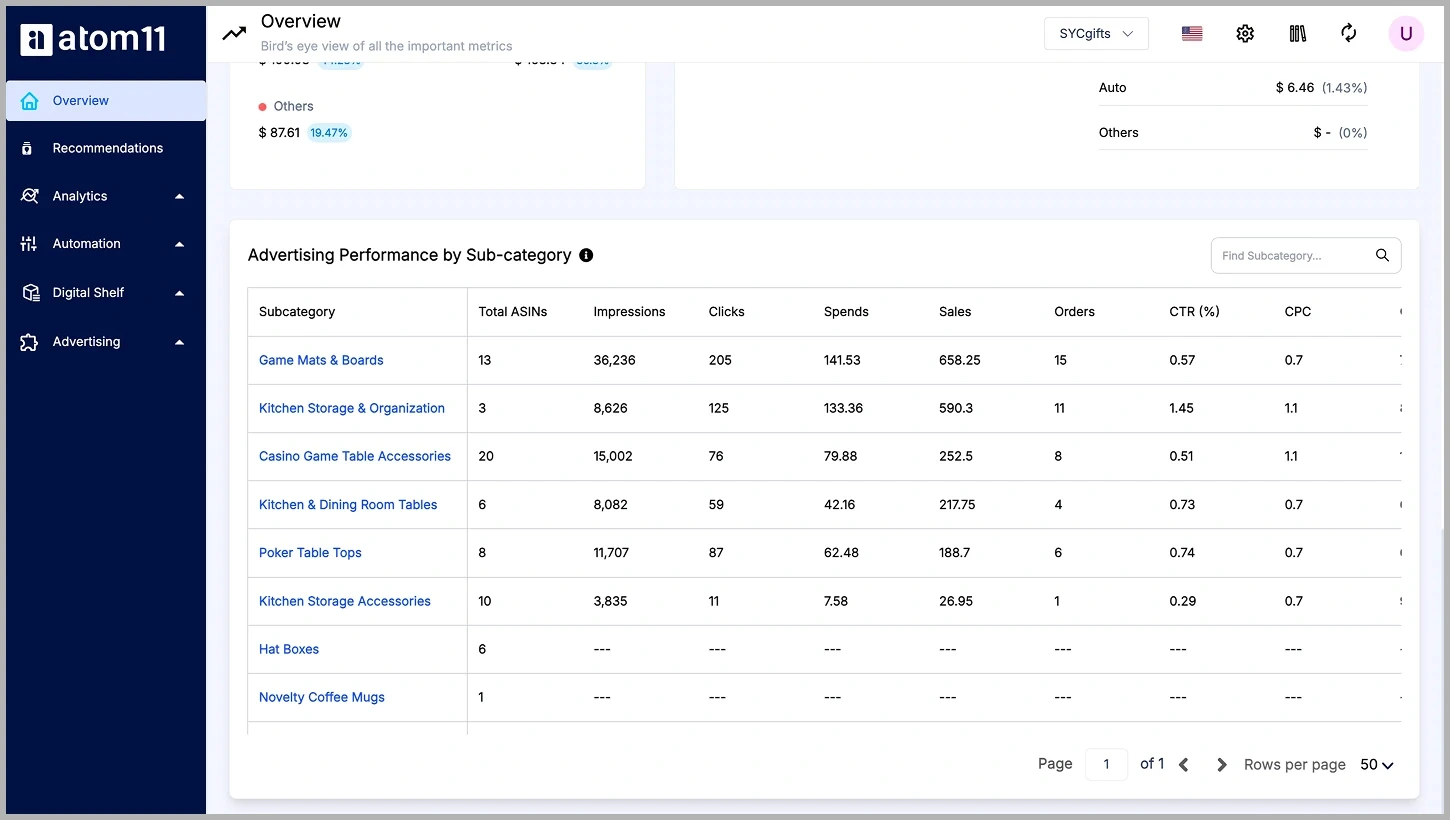
Use powerful tools like atom11, an Amazon ad optimization software, to collate and understand data on your products’ performance and your competitors’ performance in the market. The more data you collect, the better you can refine your ad campaign targeting to be more specific and successful.
2. Add Low-Performing ASINs to Negative Targeting
First, identify ASINs that are not performing well and add them to your negative targeting list. This means your ad campaigns will not target these specific products, saving you a budget that can be put to better use. However, ensure these ASINs do not fall under emerging or potential products, as you might lose sales opportunities by excluding them.
3. Target Top-Performing ASINs Manually
Find the top-performing ASINs in your product category. Look at the most popular results for the keywords you’re targeting and target those ASINs manually for better chances of conversions. An ideal advertising campaign aims to reduce ACoS (Advertising Cost of Sales), and targeting high-performing ASINs can help achieve this.
Learn more about Amazon ACoS in this comprehensive guide to improve advertising costs and achieve higher ROAS.
4. Identify and Target Relevant Competitors
Find your competition, not just the brands you want to compete with but also those closer to your product category in terms of price, quality, ratings, and product similarity. You’re more likely to succeed if you target ASINs priced similar to or slightly higher than your product. Avoid targeting products that are priced much lower or significantly higher than yours, as this may not lead to successful conversions.
5. Target ASINs with Fewer or Worse Reviews
Choose and target ASINs that are very similar to your product but have fewer and worse reviews. This might prompt consumers visiting those competitors’ product pages to click and choose your product instead, especially if you have better reviews and ratings.
6. Target Your Own ASINs
You can also target your own ASINs! Identify which of your products can be sold together, and place your other products on your own ASINs. For example, if your brand deals in toiletries, you can advertise your brush holder on your toothbrush’s product detail page. This kind of targeting helps boost your organic ranking and upsells your other products. Targeting your own ASINs often means your bid amount will be comparatively less. You can use both Sponsored Products ad targeting and Sponsored Display ads for this strategy.
Common Mistakes to Avoid
Targeting irrelevant ASINs: Ensure the ASINs you target are closely related to your product to avoid wasting ad spend and lowering relevancy scores.
Ignoring performance metrics: Failing to monitor key metrics can lead to inefficient campaigns. Regular analysis helps optimize your strategy and improve ROI. (Read our blog on Amazon advertising benchmarks to measure your campaign performance success.)
Overbidding without strategy: High bids can exhaust your budget quickly. Bid strategically based on each ASIN's potential ROI and the market's competitiveness.
Neglecting product page optimization: Driving traffic to a poorly optimized product page reduces conversions. Ensure your product page is compelling and informative, and encourages purchases.
Setting and forgetting campaigns: The Amazon marketplace is dynamic. Regularly update and adjust your campaigns to keep them effective amidst changing trends and competition.
Conclusion
Take full advantage of ASIN targeting Amazon offers to improve your product’s sales and gain a competitive edge, especially if you have better-priced and better-reviewed products than your competitors. You must ensure successful ASIN targeting campaigns by selecting the right products to target, monitoring performance metrics, and adjusting campaigns regularly.
So, start utilizing the benefits of ASIN targeting using tools like atom11. Atom11 is a tool that simplifies the ASIN targeting process with automated solutions, managing all these aspects in one place. Book a demo with atom11 today to see how our automated solutions can optimize your campaigns and drive growth.
FAQs
What is ASIN targeting on Amazon?
ASIN targeting on Amazon is a type of product targeting where you choose specific competitor or complementary Amazon Standard Identification Numbers (ASINs) on which to display your ads, rather than bidding on search terms. This strategy places your ads directly on those specific product detail pages, allowing you to intercept shoppers who are already browsing relevant items.
Can ASIN targeting improve Amazon ad performance?
ASIN targeting can significantly improve Amazon ad performance by allowing you to steal market share directly from competitors or cross-sell on your own product pages. Because you are targeting shoppers who are already viewing highly relevant products and are deep in the purchasing funnel, conversion rates can be exceptionally strong—especially if your product boasts a better price, higher ratings, or superior features compared to the targeted item.
How do I find the best ASINs to target?
To find the best ASINs to target, you should regularly analyze your Search Term Reports to identify which competitor products customers are already clicking on and buying from your automatic campaigns. You can also manually search for your primary keywords and select products on the first page of results that present a competitive vulnerability, such as having a higher price point, a lower star rating, or fewer reviews than your own offering.
How do I optimize ASIN targeting campaigns on Amazon?
You optimize ASIN targeting campaigns on Amazon by regularly reviewing the performance metrics of each individual ASIN target and adjusting your bids based on their conversion rates and profitability. You should increase bids on ASINs that consistently drive profitable sales, aggressively negate or pause ASINs that drain ad spend without converting, and continually harvest new ASINs from your auto or broad campaigns to keep your targeting list fresh and relevant.
How does ASIN targeting work in Amazon ads?
ASIN targeting works in Amazon ads by entering your product into an auction for ad placements specifically located on a chosen product's detail page, such as the "Sponsored products related to this item" carousel. When a shopper visits the targeted ASIN's page, your ad is eligible to appear alongside their organic content, effectively putting your product directly in the line of sight of a high-intent buyer during their comparison phase.
How many ASINs should I target in one campaign?
The number of ASINs you should target in one campaign typically ranges between 15 and 50 highly relevant products to ensure your budget is distributed efficiently. If you target too many ASINs in a single ad group, Amazon's algorithm may only allocate spend to the top few highest-volume targets, leaving the rest without any impressions or data to evaluate, which defeats the purpose of granular targeting.
Is ASIN targeting better for Sponsored Products or Sponsored Display?
Whether ASIN targeting is better for Sponsored Products or Sponsored Display depends entirely on your specific campaign goals, as both are highly effective but serve different visual purposes. Sponsored Products ASIN targeting is excellent for integrating seamlessly into the related products carousel to drive contextual sales, while Sponsored Display ASIN targeting is incredibly powerful for placing highly visible, disruptive ads directly under the competitor's Buy Box.
What are common mistakes in ASIN targeting?
Common mistakes in ASIN targeting include targeting highly dominant competitor products that have significantly lower prices or thousands more reviews than your own product, which usually results in wasted clicks and poor conversion rates. Another frequent error is failing to use defensive ASIN targeting on your own top-selling listings, which leaves the door wide open for competitors to place their ads on your pages and poach your customers right before they check out.
What is the difference between keyword targeting and ASIN targeting?
The main difference between keyword targeting and ASIN targeting is the user behavior you are trying to intercept: keyword targeting focuses on the specific search terms a shopper types into the Amazon search bar to show ads in the search results, whereas ASIN targeting focuses on specific product pages to show ads while the shopper is actively viewing a particular item. Essentially, keyword targeting captures initial search intent, while ASIN targeting intercepts the browsing and comparison phase.
When should I use ASIN targeting in Amazon PPC?
You should use ASIN targeting in Amazon PPC when you have a clear, demonstrable competitive advantage over specific competitor products, such as a better price-to-value ratio or a highly differentiated feature. It is also highly recommended to use it for brand defense by targeting your own catalog so that your complementary products appear on your own detail pages, keeping shoppers within your brand's ecosystem and maximizing their lifetime value.
FAQs
What is ASIN targeting?
ASIN targeting is a digital advertising feature on Amazon that lets sellers place their product ads on specific product detail pages using the unique Amazon Standard Identification Number (ASIN). Using ASIN targeting, sellers can advertise their products on competitor product pages, complementary product pages, or within specific product categories to reach shoppers who are already interested in similar items.
What is ASIN in marketing?
ASIN (Amazon Standard Identification Number) is a unique 10-character alphanumeric identifier assigned to every product on Amazon product listings. This number is assigned when sellers create a new product on Amazon’s catalog.
What is product targeting on Amazon?
Product targeting on Amazon allows sellers to focus their ads on specific products, categories, features, or brands relevant to the product in the ad. They can target individual ASINs, entire product categories, or products with certain attributes (like pricing or ratings) to ensure shoppers discover their products on organic search results when browsing similar products, pages, and categories.
What is the difference between source ASIN and target ASIN?
Source ASIN is the ASIN sellers who want to merge or transfer, and target ASIN is the ASIN that retains the merged ASIN and remains active. Sometimes, duplicate or incorrect ASINs appear in the Amazon catalog, which might confuse sellers. That’s why Amazon allows sellers to request merging the duplicate ASINs with the ‘source ASIN’ with the ‘target ASIN.’
What is the purpose of ASIN on Amazon?
An ASIN (Amazon Standard Identification Number) is a unique 10-character code assigned to every product listed on Amazon. It helps Amazon catalog, track, and organize millions of items efficiently across its platform. ASINs are essential for managing product listings, enabling accurate search results, tracking inventory, and associating reviews and other metadata with the correct item.
