Blog
/
Amazon Seller MCP: Connecting AI Agents to Seller Central and SP-API
Amazon Seller MCP: Connecting AI Agents to Seller Central and SP-API
Kajal Sharma
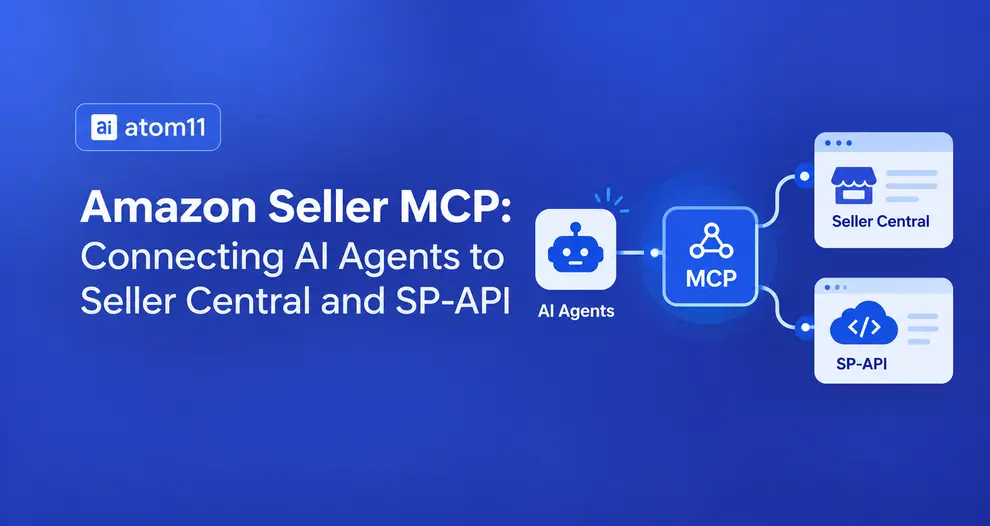
Amazon Seller MCP gives AI assistants a way to work with Amazon seller data, but connecting an AI model directly to Seller Central and the underlying APIs can still require technical setup, permissions, and data access management.
Moreover, Amazon sellers often have to export reports from Seller Central or the Ads console before asking Claude to analyze their data.
Atom11’s MCP integration changes that workflow by connecting Claude directly to Amazon advertising and retail data available through Atom11. Built on the Model Context Protocol (MCP), the integration lets Claude work with live account data instead of relying on manually uploaded reports. Sellers, vendors, and agencies can use it to query advertising performance, review key PPC metrics, and get data-driven insights through a conversation with Claude. This guide explains Amazon Seller MCP, how Atom11’s integration works, its use cases, and setup.
Key Takeaways
Amazon Seller MCP is a connector category, not a single product, it links AI assistants like Claude to Amazon account data that used to require manual exports.
Atom11 MCP is a specific implementation of that category, built on top of Atom11's existing platform rather than a bare Selling Partner API (SP-API) pass-through.
Atom11 already unifies advertising and retail signals. Sponsored Ads, DSP, Amazon Marketing Cloud (AMC), Amazon Marketing Stream, inventory, pricing and Buy Box data, through Neo, its AI copilot, which won the AI Innovation Award at the Amazon Ads Partner Awards 2025.
The MCP connector puts that same unified data inside Claude, so a question like "why did sales drop this week" is answered with the same cross-referenced reasoning Neo already runs, not a fresh, isolated query.
What Is an Amazon Seller MCP, Briefly
MCP stands for Model Context Protocol, an open standard Anthropic released in November 2024 that defines a common way for an AI assistant to ask a data source for information, and for that data source to answer, without a custom integration for every pairing.
Before MCP, connecting an AI to your Amazon data meant exporting a CSV, opening it in Excel, and pasting rows into a prompt by hand. MCP replaces that manual relay with a direct, standing connection.
An Amazon Seller MCP server is a piece of software that sits between your AI assistant and your Amazon Seller Central account. It authenticates against the Selling Partner API on your behalf, pulls orders, fees, inventory, settlements and listing data, and exposes that data to your AI client as a small set of callable "tools".
For example, get_profit_by_sku or check_inventory_cover.
You ask a question in plain English; the assistant calls the right tool; the server returns structured numbers instead of a wall of raw JSON.
Nothing about this requires you to log into a new dashboard. The server runs in the background. You keep using Claude exactly as you already do.
Does Amazon Have an Official MCP Server for Seller Central?
This is the most common point of confusion, and the honest answer is no, not yet, and not in the way most sellers assume.
Amazon surface | Official MCP server exists? | What it covers |
|---|---|---|
Amazon Ads | Yes, open beta since February 2, 2026 | Sponsored Products, Sponsored Brands, Sponsored Display, DSP and AMC. Requires an active Amazon Ads API credential, a partner-level requirement, not a Seller Central toggle. |
AWS services | Yes, generally available since May 2026, plus 40+ open-source servers under awslabs/mcp | Cloud infrastructure, not seller business data. |
Seller Central / SP-API | No official Amazon server | Orders, inventory, fees, settlements, Search Query Performance, and account health data are only reachable through third-party servers built on top of the public SP-API. |
It's worth knowing that Amazon itself doesn't run an official MCP server for Seller Central or the SP-API. Amazon's only first-party MCP server today covers Amazon Ads, and it moved to open beta on February 2, 2026. Every Seller Central-facing MCP connector, including Atom11's, is a third-party layer that authenticates through Amazon's standard channels and models the data before handing it to your AI client.
How These Servers Actually Work With the SP-API
Every credible Amazon Seller MCP follows roughly the same authorization pattern, because it's dictated by how SP-API itself is built:
Registration. The provider registers a developer application with Amazon and gets it approved for the relevant SP-API roles (Orders, Inventory, Reports, Finances, and so on).
Authorization. You connect your seller account through Amazon's OAuth flow, the same flow you'd use to authorize any third-party seller app. Credentials are scoped per account and revocable at any time from your side.
Modeling. The provider pulls raw SP-API and, in some cases, Advertising API data, joins it against orders, fees and ad spend, and stores a structured, pre-aggregated version of your account.
Exposure. That modeled data is exposed as a small number of MCP "tools" your AI client can call, not the raw API surface.
Step 3 is where providers genuinely differ. A single question like "which SKUs lost margin last week" needs orders, settlement fee lines, refunds and ad spend pulled from separate endpoints and reconciled correctly, something that can take a raw, unmodeled SP-API wrapper many separate tool calls to answer, and only if the assistant reconciles the fee lines correctly inside the prompt itself.
A server that has already done that join server-side can usually answer the same question in one call. If you're evaluating providers, ask specifically how they handle fee reconciliation and Vendor Central (1P) data, since that's where thin wrappers tend to fall apart.
Atom11 takes this modeled-data approach further by combining Amazon advertising and retail signals into a unified data layer rather than simply exposing raw SP-API endpoints. Its MCP connector gives AI clients access to the same reconciled data layer used by Neo AI Co-pilot, allowing Claude to analyze advertising performance alongside retail signals such as inventory, pricing, Buy Box status, and organic performance.
What Atom11 Is and How Its MCP Integration Works
Atom11 is an Amazon advertising and retail intelligence platform for brands, agencies, and sellers, covering Sponsored Ads, Amazon DSP, Amazon Marketing Cloud (AMC), and Amazon Marketing Stream.
Its AI copilot, Neo, goes beyond advertising metrics by analyzing more than 15 advertising and retail signals, including spend, clicks, ACoS, inventory, pricing, Buy Box status, organic search volume, and reviews. This unified view helps explain the factors behind performance changes rather than looking at ad metrics in isolation.
That same reconciled data layer powers Atom11 Amazon MCP, which connects Atom11 with Claude, and other MCP-compatible AI clients. Instead of exposing raw SP-API endpoints, Atom11 MCP gives AI access to structured Amazon advertising and retail data that can be analyzed together. This allows sellers and agencies to ask questions about PPC performance and retail signals in a single AI conversation while keeping Atom11 as the underlying data and analytics layer.
It is positioned around a simple idea: Amazon analysis rarely lives in one tool, sellers and agencies are often also pulling from spreadsheets, Keepa or Jungle Scout, so the connector is built to sit alongside those sources rather than replace your whole workflow, letting you run analysis across Atom11 data and other connected tools in one Claude conversation.
How Atom11 MCP Connects to Claude
Atom11 lists Claude as an official integration, meaning it's discoverable through Claude's own Connectors Directory rather than only as a manually configured custom connector. Here's the general flow, based on how Claude's connector system works and how Atom11 describes its own setup:
Open Claude's connector settings. In Claude.ai, Claude Desktop, or Claude Code, go to Settings (or Customize) → Connectors.
Find Atom11 in the Connectors Directory and select it or, if it isn't listed in your account's directory yet, add it as a custom connector using Atom11's MCP server URL from your Atom11 workspace.
Sign in with your existing Atom11 credentials. Atom11 doesn't issue a separate MCP login, the connector authenticates as the same user, so Claude can only see what that user could already see inside the Atom11 platform.
Approve the requested permissions. Claude will show what the connector is asking to access before the connection goes live.
Start asking questions. Once connected, you don't need to open Atom11 at all for most analysis, ask Claude directly.
Setup itself takes about five minutes, per Atom11, no terminal, no data pipeline, and no separate login for a team to manage on top of what they already use.
What You Can Ask Neo Through Claude, Once Connected
Because the connector routes through the same data Neo already reasons over, the kinds of questions that work well are the same ones Neo is built to answer, just asked from inside Claude instead of the Atom11 dashboard:
"Why did sales drop for [ASIN] this week?" pulling ad spend, ACoS, inventory cover, Buy Box status and organic traffic together instead of one metric at a time
"Give me an overview of TACoS across all my brands this month"
"Which client accounts had the biggest spend increase in the last 30 days?" (for agencies managing a portfolio)
"Pull campaign performance for [campaign] and compare it to last month"
"Combine this with my Keepa export and tell me if pricing is the issue"
How Atom11 Helps Different Users
For Sellers
A seller running one or a handful of brands uses the connection to get an overview across brands without switching tabs, ask Claude directly how to improve TACoS or increase sales, and root-cause a sales or ad performance event the same way Neo already does inside Atom11; it states this cuts analytics time by over 93% compared to manually pulling and reconciling reports.
For Agencies
Agencies manage a portfolio of client accounts, not one. The connection works the same way across every client, one Claude conversation can span custom reporting that ties advertising, retail and automation performance together, with easy setup and week-on-week scheduling per account, instead of a separate login and separate dashboard for each client.
For Vendors and Larger Brands
Because Atom11's core platform already spans Sponsored Ads, DSP, Amazon Marketing Cloud and Amazon Marketing Stream, not just Sponsored Products, vendors and enterprise brands get the same MCP connection across a broader advertising footprint, not a Seller Central-only slice of their business.
Why Use Atom11 Over a Generic Amazon MCP Connector
The Amazon Seller MCP category includes plenty of connectors that do one job well: expose SP-API or Ads API data as structured tables for an AI to query. Atom11's positioning is different in one specific way worth being direct about:
Generic reporting MCP | Atom11 MCP | |
|---|---|---|
Data source | Raw or lightly modeled SP-API / Ads API data. | Atom11's existing unified layer, ads + retail signals already cross-referenced |
Reasoning behind answers | Whatever the AI infers from raw numbers in the prompt | The same 15+ signal analysis Neo already runs, surfaced through Claude |
Best fit | Sellers who just need clean numbers fast | Sellers, brands and agencies who want the why, not just the what, without leaving Claude |
Action support | Varies by provider | Confirmation-gated bid and budget changes on the same connection |
Conclusion
Amazon Seller MCP, as a category, solves a narrow but real problem: getting live Amazon data in front of an AI assistant without a manual export. Atom11's specific implementation goes a step further by putting Claude on top of a data layer that's already unified across advertising and retail signals, the same one its award-winning copilot, Neo, uses to explain why performance moved, not just report that it did. For sellers, vendors and agencies who are already asking Claude to help diagnose Amazon performance, that's the difference between getting a clean number and getting an answer.
Put Amazon Data to Work in Claude
Connect Atom11 MCP with Claude to analyze your Amazon advertising and retail data through natural-language questions. See your PPC performance in context, uncover what is driving changes, and make faster, data-backed decisions.
Explore what Atom11 can do for your Amazon data. Book a Demo Today!
FAQs
What is Atom11 MCP?
Atom11 MCP is the connector that links Atom11's platform, Sponsored Ads, DSP, AMC, Marketing Stream and retail signals, to Claude and other MCP-compatible AI assistants, so questions can be asked and answered directly inside a chat instead of the Atom11 dashboard.
Is Atom11's Claude integration official?
Yes. Atom11 lists Claude as an official integration, alongside ChatGPT, Cursor and other MCP-compatible clients.
How long does it take to connect Atom11 to Claude?
bout five minutes, per Atom11 — there's no terminal, data pipeline, or separate login to manage beyond your existing Atom11 account.
Does the Atom11 connector work with live data or exported reports?
Live account data. Answers reflect the account at the moment you ask, not a file exported earlier.
Can Claude make changes to my Amazon account through Atom11 MCP?
Yes, for bid and budget actions, but through a confirmation step, Claude proposes the change and you approve it before it goes live.
