Blog
/
How to Get Access to the Amazon Ads MCP Server (2026)
How to Get Access to the Amazon Ads MCP Server (2026)
Nivesh J.

Quick answer: You can use Amazon’s official Ads MCP server only if you hold active Amazon Ads API credentials. That means an approved Login with Amazon application that is linked to Amazon Ads API access, plus consent from the advertiser whose data you will touch. You get those credentials by applying either as a Direct Advertiser (your own accounts) or as a Partner (software or services for other advertisers). If you do not want to build or apply, you can use a platform that already holds partner credentials, and you do not need to apply at all.
Key Takeaways
There is no separate “MCP access” form. The server is in open beta, but only for Amazon Ads partners with active API credentials. Getting the API access is the real gate.
Pick the route before you start. Three routes exist: use an approved platform, apply as a Direct Advertiser, or apply as a Partner. They differ by weeks of effort, not by minutes.
One click in the process cannot be undone. Linking your approved API access to a Login with Amazon application is permanent. Decide who owns that application before you click.
Approval times conflict. Amazon’s onboarding documentation says review may take up to one business day, while practitioners report days for direct advertisers and weeks for partners. Plan for weeks, not hours.
Most connection failures are routing and identity errors. Wrong regional endpoint, wrong account ID type and expired tokens cause most of them. This guide lists each one with its fix.
Who Can Use the Amazon Ads MCP Server Today
Amazon announced the Ads MCP server in closed beta on November 13, 2025, and in open beta on February 2, 2026. Amazon’s announcement describes the server as available globally in open beta to Amazon Ads partners with active API credentials. “Open” here means open to people who already have API access. It does not mean open to every seller with an Amazon Ads account.
Two details are worth knowing:
It exposes tools only, for now. Trade coverage of Amazon’s documentation says resources and prompts are planned for later releases, and that the technical documentation at one point still labeled the server as closed beta while the public announcement said open beta. Check Amazon’s current documentation for the status on the day you start.
Amazon does not run the assistant. Amazon says it does not own or operate the AI applications that connect to the server. Claude, ChatGPT, Gemini and other MCP clients connect to it, and you are responsible for what they do with it.
Our guide to Amazon Ads MCP vs API vs Agent explains how the server differs from the plain API and from Amazon’s own Ads Agent.
Three Routes to Access: Pick Before You Apply
Amazon’s Ads API page says the API “requires an application and approval process before access is granted,” and that the process varies by how your organization is categorized. It also says advertisers who work with a third party tool that uses the API do not need to request API access. That gives you three routes.
Use an approved platform | Direct Advertiser application | Partner application | |
|---|---|---|---|
Who it fits | Sellers, brands and agencies that want MCP answers without building anything | An advertiser automating its own accounts, with engineers | Software providers and agencies building tools for other advertisers |
Application needed | No | Yes | Yes |
Credentials held by | The platform | You | You |
Typical effort | Connect the same day | Days, plus build time | Weeks, plus build time |
You maintain | Nothing at the API level | Tokens, endpoints, tool filtering, security | All of that, for every client |
Main risk | Depends on the platform’s controls | Approval refused or delayed | Longest wait, plus compliance duties |

Figure 1: Three routes to the Amazon Ads MCP server.
A simple test decides most cases. Ask whether you need your own agent, your own tool names and your own security model, or whether you simply want trustworthy answers about your ad account. If it is the second, the platform route saves weeks. Our roundup of the best Amazon MCP servers compares the options.
The Credentials You Need, and Who Should Own Each One
Getting access is a chain of steps, and each link has an owner. The chain breaks when the wrong person owns the wrong link.

Figure 2: The credential chain. The link between approved API access and your application cannot be changed once set.
Step | What it is | Who should own it |
|---|---|---|
Amazon Developer account | The account at developer.amazon.com. It is separate from Seller Central. | A shared company mailbox, not a personal inbox |
Login with Amazon security profile | Your application identity. It gives you a client ID and client secret. A new profile is needed even if you already use one for another Amazon API. | The same company owner as the developer account |
API access application | The request for Amazon Ads API access, submitted as Direct Advertiser or Partner | Someone with authority to accept the license and data protection terms |
The permanent link | Associating approved access with your application. Amazon warns it cannot be changed once it is set. | A named owner, documented, never a former employee’s account |
Advertiser consent | The advertiser grants permission for the scopes you request | The advertiser, or the client in an agency setup |
Tokens | A short lived access token and a longer lived refresh token | A secrets store, with a named rotation owner |
Our Amazon Ads API guide walks through these steps in more detail, including the three credentials every API request carries.
The ownership audit to run before you click
Before the permanent link, answer five questions in writing:
Which email owns the Amazon Developer account, and will that mailbox exist in three years?
Does the same email appear in both the developer console and the Partner Network console? A mismatch is a commonly reported cause of long delays.
Who holds the client secret, and where is it stored?
Who is allowed to approve write actions once the server is connected?
What happens to access when the person who set this up leaves?
If you cannot answer all five, you are not ready to click. A permanent link tied to the wrong account can lock you out of your own integration.
Step by Step: Applying as a Direct Advertiser or Partner
Create a developer account at developer.amazon.com. Use a company mailbox.
Create a Login with Amazon security profile. Record the client ID and client secret, and add your allowed return URLs.
Choose the right category. A Direct Advertiser applies to access the API on behalf of its own advertising accounts. A Partner builds software or services that manage advertising for others and applies through the Amazon Ads Partner Network. If you are an agency that only builds internal tools, read the definitions carefully before you choose, because you manage other businesses’ accounts.
Describe your use case concretely. “Daily bid optimization for 40 Sponsored Products accounts” gives a reviewer something to assess. “Advertising automation” does not. Use a company domain email and explain how you will protect advertiser data.
Accept the license and data protection terms. These are part of the review, and they bind you.
Wait for the approval email, then follow its link to attach the approved access to your security profile. This is the permanent step.
Have the advertiser authorize your application through the Login with Amazon consent screen for the regions and scopes you need.
Confirm the application is authorized for the MCP server. Trade coverage of the beta says each request must carry the client ID of an application authorized for the MCP server. Ask Amazon’s developer support if the MCP server does not appear to be enabled for your application.
How Long Approval Really Takes
This is where most guides repeat one number. The evidence is mixed, so here is the honest range.
Amazon’s onboarding documentation says review may take up to one business day, and applications can be declined.
Practitioner accounts report two to three business days for direct advertisers and several weeks for tool providers and agencies. That range comes from a vendor guide, so treat it as one data point.
Amazon’s API page does not publish a timeline and does not list detailed eligibility criteria.
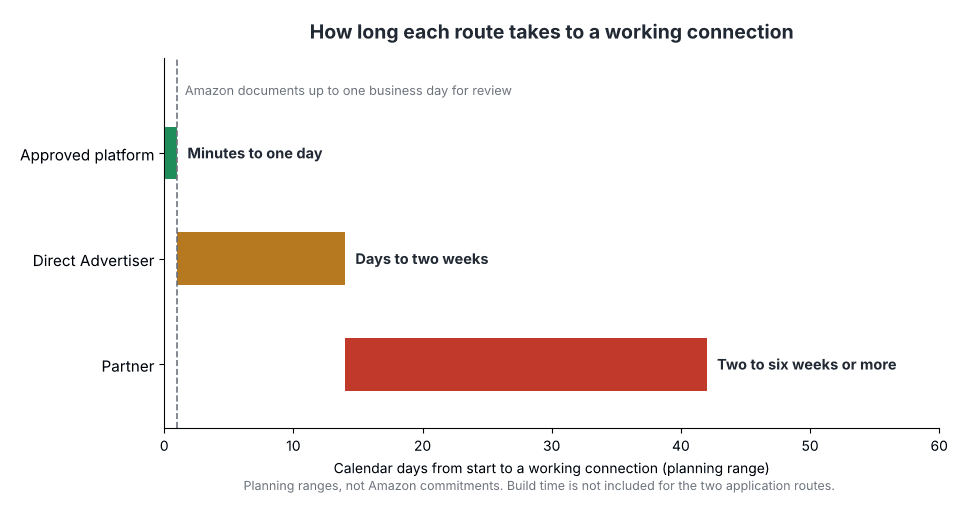
Figure 3: Planning ranges, not Amazon commitments. Amazon documents up to one business day for review, and practitioners report longer.
A practical rule: use Amazon’s number for the best case and the practitioner range for your plan. If a client deadline depends on API access, start the application before you promise a date, and have the platform route ready as a fallback.
Connecting Once You Have Credentials: Endpoints, Headers and Account IDs
The server is a hosted endpoint, not something you install. Trade coverage of the closed beta lists three regional endpoints:
Region | MCP endpoint |
|---|---|
North America | https://advertising-ai.amazon.com/mcp |
Europe | https://advertising-ai-eu.amazon.com/mcp |
Far East | https://advertising-ai-fe.amazon.com/mcp |
Use the endpoint that matches the region of the account you are connecting. India and the UAE sit on the European host for the standard API, which also trips up MCP users.
The MCP server handles account identity differently from the standard API, and this is where many first attempts fail. Trade coverage of Amazon’s documentation says the MCP server takes account identifiers in the request body rather than in headers.

Figure 4: Where identity goes. Confirm header names and field names in Amazon’s current documentation.
Three identifier types appear in the documentation: a profile ID for sponsored ads, a manager account ID for manager accounts and an advertiser account ID for DSP advertisers, global accounts or Amazon Marketing Cloud instances, depending on the tool. If you manage client accounts through a manager account, that structure is how you reach several advertisers without a separate credential per client. Our guide to Amazon MCP for agencies shows how to keep those clients apart once you are connected.
Token lifetimes matter too. Access tokens last 60 minutes. Recent technical summaries of Amazon’s documentation also report that refresh tokens issued on or after July 30, 2026 expire 365 days after the advertiser’s consent, and that a browser based OAuth 2.1 flow for public clients may require sign in again after an hour. These are secondary reports, so confirm them in Amazon’s current documentation before you build renewal logic around them.
Why Connections Fail: Error to Cause
When the first call fails, the message often looks like a permission problem. It is usually a routing or identity problem. Work down this list in order.
Symptom | Likely cause | Fix |
|---|---|---|
Rejected or unauthorized on the first call | Application not authorized for the MCP server, or the approved access was never linked to your security profile | Check the approval email link was followed, and ask Amazon support about MCP enablement |
Works for one account, fails for another | Wrong region endpoint for that account | Call the endpoint that matches the account’s region |
Account not found | Wrong identifier type, or an identifier sent in a header instead of the body | Use the profile, manager or advertiser ID the tool expects, in the request body |
Worked an hour ago, fails now | Access token expired | Refresh the access token before it expires, about five minutes early |
Fails after weeks of working | Refresh token revoked, app deleted, credentials changed or consent expired | Reauthorize with the advertiser and review your renewal logic |
Empty account list | The advertiser has not granted consent, or the account has no active campaigns yet | Confirm consent for the right scopes and region |
Long delay after submitting | Developer and Partner Network console emails do not match | Use one email across both |
If a newly linked profile fails immediately, wait a short while and retry. Practitioners report that new links can take up to an hour to propagate.
Your First Safe Session
Do not point an assistant at a live account on day one. A sensible order looks like this.
Read only first. Start with a minimal read request, such as listing the advertising accounts you can see, to confirm the connection.
Filter the tools. Disable deletion and other destructive tools before your first real prompt. An agent will call whatever tool you expose.
Use a low spend account. Test any write on a small campaign first.
Cross check totals. Compare spend, orders and ACOS from the assistant with Campaign Manager for the same dates before trusting any budget advice. Our guide on 30 Claude prompts for Amazon PPC includes a two minute check for this.
Keep a log. Record who or what changed a bid or budget, with old and new values.
Remember that Amazon’s Agent Policy took effect on March 4, 2026, and trade coverage says it is unclear whether the policy reaches Amazon Ads APIs or MCP. Confirm the current text before you automate writes.
Is It Free? Costs and Limits
Amazon’s API page says there are no additional fees from Amazon Ads to use the API, and that standard account fees and campaign costs still apply. Test accounts are available, and ads created there do not show on Amazon, so no fees apply to them. We did not find a published fee for the MCP server itself, and the public announcement does not list rate limits or usage caps. Ask Amazon directly if a number matters to your plan.
The real cost is engineering and upkeep. Someone must build or configure the client, store secrets safely, renew tokens, filter tools and watch for changes while the server is in beta. That is why many teams price the platform route as the cheaper one.
The Easier Route: Use a Partner Platform
If your goal is answers and actions in an AI assistant, not a custom agent, the quickest way to Amazon Ads data is a platform that already holds partner credentials. You authorize it to manage your advertising account through Login with Amazon, and the platform handles the API access.
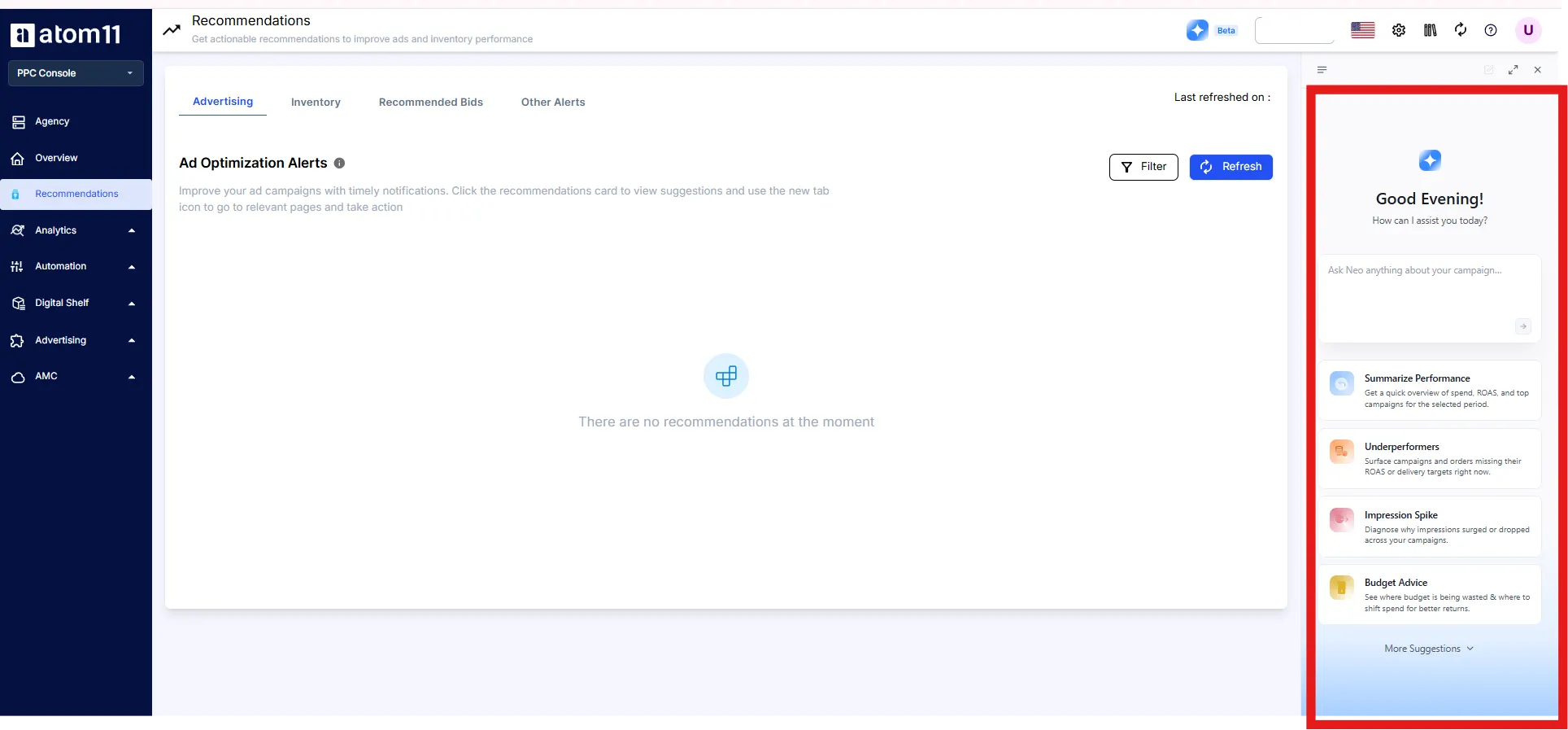
Atom11 is an Amazon Ads Partner platform, and its MCP is built for this route.
No application on your side. You connect through your assistant’s connector settings in about five minutes, with no terminal and no data pipeline.
Your existing permissions. Users sign in with their Atom11 credentials, and an AI tool can access only what that user can already access in the platform.
Live, not exported. Answers reflect the account at the moment you ask. Keys can be revoked from settings at any time.
Retail context. The MCP reads ads together with retail signals such as inventory, price and Buy Box, plus the logic behind Neo, Atom11’s AI analyst.
Writes with confirmation. Write access lets an agent adjust bids and budgets with a confirmation step on the same endpoint.
Agencies. Whether you manage one brand or a portfolio of clients, the connection is the same. Setup works through your assistant’s connector settings.
Atom11 PPC pricing is tiered by monthly ad spend, starting at $499 a month under $50K, and the MCP is included in every tier.
Not sure which route fits you? Book an Atom11 demo and we will map it to your accounts.
Conclusion
Getting access to the Amazon Ads MCP server is less about the server and more about the API access behind it. The credential chain is simple, but it has one permanent step and several owners, and most delays come from choosing the wrong route or the wrong owner, not from the approval itself.
Decide first whether you need your own agent at all. If you do, apply as a Direct Advertiser for your own accounts or as a Partner for other advertisers, own every credential with a company mailbox, and plan for weeks even though Amazon documents a day. If you do not, use a partner platform and spend those weeks on prompts, checks and approval rules instead. Either way, start read only, filter the destructive tools, and cross check the first answers against Campaign Manager before you let an assistant near a bid.
FAQs
Can anyone get access to the Amazon Ads MCP server?
Not directly. Amazon describes the open beta as available to Amazon Ads partners with active API credentials. Anyone can apply for those credentials, but approval is not guaranteed, and the process depends on how Amazon categorizes your organization.
Do I need Amazon Ads API access to use the MCP server?
Yes. The MCP server uses the same authorization model as the Amazon Ads API, so you need active API credentials. If you use a third party platform that holds them, you do not need to apply yourself.
How long does Amazon Ads API approval take?
Amazon’s onboarding documentation says review may take up to one business day. Practitioners report two to three business days for direct advertisers and several weeks for partners. Amazon does not publish a guaranteed timeline, so plan for the longer range.
Should I apply as a Direct Advertiser or a Partner?
Apply as a Direct Advertiser if you will use the API only for your own advertising accounts. Apply as a Partner if you build software or services that manage advertising for other businesses. If you are an agency building internal tools for clients, read Amazon’s category definitions carefully before you submit.
Is the Amazon Ads MCP server free?
Amazon says there is no additional fee from Amazon Ads to use the API, and we found no published fee for the MCP server. You still pay for ad spend and for the engineering time to connect and maintain it.
