Blog
/
Amazon Black Friday Listing Optimization: What to Fix Before November 27, 2026
Amazon Black Friday Listing Optimization: What to Fix Before November 27, 2026
Kajal Sharma

Amazon Black Friday listing optimization means getting your images, title, content, price, stock and ads ready so that traffic converts when the event starts. As of October 22, 2026, deal submissions have closed, but you still have 36 days to fix what shoppers actually see. Start with stock and price, because they decide whether any badge or coupon works. Then fix the main image, clean up the title for Amazon’s 75 character limit, set coupons, and line up your ads. Make low risk edits now, and freeze the risky ones early.
Key Takeaways
The deal window closed on October 20, 2026. Images, A+ Content, coupons, pricing checks, stock and ads can all still be changed.
Not every edit is equally safe. Images, A+ Content and coupons carry low risk. Titles, backend keywords and variations carry high risk, so finish them first and then leave them alone.
Discounts cost more than they look. In our worked example, a 20% discount needs about 2.5 times the unit volume to earn the same profit, and a 30% discount needs about ten times.
Peak demand shortens your stock cover. If you sell 40 units a day and expect 2.5 times that, 600 units last 6 days, not 15.
The title rule creates a trap. Titles over 75 characters are being rewritten by Amazon’s AI. Rewrite your own before Amazon does it in the middle of the event.
Use Prime Big Deal Days as your rehearsal. The October 6 and 7 event is your closest real data on how your listings convert under deal traffic.
What You Can Still Change Right Now
Lever | Status on October 22 | What to do |
|---|---|---|
Lightning Deals, Best Deals, Prime Exclusive Discounts | Protect the price and stock behind any deal you already have | |
Coupons | Open | Plan them for products without a deal |
Main image and gallery | Open | Fix compliance first, then add holiday context to secondary slots |
A+ Content and Brand Store | Open, but review takes days | Submit early, with a buffer for a rejected module |
Title | Open, with rewrite risk | Fix over limit titles now, then freeze |
Regular price | Open, but risky | Do not move it |
FBA inventory | Last inbound cutoff is October 28 | Ship now or accept that late stock may miss the event |
Ads | Open | Align budgets and campaigns with stock and listing quality |
The 2026 Timeline, With Today Marked

Figure 1: Where we are in the Amazon Black Friday 2026 calendar.
Date | Milestone | What it means for your listing |
|---|---|---|
October 14 | Inbound cutoff for AWD (passed) | Stock that missed it is unlikely to be ready |
October 15 | Peak fulfillment fees start | Add them to every discount calculation |
October 20 | Deal submissions closed | Switch to coupons and price checks |
October 21 | Inbound cutoff for minimally split FBA shipments (passed) | Check what actually arrived |
October 28 | Inbound cutoff for Amazon optimized split shipments | The last real chance to add FBA stock |
Mid November | Black Friday Week start, not confirmed | Have images, coupons and campaigns live before it opens |
November 26 | Thanksgiving | Run your final check of price, badge and stock |
November 27 | Black Friday | Check at set hours |
November 30 | Cyber Monday | Reallocate budget using Black Friday data |
January 14, 2027 | Peak fees end | Plan for the full fee window |
These dates come from Amazon’s notice as reported by PPC Land, which gives the inbound cutoffs, the peak fee window of October 15 to January 14, 2027, and Black Friday and Cyber Monday dates. The same report says the Black Friday Week start date is not stated, so confirm it in Seller Central.
The Change Risk Ladder: What to Edit and What to Leave Alone
Most Black Friday advice says “optimize your listing.” That is unhelpful, because some edits can lift conversion and others can quietly cost you rank. We sort every change into three rungs by how much damage a bad edit can do and how fast you can undo it.
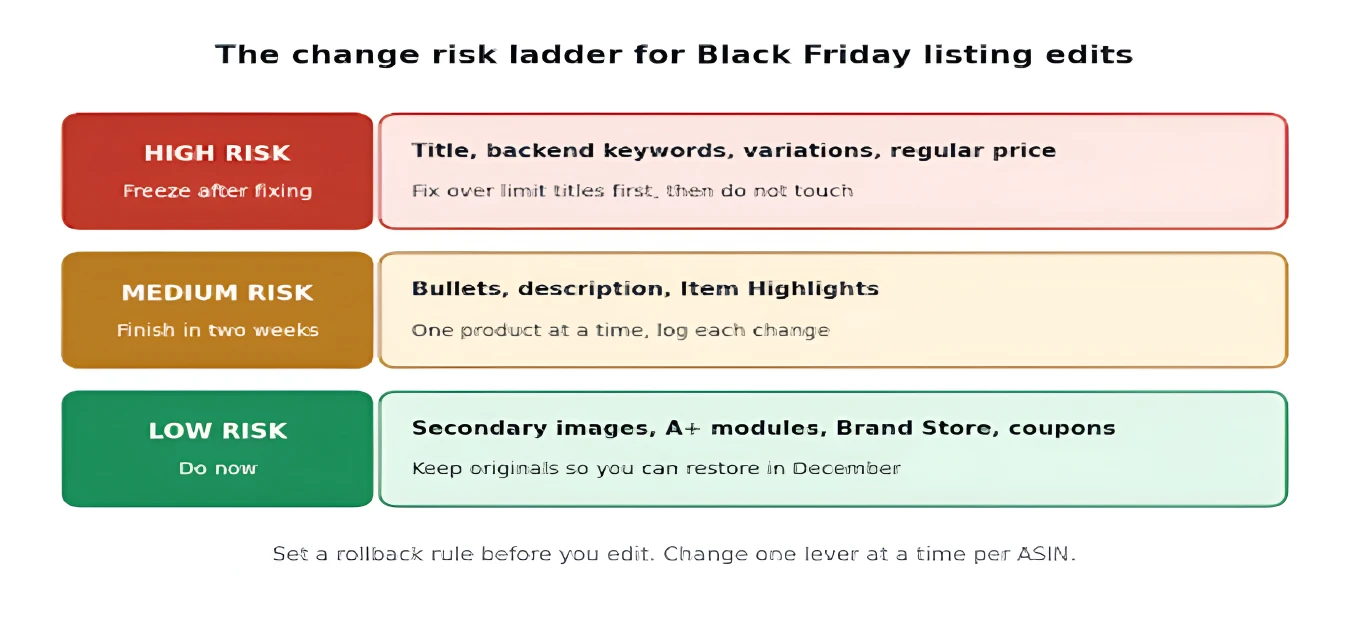
Figure 2: The change risk ladder for Black Friday listing edits.
Rung | Examples | Rule |
|---|---|---|
Low risk | Secondary images, A+ modules, Brand Store, coupons | Make now, keep your original files so you can restore them in December |
Medium risk | Bullets, description, Item Highlights | Finish within the next two weeks, one product at a time |
High risk | Title, backend keywords, variation structure, regular price | Fix over limit titles first, then freeze |
Two practical rules go with the ladder.
Set a rollback rule before you edit. Write down the metric and the threshold that makes you revert. For example, if conversion on a top ASIN falls by more than a set percentage over a set number of sessions after a change, restore the earlier version. The exact numbers depend on your traffic. What matters is that you decide before the change, not after you see a bad day. Saving your settings before seasonal changes is the same idea we use for ad bids and budgets, and our Black Friday guide for Amazon sellers shows how that safety net works on the ad side.
Change one lever at a time per ASIN. If you change the image, title and price on the same day, you cannot tell which one moved your conversion rate.
For a wider view of listing basics, see our Amazon listing optimization guide.
The Main Image: Rules, Slots and a Mobile Check
In search results, the main image is the one part of your listing every shopper sees, so it affects clicks before the title or price does. The rules do not change for Black Friday. A pure white background, a product that fills most of the frame, a high resolution file and no promotional text, badges or watermarks are the standard expectations. The 85% frame fill and the 1,000 pixel size are widely cited, but they vary by category, so check your category style guide in Seller Central before you reshoot anything.
Can you put “Black Friday” or “Sale” on the main image? No. A promotional overlay breaks the rules and risks suppression at the worst moment. Let Amazon’s own badge carry the discount message, and tell the holiday story in the gallery.
Give each secondary slot one job.

Figure 3: One job per image slot for a Black Friday gallery.
Slot | Job | Black Friday angle |
|---|---|---|
1 | Main image | Compliant white background, nothing promotional |
2 | What is in the box | Deal shoppers may never have seen the product |
3 | Scale and use | Show real size |
4 | Gift or bundle framing | A gift box, a bow or a “set of” shot |
5 | One feature, one proof | A single claim with evidence |
6 | Trust | Awards, materials, certifications |
7 | Seasonal lifestyle | Subtle holiday context, not heavy decoration |
Test on a phone. Adobe reported that 57.5% of Cyber Monday 2025 online sales came from mobile, so a gallery that looks fine on a desktop but is unreadable at thumbnail size is losing sales. Zoom out until the image is the size of a search result and check that the product, not the props, is what you see.
The 75 Character Title Rule in Peak Season
Amazon’s title limit is a Black Friday issue that most seasonal checklists skip. Under the rule that took effect on July 27, 2026, titles in all categories except media must be 75 characters or fewer, including spaces. Amazon’s AI rewrites titles that stay over the limit, and the rewrites happen gradually. Brand owners get a 14 day window in Review Listing Changes to check them.
That creates a trap for the high risk rung of the ladder. If you freeze titles in early November, an over limit title that Amazon has not yet rewritten is a live risk. A rewrite landing in the middle of Black Friday could drop a keyword you rely on, and you may not notice for days.
Here is the order we recommend.
Find your over limit titles today. Export your catalog and count characters, or use the recommended titles view in Manage All Inventory.
Rewrite your top 20% of ASINs yourself. Keep the brand, the product type, the main keyword and one differentiator. Leave out promotional words.
Move supporting detail into Item Highlights. The field allows up to 125 characters of searchable text for materials, uses and comparison terms.
Check the search term report for keywords you dropped. If an impression drop follows a title change, you will see it in the terms that used to trigger the ad. Our guide to Amazon backend keywords covers where to put the terms that no longer fit.
Then freeze. Once the title is clean, do not touch it again until December.
Some categories have mandatory descriptors that crowd the limit, such as fine jewelry and toys and games, so check your category before you cut.
Gift Keywords, A+ Content and the Brand Store
Shoppers search by recipient and budget during the holidays. Work phrases such as “gifts for him” or “under $25” into bullets and backend terms where they read naturally, and use your search term reports and Brand Analytics to choose which ones. Do not stuff them into a title that is already at the limit.
For A+ Content, make the first module explain the product without scrolling, add a comparison chart if you have a product family, and add a short gift section. Submit early, because review takes days and a rejected module starts the clock again. Our A+ Content guide covers module choices. For the holiday Brand Store, build it as a separate version and follow our guide to optimizing your Amazon storefront.
Coupons vs Deals: Fees, Price History and the Price Where Coupons Get Costly
Deals earn placement on Amazon’s event pages. Coupons earn a tag inside normal search results. Now that deal submissions are closed, coupons are the main promotion tool left for most sellers.
Tool | Where shoppers see it | Fee (US) | Watch out for |
|---|---|---|---|
Lightning Deal or Best Deal | Event pages and badge | $100 upfront plus 1.5% of promotional sales, capped at $5,000 for the Black Friday window | Submission closed October 20 |
Prime Exclusive Discount | Strikethrough and Prime badge | Same fee structure as deals | A missing reference price hides the deal, and Amazon rechecks discounts every 24 hours |
Coupon | Tag in search | The tag disappears when the budget runs out |
Check your coupon budget and dates. Check the start and end dates and the remaining funds, because a coupon that runs dry in the middle of Black Friday is a lost tag at peak traffic.
The price where coupons get costly. Amazon replaced the old coupon fee of $0.60 per unit with $5 per coupon plus 2.5% of coupon sales on June 2, 2025. That change was not equal across prices. The old fee was flat per unit, and the new one scales with price. The two are equal at $24 a unit, ignoring the $5 per coupon. Below $24, the new structure is cheaper than the old one. Above it, it costs more. On 400 units sold at a coupon price of $27, the fee is $275 ($270 plus $5), or about $0.69 per unit, against $240 under the old structure. Low priced items are the natural coupon candidates, and your higher priced heroes need more careful math.
The price history rule. A discount only earns a strikethrough if Amazon can measure it against a valid reference price. Since April 23, 2026, a seller submitted list price must be backed by outside evidence, such as recent sales at another retailer or purchases as the Featured Offer at that price. A list price that fails validation shows no strikethrough or savings amount. Prime Big Deal Days prices are left out of the 30 day and 60 day lookbacks that set Black Friday deal price limits, as Amazon’s notice reported by EcomCrew explains. Do not raise your regular price in late October to make November look bigger, because it shifts the baseline and can remove the strikethrough.
Can you stack a coupon on a deal? Sometimes, but only if your margin survives both discounts. A safer rule is one main discount per ASIN: coupons on long tail items, and deals or Prime discounts on heroes.
Discount Math: How Deep Can You Go?
Discounts feel like a conversion tool, but they are a trade of margin for volume. Peak fulfillment fees make that trade worse, because they add a cost per unit just when your price falls. The question to ask is not “what discount do shoppers expect?” but “how many extra units do I need to earn the same profit?”
Profit per unit = Selling price minus COGS minus referral fee minus fulfillment fee minus peak fees minus ad cost
Volume multiplier = Profit per unit at full price ÷ Profit per unit at the discounted price
Here is a worked example. These are illustrative numbers, so replace them with yours from the Seller Central fee preview.
Price $30, COGS $9, referral fee 15% of the selling price, fulfillment fee $5.50
Peak costs of about $0.51 a unit: the average $0.32 per unit peak increase, plus a 3.5% fuel and logistics surcharge that we have applied to the fulfillment fee. Check what the surcharge applies to in your own fee preview.
Ad cost at 10% of the selling price (a TACoS style assumption)
Discount | Selling price | Profit per unit | Units needed vs full price |
|---|---|---|---|
None | $30.00 | $7.49 | 1.0 times |
10% | $27.00 | $5.24 | 1.4 times |
20% | $24.00 | $2.99 | 2.5 times |
30% | $21.00 | $0.74 | 10.1 times |
40% | $18.00 | A loss on every unit | Never |

Figure 4: The volume you need to match full price profit rises sharply with discount depth.
In this example, the break even discount is about 33%, and the profit that disappears between 20% and 30% is where most sellers get hurt. A 30% deal that doubles your units still earns less than a no discount day. If a deeper discount is part of a plan to win rank or clear stock, that is a strategic choice, but it should be made on purpose. Check your break even ACOS before you set the discount, and track TACoS during the event so you see profit and not only sales.
The Stock Check: Peak Demand Shortens Your Cover
A listing can be perfect and still fail if the product is not available. A stockout during peak traffic wastes the ad spend still pointed at it and can erode the rank you built.
Effective days of cover = Units available ÷ (Baseline daily units × Expected uplift)
Say you have 600 units and sell 40 a day. On a normal day, that is 15 days of cover. If you expect 2.5 times your normal daily sales during Black Friday Week, you are selling 100 a day, and 600 units last 6 days. For the uplift figure, use your own results from Prime Big Deal Days on October 6 and 7, not an industry number. It is the closest real data you have.
Run the readiness gate on your top 20% of ASINs by revenue.
Check | Pass condition |
|---|---|
Stock | Effective cover reaches past the event, and past your restock lead time |
Suppression | No suppressed, inactive or stranded inventory warnings |
Buy Box | Your offer owns the Buy Box |
Variations | The promoted child ASIN is in stock and complete |
Reference price | A valid list price, if you plan a Prime discount |
If an ASIN fails the gate, do not scale its ad budget. Lower its bids or pause it, as covered in the section below. For ranking stock candidates by risk, see our guide to inventory management software for Amazon.
Align Your Ads With the Listing
Listing work and ad work must move together. A click that lands on a weak listing or an out-of-stock product is wasted spend.
Start with last week’s data. Pull Prime Big Deal Days results for your top ASINs and compare conversion on deal products against non deal products. This is your dress rehearsal. It shows which listings convert under deal traffic and which do not.
Put budget behind products that pass the gate. Weight your budget toward the ASINs that pass the readiness gate, and keep it away from those that fail.
Build event campaigns early. Create Black Friday campaigns before Black Friday Week opens, so they have time to collect history, and consider higher bids with a Top of Search adjustment for hero keywords.
Use time of day schedules. Our dayparting framework covers shifting bids by hour on event days.
Submit video and creative early. Ad creative goes through moderation, and a rejection costs days.
Tie ads to stock. Pause ads when cover falls below your restock lead time and resume after restock. A stock based rule often saves more than any bid change.
The ad checklist to run alongside your listing work
These are the rules of thumb we use at Atom11. They are guidance from experience, not Amazon rules, so adjust them to your catalog.
Stock: aim for about 60 days of inventory on your top products. If the October 28 cutoff makes that impossible, use the effective cover formula above and protect your best sellers first.
Budget: put more than 50% of your budget behind top selling ASINs that pass the readiness gate.
New campaigns: set up Black Friday campaigns with high bids and a Top of Search multiplier. You can run two campaigns for the same hero keywords, one for daytime and one for evening. Launch them at least two weeks before the event so campaign history builds up. Because Black Friday Week may open in mid November, aim to have them live by about November 7.
Video campaigns: set up Sponsored Brands video now. These campaigns go through moderation, and a rejection means a delay, so keep a cushion and start getting them live early.
Budget automation: switch on budget automation so top selling campaigns stay in budget through the peak hours.
Measurement: ad and sales data can lag during Black Friday and Cyber Monday. Track Best Sellers Rank and total sales alongside your reports. Real time sales figures can be off, and BSR tends to be a steadier signal of how a product is really moving.
For a peak event view of Amazon Marketing Cloud, see our guides on AMC for Black Friday and AMC during peak events. The wider Amazon calendar of events will help you plan beyond Cyber Monday.
During the Event: A Check Schedule
On November 26, run one final check of the strikethrough, coupon tag, Prime badge, price and stock on each hero ASIN. Then set check times for the event days and write down what you see.
Use Best Sellers Rank and total sales, not ad reports alone. Ad data can lag during peak events.
Log every change. Write down what changed, when and why.
Change one lever at a time. If conversion falls, you want to know why.
On Cyber Monday, reallocate budget using what Black Friday showed you, not what you planned in October.
How Atom11 Helps You Run This Plan
Atom11 is a retail aware Amazon PPC platform, built by former Amazon employees, that brings ad performance and retail signals together. Here is how it maps to each stage of this plan.
Before the event
Audit the listing against the ads. The Analytics Dashboard compares ad spend with Best Sellers Rank, total sales, TACoS and conversion at parent or child ASIN level, so you can see which products need attention before traffic arrives.
Use your rehearsal data. Compare Mode sets two periods side by side, such as Prime Big Deal Days and last year’s Black Friday, so you can see which products and strategies are worth repeating.
Save a restore point. Version control saves bids and budgets before seasonal changes, so you can review or roll back afterward.
During the event
Protect against stockouts. The inventory optimizer pauses ads on low stock and resumes them after restock. See how a US reseller avoided stockouts by pausing ads.
Schedule by hour. Dayparting shifts bids and budgets around the hours that perform best.
Move budget to winners. Budget and portfolio rules and bid optimizers direct spend toward stronger campaigns.
Find the cause fast. The Root Cause Analyzer and Neo, Atom11’s AI analyst, help explain what drove a change in ad and retail performance.
After the event
Measure what automation did. The Performance Monitor shows a before and after record for each automation, so you can decide which settings to keep for the next promotion.
If you want to ask these questions in an AI assistant, the Atom11 MCP gives governed access to your ad accounts and retail signals.
Want to see which of your ASINs pass the gate? Book an Atom11 demo, and we will walk through it on your own account.
Conclusion
Missing the October 20 deal window does not end your Black Friday. The listing is still yours to fix, and the work that matters most is the least glamorous: stock that lasts past the event, a price history Amazon trusts, a compliant main image, a title you rewrote before Amazon did, and ads that follow stock instead of ignoring it. Sort every edit by risk, finish the risky ones first and then freeze them. Do the discount math before you commit to a deep cut, because a 30% discount can need ten times the volume to earn what a full price sale does. With 36 days left, start today by running the readiness gate on your top ten ASINs, and ship any FBA stock before the October 28 cutoff.
FAQs
What are the Amazon Black Friday 2026 dates?
Black Friday is November 27, 2026 and Cyber Monday is November 30. Deal submissions for the Black Friday window closed on October 20, and the start date of Black Friday Week has not been stated in the notice we reviewed.
Is it too late to optimize my listing for Black Friday?
No. Images, A+ Content, coupons, price checks, stock and ads can still change. What is closed is deal submission, and the last FBA inbound cutoff is October 28.
Can I put “Black Friday” text on my main image?
No. Keep the main image compliant, with a clean background and no promotional text, and put holiday context in the secondary images. Let Amazon’s badge carry the discount message.
Should I change my title before Black Friday?
Only if it is over 75 characters. Amazon is rewriting over limit titles with AI, so it is safer to rewrite yours first, check your search term report and then freeze it. Do not make other title edits in the weeks before the event.
Should I use a coupon or a deal?
Deals earn event page placement, but submission has closed. Coupons are still available and work well for lower priced and long tail items. At prices above about $24 a unit, the current coupon fee costs more than the old per unit fee, so check the math on higher priced products.
