Blog
/
Amazon Sponsored Display Ad Specs, Placements and Examples
Amazon Sponsored Display Ad Specs, Placements and Examples
Kajal Sharma
Key Takeaways
Sponsored Display now appears as "Display" in Amazon's Campaign Manager. Existing campaigns keep running.
Ads show on product detail pages, shopping results, review areas, and off Amazon sites and apps.
Run automated creative from your listing, or custom creative with a logo, headline, lifestyle image, or video.
A single uploaded custom image can serve in up to 12,000 different size variations, so you rarely need to design every banner size by hand.
Amazon supports nine static banner sizes. Video runs 6 to 45 seconds in 16:9.
No custom CTA buttons, no animated banners, and sentence case copy only.
Retail signals like inventory and pricing decide whether display spend pays off.
Sponsored Display is the ad type sellers launch fast and fix late. A creative gets rejected. An ad lands on the wrong page. The budget leaks quietly. Sound familiar? This guide gives you the specs, placements, and worked examples, so your next campaign clears moderation and reaches the right shopper.
What Are Amazon Sponsored Display Ads?
Sponsored Display ads are self service display ads built around shopper behavior, not keywords. Amazon matches your product to a relevant product page, a category, or an audience.
Sponsored Products catches people who search. Sponsored Display follows people who looked, compared, and left. Think of it as your retargeting and conquesting layer.
Sponsored Display vs Other Amazon Ad Types
Ad type | Targeting | Where it shows | Funnel stage |
Sponsored Products | Keywords, ASINs | Search results, product pages | Lower |
Sponsored Brands | Keywords, products | Top of search, Stores | Mid |
Sponsored Display | Products, audiences | Product pages, reviews, off Amazon | Mid to lower |
Amazon DSP | Advanced audiences | Amazon, Twitch, Fire TV, open web | Full |
Display works best beside the others, not instead of them. Our roundup of Amazon ad types shows how they stack.
Sponsored Display Is Now "Display" in Campaign Manager
In 2026, Amazon positions Sponsored Display inside its broader display ads offering. New campaigns may show "Display" instead of "Sponsored Display." The use case has not changed. Only the label has.
Who Can Run Display Ads
Brand Registry sellers, vendors, and agencies with active products. There is no minimum spend, which separates it from Amazon DSP. Our breakdown of Amazon DSP vs Sponsored Display shows when to graduate.
How Amazon Sponsored Display Ads Work
Sponsored Display ads are self service and responsive. You choose the product, the targeting and the bid. Amazon builds the ad and adjusts its format to fit each placement, so the same campaign can run on desktop, mobile and off Amazon inventory without separate creative for every size.
Here is the basic flow of a campaign:
Pick the products to advertise. Use products that are in stock and ready to convert, since the ad sends shoppers to your detail page.
Choose targeting. Target similar or competing products and categories, or use audiences such as views remarketing, purchases remarketing and Amazon audiences.
Set your bid optimization and pricing model. You pay per click or per thousand viewable impressions, depending on your goal. The cost section below covers the difference.
Select the creative. Automated creative pulls your main image, title, star rating, price, Prime badge and deal or coupon flags from the listing. Custom creative lets you add a brand logo, a benefit led headline of up to 50 characters, a disclaimer of up to 60 characters, and lifestyle imagery or video.
Let Amazon place the ad. It serves your ad wherever eligible inventory matches your targeting, on or off Amazon.
Most campaigns do one of two jobs. Defensive retargeting brings back shoppers who viewed your listing and left, and it also protects your own detail pages from competitor ads. Conquesting places your ad on competitor product pages while the shopper is still comparing options.
Where Do Sponsored Display Ads Appear?
Display ads travel. They can show up across Amazon and well beyond it, depending on your targeting type and the inventory available. Here is the full map.
Placement | Location | Best use |
Product detail pages | On Amazon | Competitor targeting, own page defense |
Shopping results | On Amazon | Category visibility |
Customer review areas | On Amazon | Comparison stage shoppers |
Homepage and app sections | On Amazon | Awareness, retargeting |
Twitch, Fire TV, Prime Video, Echo Show | Amazon owned | Upper funnel re engagement |
Third party sites and apps | Off Amazon | Retargeting |
Streaming placements are worth a separate note. Prime Video, Fire TV, and Twitch run through Amazon's broader video inventory, and video creative there can follow different length and resolution rules than the standard Sponsored Display video spec covered below. If a campaign is specifically built around those placements rather than served there opportunistically, check Amazon's DSP video specs before producing creative, rather than assuming the Sponsored Display spec applies everywhere it shows.
Product Detail Pages
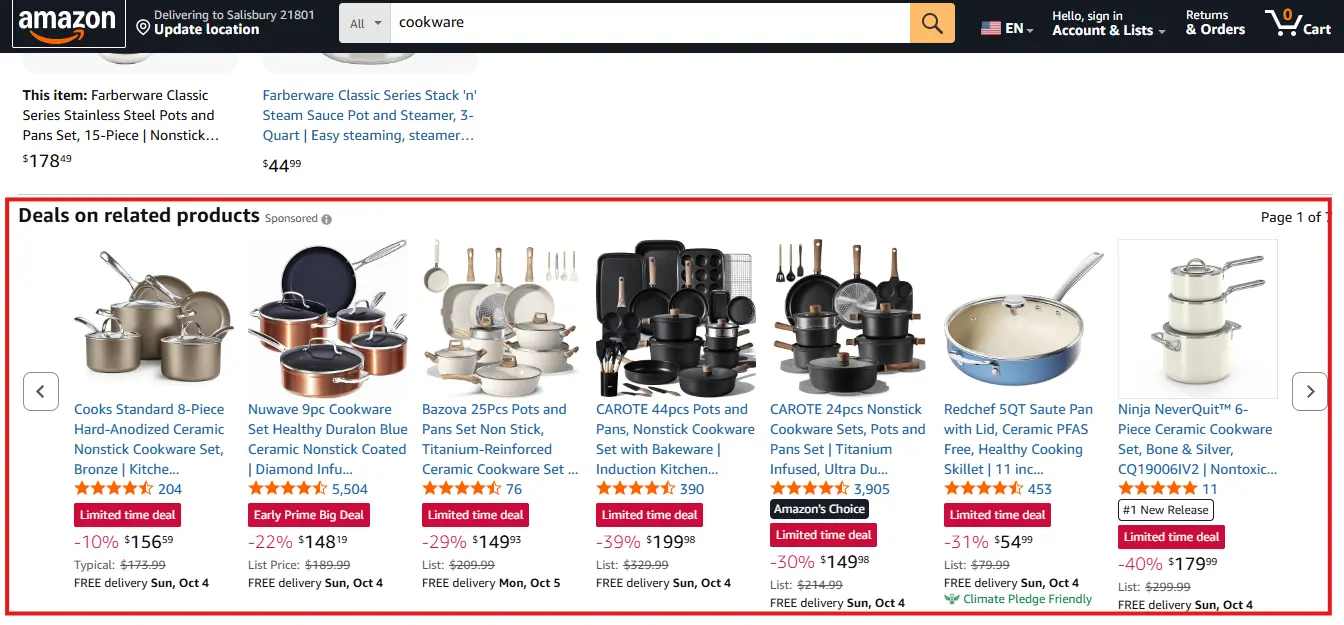
This is the most strategic spot. Your ad can run on the pages of similar or competing products, close to the buying information. The shopper is mid decision, so a strong alternative gets real attention.
Picture someone reading a rival's listing. Your ad for an equivalent or complementary product appears right there. You are in the comparison before they click away. Our guide to Amazon ads placements shows how to read results by location.
Shopping Results Pages

Display ads can also appear on search results when shoppers look up terms related to your category. These shoppers are scanning dozens of options. A well built creative pulls the eye and earns a click before they settle on a familiar name.
Customer Review Areas
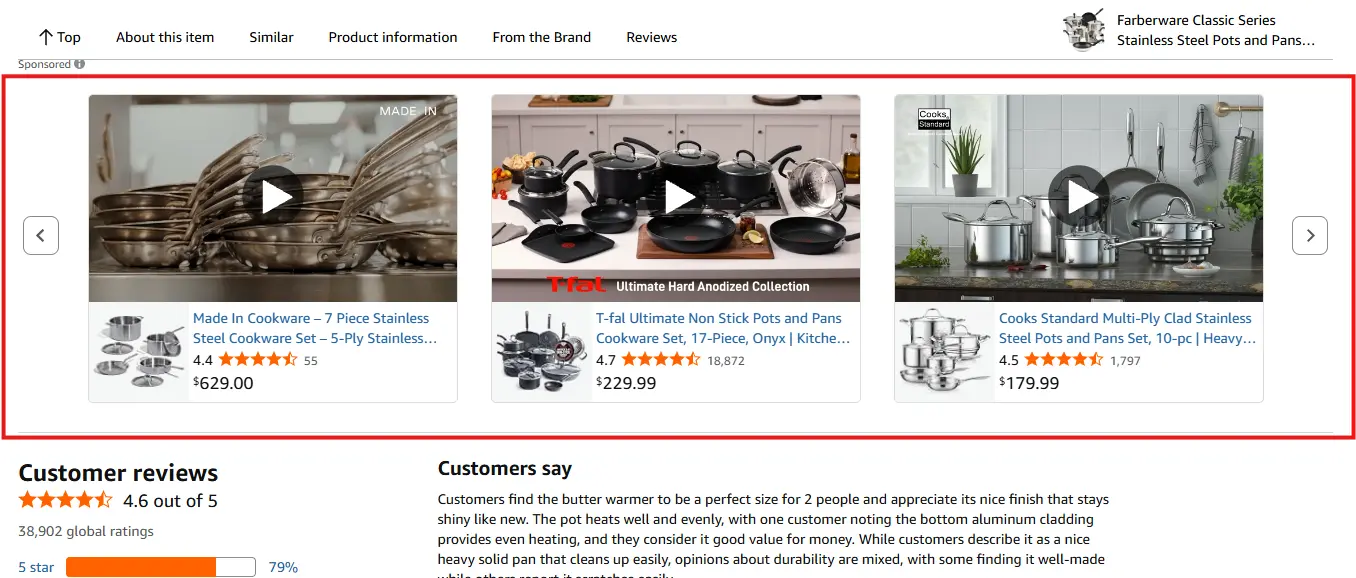
Review sections attract careful buyers. They are weighing pros and cons, so a clear benefit led headline works well here.
Homepage and App Sections
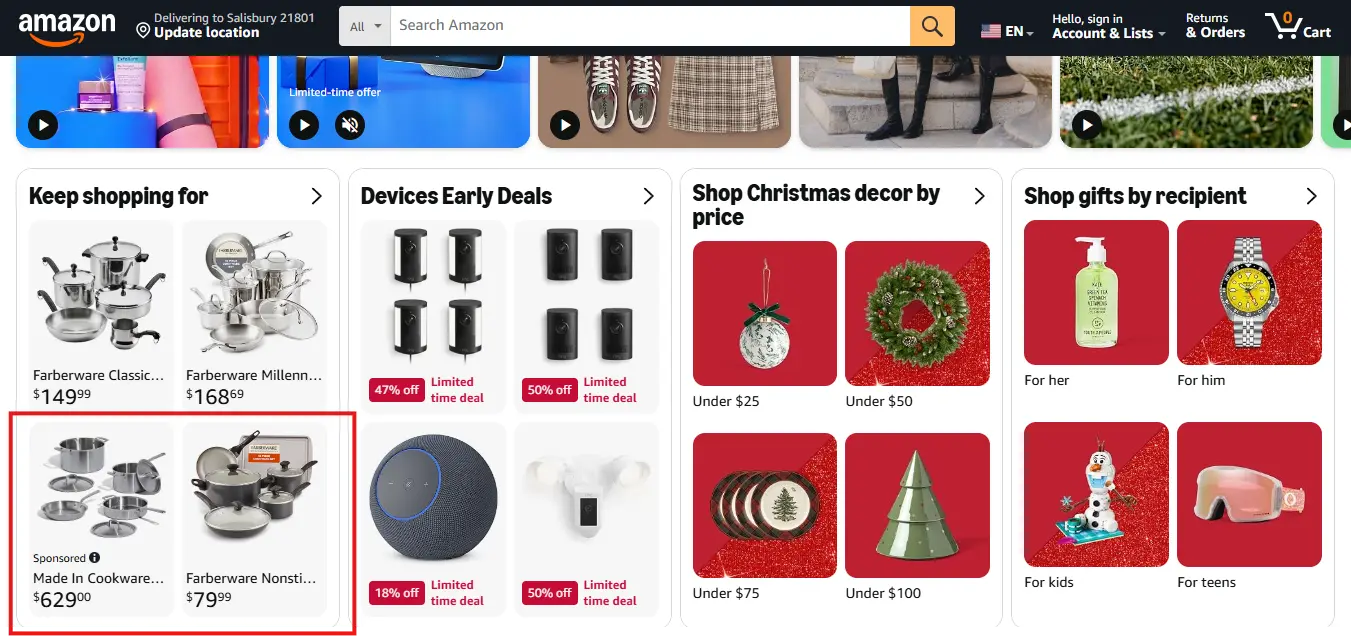
These placements support awareness and retargeting. They keep your brand visible between shopping sessions.
Off Amazon
Off Amazon delivery reaches shoppers after they leave. Where inventory is available, it can extend to Twitch, Prime Video, Fire TV, and Echo Show, plus third party sites and selected apps.
It is the best home for remarketing views. Expect softer conversion rates than detail pages, and judge it as a re engagement channel, not a last click winner. Availability always depends on your targeting type and Amazon's inventory.
Amazon Sponsored Display Ad Specs
Here is your quick reference. Banner sizes and video specs come from Amazon's official moderation guide.
Asset | Spec |
Brand logo | Square, commonly 400×400; PNG or JPEG; under 1 MB; white or transparent background |
Custom image | Minimum 600×600 px (1200×628 commonly used); PNG or JPEG; RGB, 72 ppi; up to 5 MB |
Headline | Roughly 50 characters; sentence case |
Mobile banners | 300×250, 414×125, 320×50 |
Desktop banners | 320×50, 300×250, 160×600, 300×600, 650×130, 728×90, 970×250, 980×55 |
Video | 16:9; 6 to 45 seconds; max 500 MB; 1920×1080 or higher; 4 Mbps minimum |
Logo and image dimensions vary by marketplace. Confirm them in the console before uploading.
One Upload, Thousands of Sizes
You do not need to design every banner size above by hand. Upload a single rectangular custom image, and Amazon's system can serve it in up to 12,000 different size variations across the placements where your campaign runs, cropping and resizing automatically to fit whatever slot is available. This custom image resizing feature is currently available in Canada, Germany, Spain, France, Italy, India, Japan, the UAE, the UK, and the US, so confirm availability if you are running campaigns outside those markets before relying on it.
Automated vs Custom Creative
Automated creative pulls from your detail page: main image, title, star rating, price, Prime badge, and eligible deal badges. It is fast, and it is only as good as your listing.
Custom creative adds your logo, a benefit led headline, and a lifestyle image or video. You get brand control. You also take on moderation.
Logo and Image Specs
Your logo must be your registered brand logo on a white or transparent background. No product shots. No added text. No clutter.
Custom images show the product in real life. Skip product cutouts on solid backgrounds, embedded text, and letterbox formats. Blurry or stretched files get rejected.
Banner Sizes
Amazon adjusts display ads across placements, so no single banner fits everything. Design for cropping. Keep the product centered and small text away from the edges.
Video Specs
Amazon says 15 to 30 seconds lands best. Show the product in the first two seconds and the key benefit within five. Videos autoplay muted, so add captions or a clear demo. End on your logo. Shoppers remember the last thing they see.
What Gets Videos Rejected
Black or blank frames at the start or end
Illegible or low contrast text
Letterbox or pillar box bars
Customer reviews or star ratings
Discounts, deals, or Amazon branding
Targeting Options That Decide Where Ads Show
Targeting | Best for |
ASIN targeting | Competitor conquesting |
Category targeting | Broader reach |
Views remarketing | Recovering non buyers |
Purchases remarketing | Repeat buys and cross sell |
Amazon audiences | Discovery and awareness |
Refine category targeting by brand, price, and Prime eligibility to cut low relevance traffic. For setup logic, see our ASIN targeting guide.
Amazon Sponsored Display Ads Cost: CPC vs vCPM
Sponsored Display has no minimum spend, so you can set any budget that works for you. What changes your cost is the pricing model. Per Amazon's display ads guide, you can pay per click, CPC, or per thousand viewable impressions, vCPM. The model follows the bid optimization you choose.
Model | You pay for | Bid optimization | Starting bid | Best for |
CPC | Each click on your ad | Page visits or conversions | $1 default | Traffic and sales |
vCPM | Every 1,000 viewable impressions | Viewable impressions | $5 default | Awareness and reach |
Treat the default bids as starting points, not targets. Amazon says your final CPC or vCPM depends on your adjusted bid plus other factors, so adjust from real performance data. Where Amazon shows suggested bids and bid ranges, use them as a first benchmark.
Two things to know before you choose vCPM:
You pay for exposure, not action. A viewable impression usually means at least half the ad is in view for at least one second. You are billed whether or not the shopper clicks.
Results are measured differently. vCPM campaigns count estimated view based conversions as well as click based ones. Their ROAS is not directly comparable with a CPC campaign.
Use CPC when you want tight control over profitability and direct sales. Use vCPM when the goal is reached, or when you want more predictable budgeting on higher priced placements. Start small, run each model for at least two weeks, and compare results before you shift budget. For wider cost context, see our guides to Amazon ad cost and bidding strategies on Amazon.
Sponsored Display vs Sponsored Products vs Sponsored Brands vs Amazon DSP
Each ad type does a different job, so the right question is which one fits your goal. Here is how the four compare.
Ad type | Targeting | Where it shows | Pricing | Best for |
Sponsored Products | Keywords and ASINs | Search results and product pages | CPC | Capturing shoppers ready to buy |
Sponsored Brands | Keywords and products | Top of search, Stores, video | CPC or vCPM | Brand visibility and category share |
Sponsored Display | Products, categories, audiences | Product pages, reviews, off Amazon | CPC or vCPM | Retargeting and conquesting |
Amazon DSP | Advanced audiences | Amazon, Twitch, Fire TV, open web | CPM | Full funnel reach at scale |
Sponsored Products catches intent. Shoppers search, and your ad answers. Sponsored Brands adds a logo, headline and several products, so it suits brand building. Sponsored Display reaches shoppers by behavior, including people who left without buying.
Amazon DSP goes furthest. It offers deeper audience targeting and wider inventory. The trade off is budget and complexity. DSP has no minimum for some self service routes, but managed service and agency routes often need five figure monthly budgets, so confirm current requirements. Read our Amazon DSP vs Sponsored Display comparison, or explore Atom11's Amazon DSP software, if you are weighing the move.
Most brands get the best results by layering the four. Start with Sponsored Products for demand, add Sponsored Brands for visibility, use Sponsored Display to win back or intercept shoppers, and graduate to DSP when your budget and goals justify it.
Sponsored Display Ad Examples
These are illustrative setups, not guaranteed results.
Example 1: Competitor ASIN Targeting
A protein powder brand targets rival ASINs and leads with cleaner ingredients. The ad appears on the competitor's page, where the shopper is mid comparison. You borrow attention at the exact moment it is up for grabs.
Example 2: Views Remarketing
A skincare brand retargets serum viewers with a lifestyle image and a coupon badge. Match the lookback window to how often people repurchase. A serum buyer returns in weeks, a blender buyer in years. Layer in Amazon Marketing Cloud audiences for sharper segments.
Example 3: Cross Sell and Own Page Defense
A coffee machine brand promotes filters and pods to buyers. It also targets its own ASINs, so competitors cannot take the slot near its buy box.
Headlines That Pass Moderation
Rejected | Approved |
Save 50% today!!! | Great savings on cookware |
Better than Brand X | Cookware built to last |
BUY NOW BEFORE IT'S GONE | Shop cookware |
Amazon's sponsored ads policies ban urgency language, competitor names, and specific discount amounts.
Creative Rules That Trip Up Advertisers
No custom CTA. Display ads add one automatically.
Static only. Animation is allowed in video, not banners.
Sentence case. Title case and all caps get rejected.
No "you" or "your." Amazon flags personal language.
Pause out of stock items. Ads cannot promote unavailable products.
Submit early. Give moderation at least a week before launch.
Common Mistakes to Avoid
Launching before the listing is retail ready or stock is stable
Stuffing unrelated ASINs into one campaign
Treating Sponsored Display like Sponsored Products
Mixing retargeting and competitor targeting in one campaign
Judging results before attribution catches up
Scaling budget without checking conversion quality
Most of these come down to structure. Fix the structure and the numbers follow. A campaign with one clear job is easy to read, easy to scale, and easy to cut when it underperforms.
How to Get More From Display Campaigns
Give every campaign one job. Never mix prospecting, retargeting, and competitor targeting.
Pick bid optimization by goal: viewable impressions for awareness, page visits for consideration, conversions for sales. Skip end dates when possible, since attribution can take 7 to 14 days. Wait two weeks before major changes, and test one creative variable at a time.
Automate the Boring Parts With Atom11
Perfect specs and smart placements still lose money if the ad points at a product you cannot ship. Display ads are only as good as the business signals behind them. That is the gap Atom11 fills.
Atom11 is a retail aware Amazon PPC platform built by ex Amazonians. It links your ad data with inventory, pricing, buy box, and organic rank, so your spend reacts to what is really happening in your account. Legacy tools optimize bids in a vacuum. Atom11 does not.
Where Manual Display Management Breaks
Display headache | How Atom11 handles it |
Ads run on out of stock ASINs | Inventory rules pause ads when stock runs low and restart them after replenishment |
Retargeting bids stay flat all day | Dayparting schedules bids and budgets by hour and day of week |
Sales drop and you cannot tell why | Neo compares time periods across 15 plus ad and retail signals |
You cannot tell if automation helped | Performance Monitor shows before and after results, with rollback |
Prime Day changes wreck your bids | Version control saves bids and budgets, then restores them |
Protect Spend With Inventory Aware Ads
Amazon will not let you promote unavailable items, and shoppers hate clicking through to "out of stock." Atom11 pauses advertised ASINs when inventory dips and switches them back on when stock returns. One US reseller used this to avoid stockouts by pausing ads.
Schedule Retargeting With Dayparting

Shoppers do not behave the same at 2 a.m. and 8 p.m. Dayparting lets you raise bids when your audience is active and trim them when it is not. You can schedule both bids and budgets, and control how Atom11 handles conflicts if you edit mid schedule. Our dayparting guide walks through the framework.
Diagnose Drops Fast With Neo and the Root Cause Analyzer
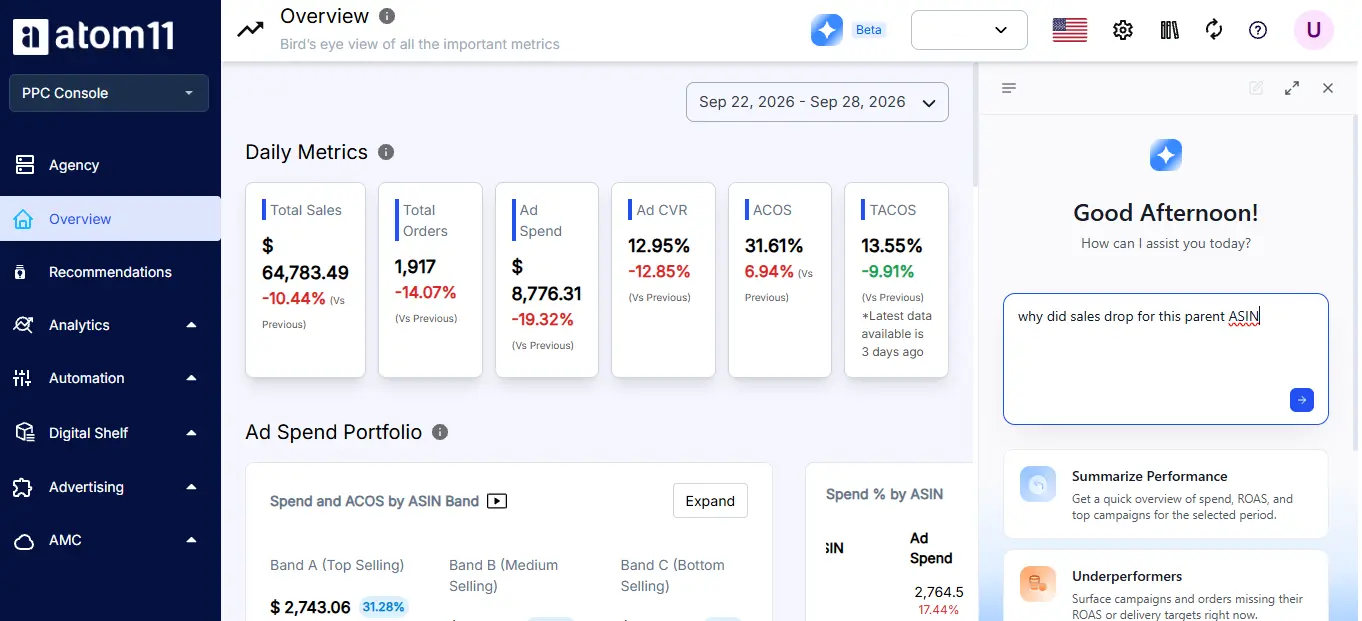
When sales dip, you do not need twelve reports. The Root Cause Analyzer compares two periods and highlights which metrics moved and which did not. Neo, Atom11's AI analyst, answers plain English questions like "why did sales drop for this parent ASIN" in seconds. Neo won a 2025 AI Innovation Award at the Amazon Ads Partner Awards. One brand reported cutting analytics time by 93 percent with Ask Neo and MCP.
Scale Audiences and Changes in Bulk
Managing audiences campaign by campaign is slow. Atom11 lets you create audiences across many campaigns in one go, remove them, or adjust audience bid adjustments in bulk. Its Amazon Marketing Cloud tools add drag and drop reports and audience building on top.
Results and Proof
Atom11 reports 20 to 35 percent better PPC performance for its users. It has won three Amazon Ads Partner Awards, holds a 4.8 out of 5 rating on G2, and serves more than 1,000 brands and agencies. Treat the performance range as company reported, and test it on your own account.
Ready to see it in your catalog? Explore Atom11 Sponsored Ads or book a demo.
Conclusion
Sponsored Display rewards preparation. Get the logo, image, banner, and video specs right, and you clear moderation on the first try. Choose placements on purpose: detail pages to conquer and defend, off Amazon to re-engage.
Then let automation handle inventory, timing, and bids while you focus on creativity. Ready to stop guessing and start testing? Build one campaign per goal, launch it clean, and give it two weeks to prove itself.
FAQs
What is the image size for Sponsored Display custom creative?
Commonly 1200×628 in PNG or JPEG, with a square logo. Confirm in your console, since sizes vary by marketplace. A single upload can serve across up to 12,000 different size variations automatically, so you do not need to design every size yourself.
Can Sponsored Display ads use video?
Yes. Video is 16:9, 6 to 45 seconds, up to 500 MB, at 1920×1080 or higher.
Where do Sponsored Display ads appear?
On product detail pages, shopping results, review areas, and third party sites and apps, plus Amazon owned video inventory like Twitch, Fire TV, and Prime Video where available.
Are animated banners allowed?
No. Display ads must be static unless you use the video format.
Do I need a Brand Registry?
Brand Registry sellers, vendors, and eligible advertisers can run them. Check eligibility in your console.
