Blog
/
Amazon Sponsored Products Software: Features, Fit, and How to Choose
Amazon Sponsored Products Software: Features, Fit, and How to Choose
Kajal Sharma
Key Takeaways
Amazon Sponsored Products software connects to the Amazon Ads API and automates bids, budgets, and search terms.
The features that matter most are hourly dayparting, search term management, bulk edits, and reporting that explains sales swings.
Retail aware automation reads inventory, Buy Box, and rank, so you stop paying for clicks you cannot fulfill. For how retail aware automation compares across every Amazon ad format, not just Sponsored Products, see our Amazon ads automation software guide.
Pick software you can audit, and check whether it prices by tiered ad spend or by a percentage of it.
Atom11 is built around those points, with a glass box Performance Monitor and the Neo AI analyst.
Amazon's own data shows that on average, advertisers who used Sponsored Products saw 34 percent more sales growth compared to those who did not, four weeks after adoption. That number is about running Sponsored Products at all, not about managing it well once a catalog grows past a handful of ASINs, and Amazon's own cost control data shows how fast that management challenge can move: during a high volume event, display campaigns using cost controls saw a 2.6X uplift in ad attributed sales compared to campaigns without them, a reminder that a bid or budget set correctly on Monday is not guaranteed to still be right by the weekend. That gap is the problem Amazon Sponsored Products software exists to close.
What Is Amazon Sponsored Products Software?
Amazon Sponsored Products software is a third party platform that connects to your Amazon Ads account through the Amazon Ads API to automate and optimize campaign management. Instead of manually adjusting every bid, budget, keyword, or search term, the software uses campaign performance data and predefined rules to make changes at scale.
Depending on the platform, it can automate bid and budget adjustments, search term management, dayparting, bulk campaign edits, and performance reporting. More advanced tools can also incorporate retail signals such as inventory, Buy Box status, pricing, and organic rank to make advertising decisions based on what is happening across your business, not just inside the ad account. If you are comparing this against automation for Sponsored Brands, Sponsored Display, or Amazon DSP as well, our broader guide to Amazon ads automation software covers how those categories differ.
What are Sponsored Products ads, and why do they carry most of the spend?
Sponsored Products are cost per click ads that promote individual product listings, and you either choose the keywords or let Amazon target them automatically. Agency benchmarks put them at 60 to 70 percent of total Amazon ad spend for most brands. Our guide to the types of Amazon ads shows where they sit next to Sponsored Brands and Sponsored Display.
How Does the Software Connect to Your Account?
It connects through the Amazon Ads API. Add Amazon Marketing Stream, which pushes hourly campaign metrics in near real time, and the software can react during the day instead of waiting for next day reports. Many tools also read Seller Central data, which is how they see inventory.
Why the Console Stops Being Enough for a Growing Sponsored Products Account
The Amazon console is free and shows what your campaigns did. It decides nothing for you. That gap between visibility and action is a general one across every Amazon ad format, covered in more depth in our Amazon ads automation software guide, but it shows up in a specific way for Sponsored Products, since bid and search term decisions there happen at far higher volume than in Sponsored Brands or Sponsored Display.
Task | Amazon console | Sponsored Products software |
Bid changes | Manual, plus Amazon's bidding strategy options | Rule based or predictive changes per target, on a schedule or hourly |
Hourly scheduling | Limited scheduling options | Bid and budget schedules by hour and day of week |
Search terms | Manual review of search term reports | Rules that promote converting terms and negate wasteful ones |
Bulk work | Bulk sheets and uploads | In app bulk create and edit, with a preview |
Retail signals | Ads and retail data sit in separate reports | Inventory, Buy Box, and rank feed the rules |
Audit trail | Change history | Before and after performance for each automation |
How a Retail Aware Bid Rule Handles an Approaching Stockout
Most explanations of retail aware automation stay abstract, so it helps to see the actual math behind one decision.
Say an ASIN is selling at a trailing velocity that projects it to run out of stock in three days, and it is currently spending $150 a day in Sponsored Products. A rule set to cut the bid by 50 percent whenever projected days of stock fall below five would trigger two days before the stockout, not after it. Without that rule, the campaign keeps bidding at full strength until Seller Central reflects the stockout, which is often a day or more after it actually happens on the shelf. That lag alone can mean roughly $150 to $300 in spend going toward clicks on a listing that cannot fulfill the order, money that a manual reviewer would only catch on the next scheduled check, by which point it is already spent.
This is also why inventory data has to sit inside the same system as the bid logic rather than in a separate report. A rule that only reads ACoS has no way to see the stockout coming, it can only react after ACoS has already spiked from wasted clicks, which is several steps slower than a rule that reads projected days of stock directly.
Core Features of Amazon Sponsored Products Software
The core features are bid and budget automation, search term management, dayparting, bulk actions, and reporting that explains performance changes.
Bid and budget automation
Every bid answers one question: how much can you pay for a click and still hit your target ACoS?
Max CPC = Conversion Rate × Average Order Value × Target ACoS
At a 10 percent conversion rate, a $40 order value, and a 25 percent target ACoS, that is 0.10 × $40 × 0.25 = $1.00.
Software reruns that math for every target as new data arrives, instead of once a week.
Search term harvesting and negation, with a worked example
Auto campaigns surface search terms you would never guess. Software promotes the ones that convert into manual campaigns and negates the ones that spend without orders.
Take a search term inside an automatic campaign showing 40 clicks, 4 orders, $220 in sales, and $60 in spend, against a 30 percent target ACoS. Conversion rate is 4 divided by 40, or 10 percent. ACoS is $60 divided by $220, or 27.3 percent, inside target. That combination, enough orders and an ACoS inside target, is what triggers a harvest rule: move the term into a manual exact match campaign at a bid close to what it is already earning, and add it as a negative exact inside the automatic campaign so the two campaigns stop bidding against each other for the same shopper. Here is how to handle search term negation safely.
Dayparting on hourly data
Dayparting raises bids and budgets in the hours that convert and lowers them in the hours that do not. It is only as good as its data, so ask whether the tool runs on hourly Amazon Marketing Stream data. The dayparting guide walks through the setup.
Bulk campaign creation and editing
Bulk actions build hundreds of campaigns, ad groups, and targets in one pass and change bids, budgets, and states across a whole selection. Good ones preview the new value on every affected target.
Feature | Decision it automates | Data it needs |
Bid automation | Which targets get higher or lower bids | Clicks, orders, order value, target ACoS |
Harvesting and negation | Which search terms to promote or block | Search term reports |
Dayparting | Bid and budget levels by hour | Hourly Marketing Stream metrics |
Bulk actions | Campaign builds and edits at scale | Campaign structure |
Root cause analysis | Which metric explains a sales swing | Ads plus retail data |
Inventory rules | When to pause and resume ads | Stock levels |
Pricing Models for Sponsored Products Software, and What They Cost at Scale
Sponsored Products software is generally priced one of three ways: a flat monthly fee, a fee tiered to ad spend bands, or a percentage of the ad spend running through the platform. The difference between these looks small on a demo call and becomes a real cost line once spend grows.
Take a brand spending $50,000 a month on Sponsored Products. A tool charging 5 percent of managed ad spend costs $2,500 that month. If that same brand grows spend to $100,000 the next quarter, the fee grows to $5,000, even though the tool did not do twice the work to earn it, the brand simply spent more on ads. A flat fee or a tiered fee tied to spend bands does not move the same way, since it changes only when the account crosses into a new band, not every dollar the account spends.
This is worth checking before signing a contract, not after the first invoice at a higher spend level. Ask any vendor directly whether the fee scales with spend, and if so, at what rate, since that single number determines whether the software gets cheaper or more expensive relative to your ad budget as you grow.
Common Mistakes When Adopting Sponsored Products Software
Choosing on feature count alone. A long settings list is not the same as good decisions. What matters is whether the tool's rules can see the data, inventory, Buy Box, rank, that actually explains why a metric moved.
Ignoring the pricing model until spend grows. Covered above, and it is the single most common regret sellers report after outgrowing a percentage based plan.
Turning on every automation at once. A new tool with dayparting, bid rules, and harvesting all enabled on day one makes it hard to tell which change caused which result. Turn features on one at a time against a control group of campaigns where practical.
No audit trail. If a tool cannot show what changed and when, diagnosing a bad week means guessing, not checking.
Skipping a real account test. A demo on sample data looks clean by design. Test any tool against your own account's messier reality, slow sellers, seasonal spikes, before committing.
How Atom11 Approaches Amazon Sponsored Products Software
Atom11 is a retail aware Amazon PPC platform, built by ex Amazonians, for sellers, vendors, and agencies. Its Sponsored Ads software treats inventory, pricing, and Buy Box as inputs to every ad decision.
Retail aware automation, dayparting, and bulk edits

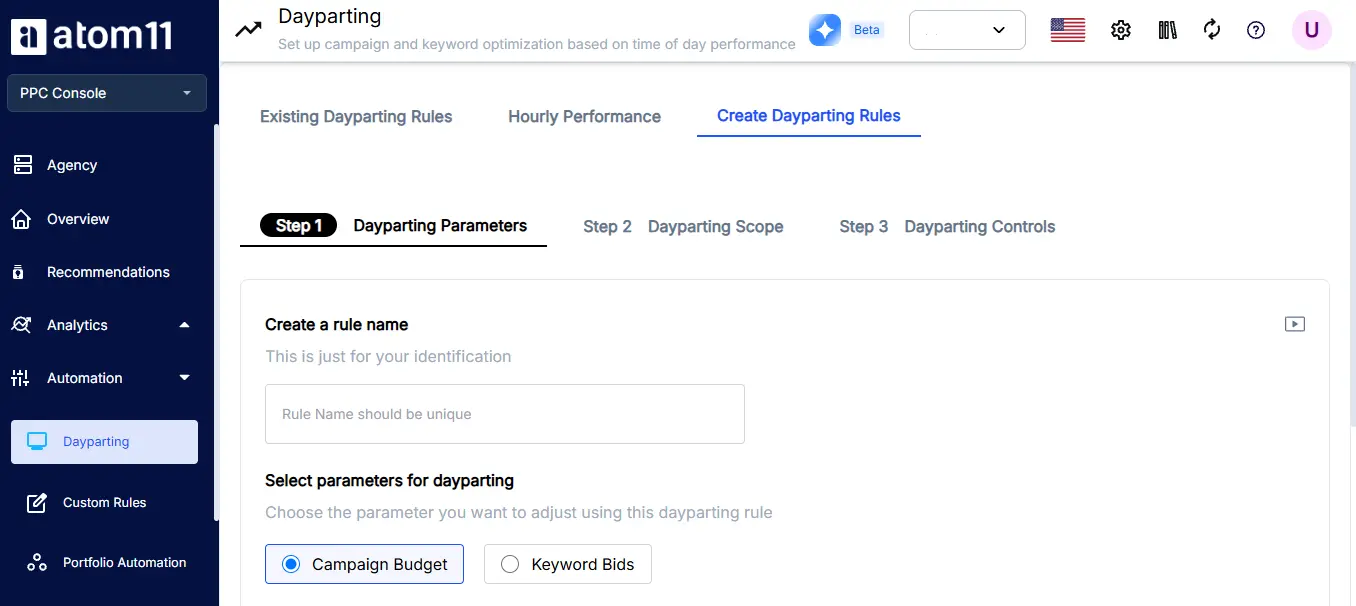
Atom11 pauses ads when stock is low and resumes them when stock returns. For vendors, it pauses ads when the Buy Box is lost and resumes them when it is won back. It can also raise or lower keyword bids according to search rank.
Hourly dayparting runs on Amazon Marketing Stream data, with different rules for different days. Version control lets you save bids and budgets before Prime Day and roll back afterward. Performance Monitor keeps a before and after record for every keyword.
Neo and the MCP connector for analysis
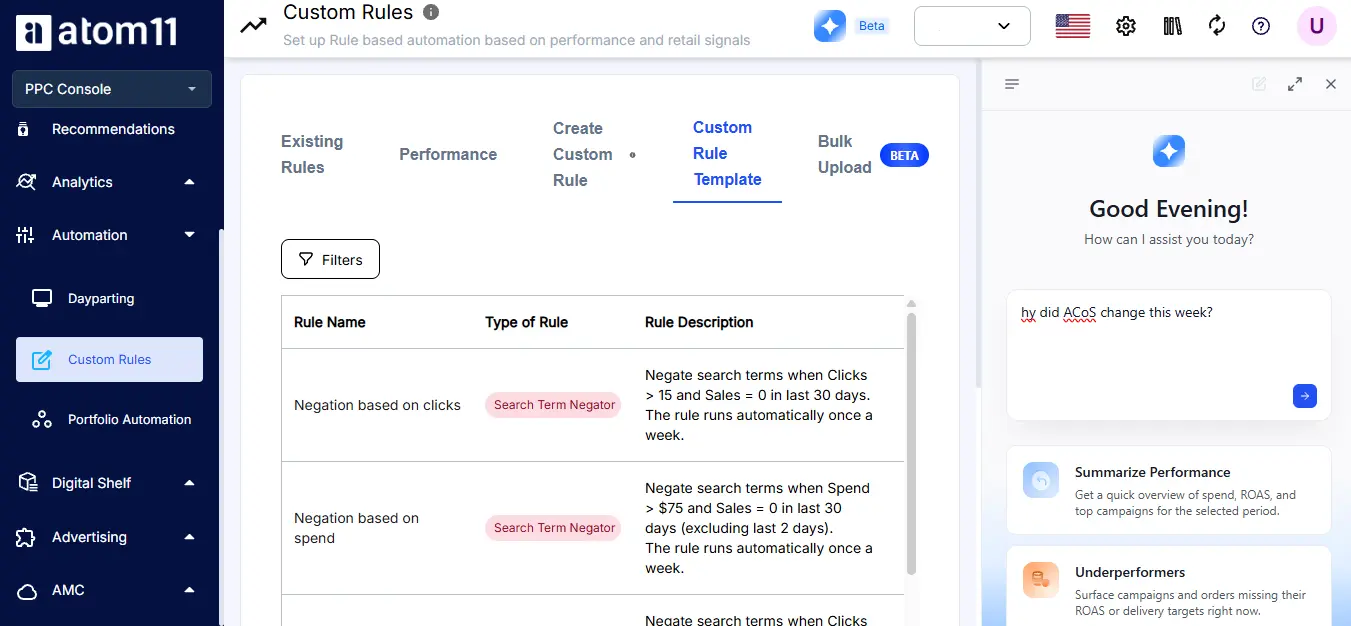
Neo, Atom11's AI analyst, answers questions like why ROAS dropped by comparing ad and retail signals. The MCP connector lets you ask the same questions from an AI assistant such as Claude.
What do the results look like?
Customer | What they did | Result |
Gala | Went aggressive in peak hours using Marketing Stream data, plus bid, budget, and placement automation | ACoS down 40 percent over six months |
Beco | Set price alerts on three competitors and lifted bids 30 percent in one click when one raised prices | ACoS from 19.4 percent to 12.2 percent; orders from about 8 to about 24 a day |
Luum | Layered dayparting, five custom rule sets, and A/B/C product segmentation across 15 plus accounts | ACoS down 10 percent |
These are individual results, not guarantees. Read the full Gala case study.
How Is Atom11 Priced?
Atom11 prices by tiered ad spend, not a percentage of it, so your bill does not climb in lockstep with your growth. See the pricing page for details.
How to Choose Sponsored Products Software for Your Account
Choose Amazon Sponsored Products software based on catalog size, inventory volatility, team size, and how much you need to see behind the automation, not on the longest feature list.
A small catalog with steady demand can do well on rules and careful manual oversight. A large catalog with swinging stock needs retail signals, because ad data alone lags behind what is happening in the business.
Agencies need multi account views and strong bulk tools. Our guide to an Amazon PPC platform for agencies covers that case. Then check the pricing model, since a percentage of spend penalizes growth. If you are weighing this decision across your whole Amazon ads stack rather than Sponsored Products alone, our Amazon ads automation software guide walks through that broader evaluation. Finally, test any tool on your own account.
Conclusion
Amazon Sponsored Products software is most valuable when it helps teams manage campaigns faster, respond to performance changes sooner, and understand why specific optimizations were made. The right platform should go beyond basic bid automation by combining hourly performance data, retail signals, bulk controls, and a clear audit trail.
Automation, however, is not a substitute for sound campaign strategy. Strong campaign structure, targeting, budgets, and goals still provide the foundation; software helps teams execute and optimize that strategy at scale.
Atom11 combines retail aware Amazon PPC automation with hourly dayparting, bulk campaign management, Performance Monitor, Neo AI analysis, and an MCP connector. If you want to see how these capabilities can work with your account, you can book a demo.
FAQs
What is Amazon Sponsored Products software?
Amazon Sponsored Products software is a third party platform that connects through the Amazon Ads API to automate bids, budgets, search terms, and reporting for Sponsored Products campaigns, so teams spend less time on manual changes.
Is Amazon Sponsored Products software worth it for a small catalog?
Often not on its own. A skilled manager with basic rules can handle a small, stable catalog. The value grows with SKU count, inventory swings, and the number of accounts you manage.
How is Amazon Sponsored Products software different from Amazon's own tools?
Amazon's console shows performance and offers built in options. Third party software adds cross account management, bulk tooling, hourly rules, and, in some cases, retail data such as inventory and Buy Box status.
Does it work for both sellers and vendors?
Most platforms connect to Seller Central and Vendor Central, though features differ by account type. Atom11 serves sellers, vendors, and agencies, and its Buy Box rule is designed for vendors.
What is dayparting in Sponsored Products?
Dayparting adjusts bids and budgets by hour and day of week, raising them when shoppers convert and lowering them when they do not. Accurate hourly data makes the schedule far more reliable.
