Blog
/
Amazon Ads Automation Software: A 2026 Buyer's Guide
Amazon Ads Automation Software: A 2026 Buyer's Guide
Neha Bhuchar
Key Takeaways
Amazon ads automation software takes over repetitive work (bids, harvesting, negatives, budget pacing) so your team can focus on strategy.
Amazon's native tools are a good base, but manual work multiplies quickly as your catalogue grows.
Rule-based, AI-driven, and retail-aware tools behave very differently. Ask how a tool makes decisions before you buy.
Automate execution, and keep targets, launches and big budget shifts with a human.
Watch profit metrics like TACoS and margin, not ACoS alone.
Atom11 links ads to inventory, pricing, buy box and organic rank. Its Performance Monitor and Version Control show and reverse what automation changed.
Amazon's advertising business generated $68.63 billion in 2025, up 22% year over year. That growth means more advertisers competing for the same shopper clicks. It also means more campaigns, keywords and budgets for your team to manage.
Ten products across Sponsored Products, Sponsored Brands and Sponsored Display can quickly become dozens of campaigns and hundreds of keywords. No team can adjust all of that by hand every week. Amazon ads automation software solves this by doing the repetitive work automatically. Used badly, it can also spend your money faster than you can notice.
This guide covers what the software does, which features matter, what to keep human, and how Atom11 approaches the problem.
What Is Amazon Ads Automation Software?
Amazon ads automation can mean two different things: automation built into Amazon's own advertising platform and third-party software that connects to Amazon Ads. Both can automate parts of campaign management, but they differ in how much control, data, and functionality they provide.
Amazon's Native Ads Automation
Amazon provides automation features within the Advertising Console itself. These tools can automate specific campaign tasks, such as bid adjustments, budget management, targeting, and rule-based actions, without requiring a separate software platform.
For advertisers with straightforward campaigns, native automation can handle routine optimisation directly inside Amazon's ecosystem. However, its automation is generally focused on managing Amazon advertising rather than connecting ad decisions with the broader retail context.
Third-Party Amazon Ads Automation Software
Third-party platforms such as Atom11 connect to Amazon's advertising API and add another layer of automation and analysis. Instead of manually opening the console, exporting reports, and changing bids one by one, these platforms can monitor performance continuously and make changes based on rules, targets, or performance goals.
You define the target or strategy. The software monitors the relevant signals and acts when conditions are met. Depending on the platform, this can extend beyond individual bid changes to areas such as portfolio-level budget allocation, campaign management, retail data analysis, and automated optimisation.
The key difference is that Amazon's native tools automate specific advertising tasks within Amazon, while third-party platforms are designed to provide a broader automation layer on top of Amazon Ads. Better third-party platforms also show you what changed, why it changed, and whether the change improved performance.
What Can You Automate Through Amazon Ads Automation Software?
Most PPC work follows repeatable patterns, so most of it can be automated. The table shows the common tasks and the guardrail each one needs.
Task | What automation does | Guardrail to set |
|---|---|---|
Bid changes | Raises or lowers bids against a target ACoS or ROAS | Cap the daily change per keyword |
Keyword harvesting | Moves converting search terms from auto to manual campaigns | Set minimum orders before harvesting |
Negative keywords | Blocks terms that spend without converting | Require a click threshold first |
Budget pacing | Lifts budgets when a campaign runs out early, cuts weak ones | Set a maximum budget ceiling |
Dayparting | Changes bids or budgets by hour or weekday | Review after two full weeks of data |
Placement bids | Adjusts top-of-search, rest-of-search and product-page modifiers | Change one placement at a time |
Inventory protection | Pauses ads when stock runs low | Set the restart trigger clearly |
Reporting and alerts | Flags spend spikes and budget outages | Route alerts to one owner |
Native tools react to what already happened. They don't use inventory, pricing or organic rank, and they don't offer hourly logic.
Key Use Cases Where Amazon Ads Automation Is Required
Some situations aren't "nice to automate"; they break down without it.
Event-driven bid surges (Prime Day, BFCM). Sellers push bids and budgets up sharply across dozens or hundreds of campaigns at once to capture the demand spike, then need to reset everything the moment the event ends. Doing this manually means someone has to remember (or have logged) every original bid and budget, across every campaign, and re-enter it by hand. It's not a bid-adjustment problem, it's a bulk operations + version control problem. You need to change hundreds of line items in one pass, and you need a saved snapshot to roll back to in one action rather than reconstructing it from memory or spreadsheets.
New listing launches. Aggressive early bids are needed to build review velocity and organic rank, then need to taper down on a schedule as ranking improves, a multi-week bid curve that's impractical to babysit manually.
Inventory-linked pausing. Ads need to pause the moment stock drops below a threshold and resume when replenished, timing that depends on retail data native ad tools don't see at all.
Dayparting across a large catalog. Adjusting bids by hour and weekday across hundreds of ASINs isn't a task a person can execute in real time; only a rule engine can.
Multi-account agency operations. Applying the same targeting or budget logic across dozens of client accounts at once is a scale problem, not a strategy problem.
Built for the Prime Day problem specifically. Atom11's version control lets you save a snapshot of bids and budgets right before a major push, make the surge changes in bulk across every affected campaign, and roll the entire account back to that saved version in one action once the event ends.
Rule-Based, AI-Driven and Retail-Aware Automation: What's the Difference?
Marketing pages often label everything "AI." The label matters less than how the tool makes decisions.
Type | How it decides | Strength | Weakness |
|---|---|---|---|
Native Amazon tools | Simple, built-in settings | Free and easy to start | Little control; ignores retail data |
Rule-based | Your if-then rules ("if ACoS > 30%, cut bid 10%") | Predictable and transparent | Can't adapt to context you didn't write in |
AI-driven | Learns from account data | Handles scale and complexity | Often a black box; may ignore margin |
Retail-aware | Combines ad data with inventory, pricing, buy box and rank | Ads follow business reality | Needs clean, connected data |
Features That Matter When Choosing Amazon Ads Automation Software
Choosing Amazon ads automation software requires more than checking whether it can adjust bids or pause campaigns. The right features should give you control over automated changes, prevent wasted ad spend, and make performance easier to measure. Here are five capabilities to look for.
1. Bid automation you can control
Look for rules and AI that let you set limits, such as a minimum and maximum bid, and that explain each change. If a tool can't show why it moved a bid, treat that as a red flag.
2. Dayparting for bids and budgets
Shoppers behave differently at 2 a.m. and 8 p.m. Dayparting lets you raise or lower bids and budgets at set hours or days. Check how the tool handles conflicts when you edit a bid manually while a schedule is active.
3. Inventory-aware advertising
Ads that send shoppers to a product that is nearly out of stock waste money. They can also hurt rankings when the listing sells out. The tool should pause ads on low stock and restart them after replenishment.
4. Transparent performance tracking
You should be able to see whether an automation helped or hurt. Look for before-and-after views of the campaigns it touched.
5. Version control and rollback
Before Prime Day or Black Friday, you might raise many bids and budgets. Afterward, you need a fast way back. Saving a snapshot of your bids and budgets makes that a single step.
6. Amazon Marketing Cloud (AMC) and bulk tools
AMC gives access to deeper reporting and audience building. Bulk actions save time when you create campaigns, add keywords or change audiences at scale. Real-time data sources such as Amazon Marketing Stream enable faster, intraday changes.
The ACoS and TACoS Metrics Your Automation Should Track
ACoS (Advertising Cost of Sales) measures how much you spend on advertising for every dollar of attributed ad sales. However, a low ACoS does not automatically mean a campaign is profitable. Product margins, fulfillment fees, discounts, and other selling costs also affect profitability. Before setting automation rules, understand the relationship between CPC, conversion rate, and average order value. These metrics help explain why ACoS changes and whether bid adjustments are likely to improve advertising efficiency without sacrificing valuable sales.
ACoS = ad spend ÷ ad sales = CPC ÷ (conversion rate × average order value)
Worked example: your CPC is $1.20, conversion rate is 10%, and average order value is $30.
ACoS = 1.20 ÷ (0.10 × 30) = 1.20 ÷ 3.00 = 40%
If conversion rises to 12% (better images, a coupon, more reviews), ACoS drops to 1.20 ÷ 3.60 = 33.3%, with no bid change.
This shows that a bid rule is only one lever. Conversion and order value matter just as much.
Two more basics help here. Ad auctions favor advertisers with a strong combination of bid and expected click-through rate.
And TACoS shows whether ads are building the whole business. Many advertisers treat 10% or lower as an excellent result, though the right level depends on your margins and growth stage. Set targets based on your profit margin, not on a generic benchmark.
TACoS = (ad spend ÷ total sales)
What to Keep Human
Automation should carry out your plan, not create it. Keep these decisions with a person:
Targets: the ACoS or TACoS each product should run to, based on margin.
New product launches: early data is thin, and stakes are high.
Big budget shifts: moving money across the portfolio.
Incrementality: judging whether ads create new sales or just capture organic ones.
Listing quality: price, main image and reviews, which no bid rule can fix.
How Atom11 Approaches Amazon Ads Automation
Atom11 is a full-funnel Amazon PPC platform for sellers, vendors and agencies, built by ex-Amazonians. Its core idea is being retail-aware: it connects advertising data with inventory, pricing, organic rank and buy box, so automation reacts to what is happening in the business, not just in the ad account.
One dashboard for control
The Agency view lists every connected account in one place, useful for agencies and brands with multiple sub-brands. The Overview page shows your spend portfolio: spend by ad type, campaign type, placement, search-term type (branded, competitor, generic) and target type (match types, product and auto targeting). You can expand any of these to see how each segment performs.
Version Control → the Prime Day problem. Save a snapshot of bids and budgets before a major push, make bulk changes across every affected campaign, then restore the whole account in one action once the event ends, instead of resetting hundreds of line items from memory.
Inventory Optimizer → the stock-out problem. Pauses advertised ASINs automatically when stock runs low, using retail data native Amazon automation can't see, and resumes on a defined trigger.
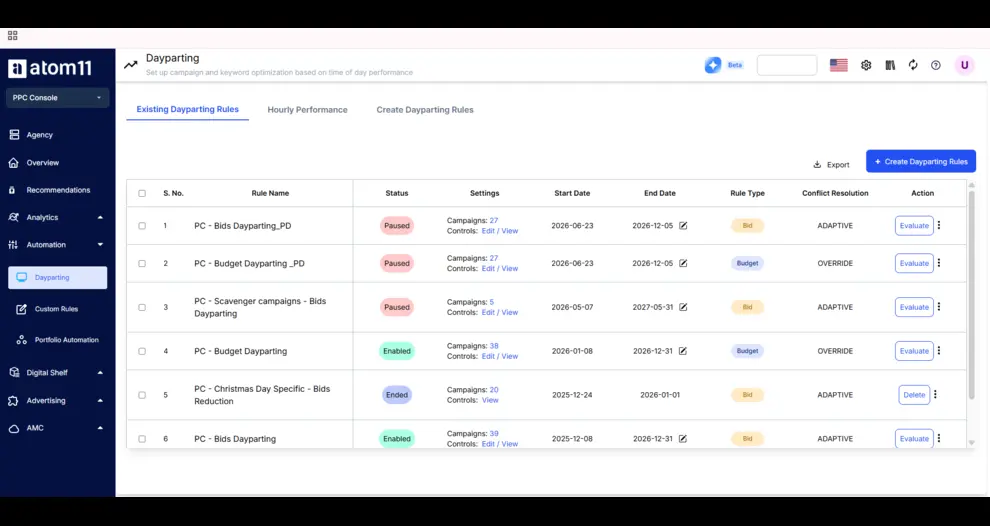
Dayparting → the hourly-logic problem. Adjusts bids and budgets by hour and weekday, with explicit conflict-handling rules for when a manual edit overlaps an active schedule.
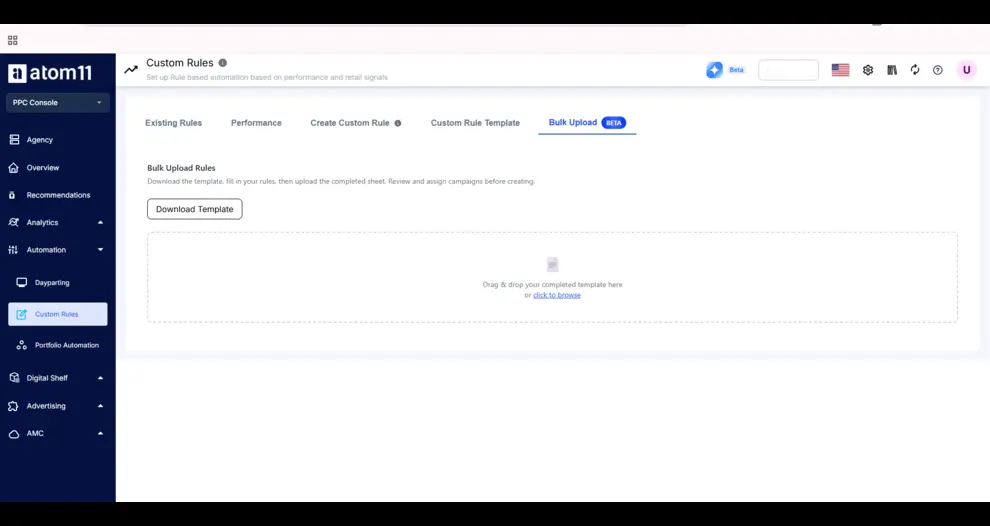
Search-Term Harvesting + Bulk Actions → the scale problem. Moves converting terms from auto to manual campaigns and applies campaign creation, keyword additions, and negations in bulk operations, built for agencies running the same logic across many accounts at once, or brands with a large catalog.
Root Cause Analyzer + Neo → the "reporting after the fact" problem. Compare Mode isolates which metrics actually moved (e.g., orders fell because ad spend, ROAS, and page views dropped, not average order value), and Neo explains a sales swing across 15+ ad and retail signals in under 60 seconds, reachable via chat through Atom11's Claude connection.
Atom11 reports a 4.8/5 rating on G2 (17 verified reviews), and its pitch materials cite case studies such as Kreo (566% sales growth) and Gala (93% less analytics time).
How Atom11 Works: A Plain Q&A
Atom11 brings Amazon advertising data, automation controls, and performance analysis together in one platform. Here’s how it works, from connecting your accounts to monitoring results and managing changes.
"What do I do first?"
Connect your Amazon Ads and Seller Central or Vendor Central accounts. Atom11 pulls in advertising, pricing, inventory and retail data so everything sits in one place.
"Will it change my bids on day one?"
Only what you approve. You choose the rules, set the limits and decide which campaigns they apply to. Many teams start with one automation, such as harvesting or negatives, then add more.
"How do I know an automation worked?"
Open the performance view for that automation. It compares campaign results before and after the change, so you don't have to build the spreadsheet yourself.
"What if a rule goes wrong?"
Use Version Control to roll bids and budgets back to a saved snapshot.
"Why did my sales drop?"
Use Compare Mode and the Root Cause Analyzer, or ask Neo. You'll see which metrics moved and which didn't matter.
"Is it only for big brands?"
No. It suits individual sellers, fast-growing brands, agencies and large-catalog brands. Plans are priced by monthly ad spend, so the Contact Us page is the best way to get the right fit.
How to Roll Out Automation Safely
Set the goal per campaign. Decide whether it is for ranking or profit, and set the target from your margin.
Start with native tools. Turn on the right dynamic bidding mode and let auto campaigns feed discovery.
Add one automation at a time. Begin with low-risk work like harvesting and negatives.
Cap every rule. Limit how far any bid or budget can move in a day.
Review weekly. Check the outcome of each automation, then expand only what works.
Conclusion
Amazon ads automation software is a workload tool, not a strategy. Used well, it removes repetitive bidding, harvesting and budget pacing so your team can spend its time on decisions that move profit. The best choice is transparent, lets you set limits, and understands your retail data, including inventory, pricing and rank. Start with Amazon's native controls, add automation in small steps, and keep people in charge of targets, launches and budgets. If you want to see how a retail-aware platform handles your account, Atom11's team can walk you through it.
See retail-aware automation working on your own account. Book a free demo with Atom11 and get a walkthrough of dayparting, the Root Cause Analyzer, and Neo, built around your catalog and ad spend.
FAQs
What is Amazon ads automation software?
It is a platform that connects to Amazon's advertising API and manages bids, budgets, keywords and reporting for you, based on rules or goals.
Is Amazon PPC automation worth it?
Usually yes once your catalog or budget outgrows manual work. Small accounts can often run well on native tools plus a few rules.
Can Amazon PPC be fully automated?
No. Execution can be automated, but strategy, targets and launches still need a person
What is the difference between rule-based and AI automation?
Rule-based tools follow your if-then instructions. AI tools learn from account data and adjust on their own. Both need guardrails.
Which metrics should I monitor?
Lead with TACoS, profit margin and ACoS against target, then conversion rate and spend pacing.
