Blog
/
Amazon Sponsored Brands Ad Specs: Formats & Examples for 2026
Amazon Sponsored Brands Ad Specs: Formats & Examples for 2026
Neha Bhuchar

Key Takeaways
Sponsored Brands needs Brand Registry and comes in three formats: Product Collection, Store Spotlight and Video.
Video specs are fixed: 6–45 seconds (20 or less recommended), 16:9, MP4 or MOV, up to 500MB.
Since January 2026, Amazon is moving product collections to 3–10 ASINs, with no custom headline or image required.
Legacy creative specs still matter for Store Spotlight and for older campaigns: 400×400 logo, 1200×628 custom image, 50-character headline.
Most rejections come from competitor names, claims, text-heavy images and black bars on video, not from file size.
Atom11 puts Sponsored Brands spend, retail signals, automation and rollback in one dashboard, so you can see whether a format works instead of guessing.
Amazon Sponsored Brands ads combine your brand logo, headline, products, images, or video to promote your brand across Amazon. In 2026, the available formats include Product Collection, Store Spotlight, and Video, each with different creative requirements.
This guide covers the latest Sponsored Brands ad specs, including logo, headline, image, and video requirements, format-specific dimensions, product and ASIN limits, and practical examples to help you create and launch compliant ads.
What Are Amazon Sponsored Brands Ads?
Sponsored Brands (formerly Headline Search Ads) are keyword- and product-targeted ads that promote your brand rather than a single listing. They can include a logo, a headline, a custom image, a product set or a video. Shoppers land on a Brand Store, a product detail page or a custom landing page.
Sponsored Brands Formats at a Glance
Format | What shoppers see | Lands on | Best for |
Product Collection | Multiple products, plus logo and headline in the legacy version | Product page, Store or landing page | Bestsellers, product lines |
Store Spotlight | Brand Store with up to three subpages | Store subpages | Large, varied catalogs |
Video | Silent autoplay video with a product card | Product page or Brand Store | Products that need demonstration |
Product Collection Ads: Specs and How to Run Them
Product Collection ads show three to ten related products under your brand name and logo in Amazon search results. Shoppers who click a product go to its detail page. Shoppers who click the brand name, logo or headline go to a Brand Store page or a custom landing page, which makes this the format to use when you want to sell a range rather than a single listing.
Legacy: logo, custom headline and up to three products. A custom lifestyle image appeared on mobile. Landing pages could hold up to 100 ASINs, though only three showed in the ad.
2026 format: 3–10 ASINs per ad, no custom image or headline required, and a choice between Amazon's AI picking the most relevant products or manual selection. Existing campaigns with one or two ASINs keep running and can be optimized, but you cannot add new ad groups.

Specs and eligibility
Eligibility: enrolled in Amazon Brand Registry, with at least three related products. Size or color variations count toward the three.
Brand logo: at least 400×400 px, on a clean white or transparent background.
Headline (legacy and manual setups): up to 50 characters in the US, with no competitor names or unsupported claims.
Custom image (legacy): 1200×628 px or larger, PNG or JPG, 5MB or smaller, and clean and product-focused with no text, graphics or logos.
Automatic vs. manual collections
Automatic collections let Amazon's AI group the most relevant products for each shopper query, based on your keyword targets. You can add product exclusions, and Amazon updates the product mix over time. Manual collections let you choose the exact ASINs, use keyword or product targeting, and link the ad to a branded experience or a Brand Store page. Use manual when you need control over which products appear (a launch, a seasonal range, a margin priority) and automatic when you want reach and discovery.
Practical read: brands with fewer than three ASINs lose new product collections and should lean on video or Sponsored Products.
Store Spotlight Ads: Specs and How to Run Them
Store Spotlight features your Brand Store and up to three Store subpages in a layout similar to product collection ads at the top of search results. Shoppers land on your Store home page or a subpage, so it works best for brand awareness and for brands with large, varied catalogs rather than for direct-response sales of one item. A good setup points each tile at a distinct intent: Best Sellers, New Arrivals, a category page.
Specs and eligibility (US)
Eligibility: a published Brand Store with at least four unique pages.
Brand logo: at least 400×400 px.
Brand name and headline: brand name plus a headline of up to 50 characters in the US.
Store pages: the ad draws on your Store pages, so the pages you feature should be live, on-brand and mobile-friendly. Amazon's Stores guidelines ask for a header logo of at least 400×400 px and a header hero image of at least 3,000×600 px, with a 5MB maximum.
How to set up a Store Spotlight campaign
Step 1, create the campaign: in Campaign Manager, choose Create campaign, then Sponsored Brands.
Step 2, settings: enter the campaign name, start and end dates and a daily budget, and keep automated bidding on unless you have a reason not to.
Step 3, choose the format: select Store spotlight. This format skips product selection and goes straight to targeting.
Step 4, targeting: pick keywords or products to target. Keep branded and non-branded keywords in separate campaigns so you can read each one clearly.
Step 5, creative: upload the logo, enter the brand name and headline, and choose the Store pages to feature.
Step 6, submit: submit for review. Amazon typically reviews within about three business days and gives reasons if an ad is rejected.
Judge Store Spotlight on Store visits, new-to-brand orders and branded-search share, not only on ROAS.
Sponsored Brands Video Ads: Specs and How to Run Them
Sponsored Brands Video is a silent autoplay video with a product card below it. Amazon describes two campaign types: Product Detail Page, which sends shoppers to a product page, and Brand Stores, which sends them to your Store. The video plays automatically once 50% of its pixels are on screen, always starts muted, and shows a mute toggle in the lower right. It suits products that need to be seen in use, and it still works when you have only one product.
Specs and eligibility (US)
Eligibility: a registered brand and one product to feature.
Length: 6–45 seconds, with 20 seconds or less recommended.
Shape and size: 16:9 only, at 1280×720, 1920×1080 or 3840×2160 px.
File: MP4 or MOV, up to 500MB, H.264 or H.265, at 23.976, 23.98, 24, 25, 29.97 or 29.98 fps, with a minimum bitrate of 1 Mbps (4 Mbps or higher recommended).
Audio: AAC, PCM or MP3 at 96 kbps or higher and 44.1 kHz or higher. The language must match the marketplace, so use English on-screen text or voiceover for amazon.com.
Creative tips that affect results
Show the product in use within the first three seconds, because shoppers scroll past quickly.
Make the video work without sound, using on-screen text for key claims.
Design for mobile first, with close-ups and large, readable text, and keep text out of the lower-right corner.
Add your logo and brand name later in the clip or on an end card.
Sponsored Brands Ad Specs Checklist
Asset | Requirement |
Brand logo | Minimum 400×400 px, up to 1MB; registered brand, clean background (white or transparent) |
Headline | Up to 50 characters, sentence case, no competitor names, no prohibited superlatives or promotional claims |
Custom image (legacy) | 1200×628 px or larger, PNG or JPG, under 5MB, product-focused, no embedded text |
Video length | 6–45 seconds, 20 or less recommended |
Video size | 1280×720, 1920×1080 or 3840×2160; 16:9 only |
Video file | MP4 or MOV, up to 500MB, H.264 or H.265 |
Video bitrate | Minimum 1 Mbps, 4 Mbps or higher recommended |
Audio | AAC, PCM or MP3; minimum 96 kbps, 44.1 kHz |
Safe area | Keep text out of the lower-right corner; avoid letterboxing |
Amazon's video page also says the video's language must match the marketplace, via on-screen text or voiceover.
Sponsored Brands Specs Explained (US Marketplace)
The table is a quick reference. The notes below explain how each requirement works in practice, so you can build assets once and avoid resubmissions.
Brand logo. Upload a logo of at least 400×400 px, up to 1MB. Use your registered brand logo, not a product photo, on a white or transparent background. Logos that are product photos or sit on busy backgrounds are a common reason for rejection.
Headline. Amazon's creative guidelines allow up to 50 characters in the US and most marketplaces, and a shorter 25 characters in Japan. Write in sentence case and lead with the benefit or product type. Avoid competitor names, prohibited superlatives and promotional claims. If you advertise outside the US, check the character counter in Campaign Manager for that marketplace before you finalize copy
Custom image (legacy collections). Use 1200×628 px or larger as a PNG or JPG under 5MB. The image should be clean and product-focused with no embedded text, graphics or logos, because your logo and headline are placed by Amazon. If you build with Amazon's Brand Store creative tools instead, the recommended sizes are 1200×628 px (wide), 1200×1200 px (square) and 1000×1000 px (tall), with minimums of 600×314 px, 600×600 px and 338×600 px, and a source file of at least 600×600 px and 5MB or smaller for the cropping tool.
Video file and encoding. Export in 16:9 at 1920×1080 for most campaigns, using MP4 or MOV with H.264 or H.265 and a single video stream. Keep the file under 500MB and the length between 6 and 45 seconds, aiming for 20 or less. The minimum bitrate is 1 Mbps, and 4 Mbps or higher is recommended.
Audio, safe area and language. Because the video always starts muted, treat sound as a bonus. Use AAC, PCM or MP3 audio at 96 kbps and 44.1 kHz or higher, and put the key message on screen. Keep captions and logos out of the lower-right corner, where the mute toggle sits, and avoid letterboxing. For the US marketplace, the on-screen text or voiceover must be in the marketplace language.
Three Sponsored Brands Examples
These are illustrative setups, not client results.
1. Skincare brand, five products. Use a 3–10 ASIN collection of the five bestsellers, sent to the Store's "Best Sellers" page. Target proven exact-match terms only
2. Kitchen gadget brand, one hero product. Too few ASINs for a collection. Use a Sponsored Brands video of 15–20 seconds that shows the gadget in use in the first three seconds, linked to the product page.
3. Pet brand with food, toys and grooming. Use Store Spotlight with three subpages, one per category, and keep branded and non-branded keywords in separate campaigns.
Setup is only half the job: before your ads go live, Amazon moderates every creative asset, so it helps to know what gets flagged most often.
Why Sponsored Brands Ads Get Rejected
Competitor names or unsupported claims in the headline.
Text overlaid on product images.
Logos that are product photos or have busy backgrounds.
Video with black bars, or captions in the lower-right safe area.
Video in a language that does not match the marketplace.
Getting an ad approved is only the first hurdle. Once it is live, you need to see what it spends, what it earns, and what to change, and that is where a management dashboard matters.
How Atom11 Helps You Manage and Control Sponsored Brands
Atom11 is an Amazon PPC platform built by former Amazon employees. It is "retail-aware," meaning your ad data sits next to Seller Central signals such as inventory, pricing and organic rank.
See where Sponsored Brands spend is going
The Overview page shows your ad spend portfolio, meaning how much you spend and how well it performs. You can break it down by:
Ad type and campaign type, so you can see how much goes to Sponsored Brands versus sponsored products.
Placement, for example, top of search versus other positions.
Search-term type: branded, competition or generic. This matters for Sponsored Brands, because a brand-led ad often earns a lot of branded searches, and you want to know if that is where your budget is landing.
Match type and targeting: broad, phrase, exact, product and auto.
Expanding any block shows its performance, not just its spend. For example, you can compare branded keywords against competitor and generic keywords side by side.
Measure brand ads against business results
Sponsored Brands are often judged on ROAS alone, which misses their purpose. The Analytics tab combines advertising, pricing, inventory and retail data in one view. You can plot ad spend against total sales, TACoS, conversion rate or Best Seller Rank, by day, week or month, and at parent or child ASIN level. You can also create labels and tags to group campaigns, such as "Sponsored Brands – video," and view the data as a time series or cumulative.
This helps answer practical questions: did a new video lift sales across the whole brand, or only the featured ASIN? Did ranking improve while spend stayed flat?
Find out why performance changed
When sales move, Compare Mode lets you pick two time periods and see a detailed side-by-side comparison. The Root Cause Analyzer then highlights the metrics that changed and sets aside the ones that did not, so you do not need to scroll through every column. In the demo, for example, a drop in orders was traced to lower ad spend, lower ad sales and fewer page views, which meant AOV and stock levels could be ignored.
Neo, Atom11's AI analyst, handles the same questions in plain language, such as why sales dropped for a specific parent ASIN, or which products are currently ineligible. According to Atom11's own materials, it compares periods across 15+ ad and retail signals. Atom11 also reports a customer case where Neo's analysis helped Gala find the real cause behind a product sales decline despite higher ad spend.
Automate with rules you can inspect
For Sponsored Brands campaigns that need constant adjustment, Atom11 offers:
Bid optimizer: raises or lowers bids based on performance.
Budget rules: increase a budget if a campaign runs out early, or reduce it if results are weak.
Search-term harvesting: moves winning terms from auto campaigns into manual ones, which supports the practice of using only proven keywords in brand campaigns.
Placement optimizer and portfolio budget optimizer: adjust spend where cost targets are being met.
Inventory optimizer: pauses ads on products at risk of going out of stock, so you do not pay to advertise something you cannot ship. This is especially relevant when a collection ad includes several ASINs.
Dayparting: schedules bids and budgets by hour and day, with controls for how conflicts are handled if you make manual changes.

A performance monitor then shows how each automation affected results, so you can tell whether it helped or hurt and roll it back if needed.
Protect your account during big events
Version control saves a snapshot of your bids and budgets. A typical use is saving a version before Prime Day, raising bids for the event, and rolling back afterwards. The keywords tab also shows Max CPC, the bid you need to hit to reach your target cost.
Scale without manual work
Bulk actions cover campaign creation, keyword additions, negations and audience changes across many campaigns at once. Atom11 also includes Amazon Marketing Cloud reports (drag-and-drop filters, pre-built reports and report requests) and AMC audience building. Teams can connect Atom11 to Claude to query their data conversationally, and the company says write access is coming, so bid and budget changes could be made there.
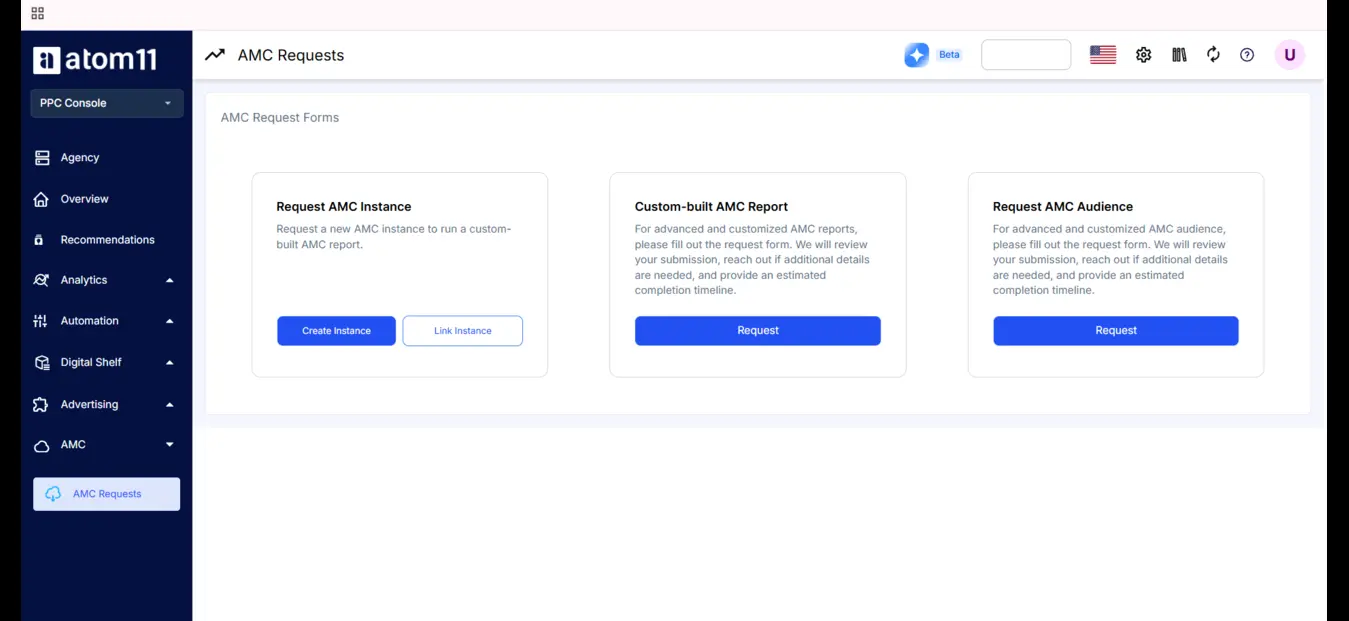
To see it on your own account, Book a demo with Atom11 today.
Conclusion
Sponsored Brands rewards brands that get the specs right and then measure honestly. Match your logo, headline and video to Amazon's requirements, expect product collections to move to the 3–10 ASIN model, and judge each format on brand-level metrics, not just ROAS. If you want one place to see spend, retail signals and automation impact together, Atom11 is built for that. Contact Atom11 to see it on your own account.
FAQs
What are Amazon Sponsored Brands ad specs?
They are the logo, headline, image, product and video requirements Amazon sets for Sponsored Brands ads. For video, that means 6–45 seconds, 16:9, MP4 or MOV, and up to 500MB. Meeting them is what gets your creative approved during moderation.
Do I need Brand Registry for Sponsored Brands?
Yes. Sponsored Brands are built for registered brand owners and vendors, so enrol in Amazon Brand Registry first. It is also worth having a published Brand Store ready, since many formats send shoppers there.
How many products can a Sponsored Brands ad show?
The legacy product collection format showed three products in the ad. The newer collections format, rolling out since January 28, 2026, supports 3–10 ASINs per ad. You can let Amazon's AI pick the most relevant products or choose them yourself.
What size should a Sponsored Brands logo be?
Use at least 400×400 px, with a file size up to 1MB, based on Amazon's API documentation as reported by PPC Land. Use your registered brand logo on a clean white or transparent background, not a product photo.
Do Sponsored Brands videos have sound?
They always start muted and play automatically once half the video is on screen. Shoppers can turn sound on with the mute toggle in the lower-right corner. Because most people will see it silent, make sure the video works without audio.
