Blog
/
Multi-Account Amazon PPC Management: How to Scale Without Losing Control
Multi-Account Amazon PPC Management: How to Scale Without Losing Control
Deepika Thakur
Key Takeaways
Multi-account PPC is an operations problem first and a bidding problem second. Structure, access and shared rules decide whether it scales.
Amazon's manager account gives you one sign-on for up to 500 advertiser entities. It is a navigation layer, not an optimization engine.
Keep seller-account compliance and ad-account management separate. Use invited users and authorized tools, never shared passwords.
Write rules around each account's target ACoS and max-CPC ceiling, not fixed bid changes. The same rule can be safe in one account and costly in another.
Alerts and reusable report templates save more time than any single bid tweak.
Atom11 is built for teams running 10+ accounts. It offers retail-aware automation (inventory, Buy Box), a "glass-box" Performance Monitor, cross-account bulk actions, individual seats and an MCP connection to your AI tools.
Multi-account Amazon PPC management means running campaigns across multiple Seller Central or advertising accounts while keeping bidding, budgets, search terms, reporting, and access organised.
The most effective approach is to centralise account visibility and repetitive execution without applying identical rules to every account. Each account still needs its own targets, products, margins, inventory conditions, and campaign structure.
A multi-account PPC platform can automate recurring actions, standardise workflows, and surface account-level issues without requiring managers to switch between dashboards constantly. This guide explains how to structure multi-account management, control access, automate safely, monitor performance, and scale PPC operations.
What is Multi-account Amazon PPC management?
Multi-account Amazon PPC management means running Sponsored Products, Sponsored Brands, Sponsored Display and often DSP campaigns across more than one advertising account. You do it with one shared operating system for structure, access, rules and reporting. Three setups are common:
Setup | Who runs it | Main pain point |
Agency with client accounts | PPC agencies | Holding quality steady per client without adding headcount |
Multi-brand owner | Brand houses, aggregators | Sibling brands bidding against each other on the same terms |
Multi-region brand | Global sellers | Different currencies, benchmarks and seasonality |
An ad account is not a seller account. Amazon's standard policy is one Seller Central account per seller, with multiple accounts possible for legitimate business needs. If one is deactivated for a violation, it can affect selling across all associated accounts.
Advertising access sits on top of that. PPC teams get in through invited users, manager accounts or API-authorized tools, not shared passwords. Browser-isolation tools solve a login-separation problem, but they don't help you decide which bid to change. Check the current requirements in Seller Central before opening any additional account.
How access to multiple ad accounts actually works
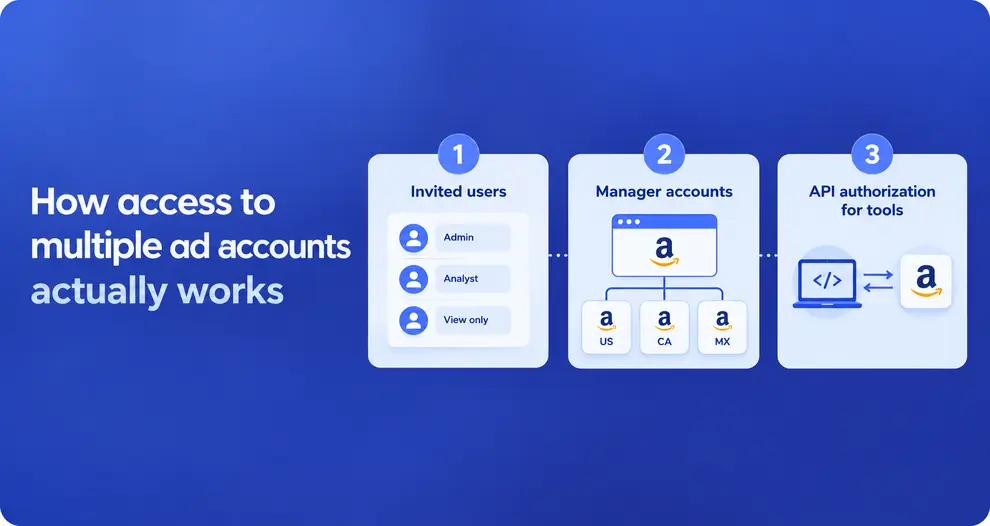
There are three legitimate routes, and most teams use a mix.
1. Invited users. Each specialist is invited to an ad account with a role. Nobody shares a password, and activity is attributable to a person.
2. Manager accounts. A manager account provides a single sign-on across multiple advertising accounts. It allows a maximum of 500 advertiser entities, and country accounts can be linked into regional groups, for example the US, Canada and Mexico together.
3. API authorization for tools. Advertisers can delegate access to approved client applications through an OAuth 2.0 flow. The advertiser grants authorization once, and the application then acts within that scope. This is how PPC software connects to your accounts.
This is why browser-isolation and VPN workarounds, which often show up in search results for this topic, are a different problem. They address login separation, not optimization. Follow Amazon's current rules and ask Amazon or your software partner if unsure.
One more mechanic matters here. Amazon Marketing Stream pushes hourly campaign metrics in near real time. It is available to agencies, tech providers and direct advertisers integrated with the Amazon Ads API. Retail data such as stock isn't included in that feed. So a tool has to combine ad data with retail signals from elsewhere to know that an ASIN is about to sell out.
Build the Structure Before You Automate
Naming. Use one convention across accounts, such as Brand | Ad type | Target type | Goal (Acme | SP | Exact | Profit). This lets rules and reports cover campaigns consistently.
Portfolios. Group campaigns by margin band, lifecycle stage, or business goal rather than who created them.
Roles. Give specialists separate seats with least-privilege access. Advertising managers do not need billing access, while analysts may only need reporting rights.
Campaign types. Keep Sponsored Ads and DSP structures separate because their optimisation signals differ. Track ACoS, ROAS, CTR, CVR, CPC, and search-term performance for Sponsored Ads; monitor ROAS, reach, frequency, view-through conversions, and new-to-brand metrics for DSP.
Central tracking. Bring these metrics into one reporting layer so teams can compare account and campaign performance without applying identical optimisation rules across campaign types.
Archetypes. Classify each account as launch, mature profit, seasonal, or inventory-constrained, then set automation rules and guardrails around its specific goal.
Ask yourself: Before applying a rule across accounts, check which campaign type it affects, which metrics determine success, what retail conditions could change the decision, and what guardrail should stop or reverse the automation.
Archetype | Goal | Rule emphasis | Guardrail |
Launch | Rank and reviews | Higher ACoS tolerance, aggressive harvesting | Time-box the target, review weekly |
Mature profit | Margin | Tight ACoS/TACoS targets, negation | Cap bid increases |
Seasonal | Capture peaks | Dayparting, budget ramps | Save a version first, roll back after |
Inventory-constrained | Avoid stockouts | Reduce or pause on low stock | Auto-resume on replenishment |
Use Time and Retail Signals Across Multiple Amazon PPC Accounts
Bids based only on past ad performance miss what is happening now.
Dayparting uses hourly and weekly patterns. Hourly Marketing Stream data is the raw material, and Amazon's own guide describes raising bids during high-performing hours and adjusting budgets through the day.
Inventory rules stop spend on products about to sell out. Ads on low-stock ASINs raise sales velocity and speed up the stockout. A late unpause after restocking wastes the recovery window.
Price and competitor signals create short opportunities. If a competitor raises prices, lifting bids on that listing can capture the demand for a few days.
One workflow: react to changing retail conditions
Monitor hourly performance → check inventory and price signals → identify an opportunity or risk → adjust bids or budgets within account limits → pause or resume campaigns when inventory changes → review the result.
This lets PPC teams optimise against current retail conditions rather than yesterday's ad data alone.
Monitoring: alerts, cadence and diagnosis
A person checking 20 accounts each morning finds yesterday's problems. Set alerts for five conditions per account:
Budget exhausted before midday
ACoS above target for three days
Ad spend on low-stock ASINs
Buy Box lost
A sudden impression drop
Cadence | Task |
Daily | Triage alerts, check pacing |
Weekly | Harvest and negate search terms, review placements |
Monthly | Reset targets, re-check archetypes, send client reports |
Before big events | Save a version of bids and budgets |
When an account dips, diagnose in order. First separate traffic from conversion: did impressions and clicks fall, or did conversion fall? Then check stock, price, Buy Box and competitor changes before touching bids. Bid-tweaking without this step often treats a symptom.
Reporting across accounts
Build one report template and reuse it. Include campaign-level views for specialists and ASIN-level views for clients. Put inventory, price and Buy Box status next to spend, since those are often the real cause of a swing. Schedule delivery so reports don't depend on someone remembering.
How to manage key events like Prime Day
Major events like Prime Day require a different monitoring rhythm because traffic, conversion rates, budgets, and inventory can change rapidly. The workflow should start before the event, not when the sale begins.
Before the event: Save the current bid and budget version, identify priority ASINs, confirm inventory levels, set event-specific targets, and increase budgets or bids where the account can support additional demand.
During the event: Monitor spend pacing, conversion rate, Buy Box status, inventory, and hourly performance. If a high-priority campaign is spending faster than planned, adjust its budget or bid; if an ASIN approaches a stockout, reduce or pause its advertising.
After the event: Compare event performance with the saved baseline, identify which campaigns and ASINs benefited from the increased spend, then restore or revise bids and budgets rather than leaving temporary event settings running indefinitely.
Seven mistakes that cost multi-account teams money
A few recurring mistakes can quietly increase costs, create operational risks, and make it harder to manage multiple Amazon accounts efficiently.
Mistake | Why it hurts | Fix |
One rule set for every account | Ignores different margins and CPC ceilings | Archetype playbooks |
Shared logins | No audit trail, higher risk | Individual seats, invited users |
Ignoring stock | Spend on products that can't ship | Inventory rules |
Automation nobody audits | Can't defend results to clients | Before-and-after tracking, undo |
No pre-event snapshot | Hard to roll back after Prime Day | Version control |
Manual reporting | Hours lost every week | Templates and scheduling |
Treating ACoS as the only metric | Ignores total sales and organic lift | Track TACoS and profit too |
Spreadsheets vs. Amazon Ads console vs. multi-account PPC software
A simple comparison helps show which approach makes sense as the number of Amazon Ads Bulk operations and the complexity of management increase.
Approach | Visibility | Automation | Access control | Best for |
Spreadsheets + VAs | Manual exports | Manual | Shared logins are common | 1–3 accounts |
Amazon Ads console + manager account | One sign-on, per-account data | Native tools | Roles by manager account | 3–10 accounts, light optimization |
Multi-account PPC platform | Per-client analytics and alerts | Rules, dayparting, bulk actions | Seats, sub-accounts, history | 10+ accounts or large catalogs |
How Atom11 supports multi-account Amazon PPC management
Atom11 is an Amazon PPC software and analytics platform built by ex-Amazon operators. It is aimed at agencies managing ten or more accounts, and at brands with large or seasonal catalogs. It connects to each account through Amazon's Ads API and pulls in historical ad and retail data, so you don't start from a blank slate. Amazon's Ads Partner Awards gave Atom11 its 2025 AI Innovation Award for its Neo analyst.
What it offers multi-account teams
Cross-account bulk actions. Rule sets, bid and budget edits and campaign creation can be applied across client accounts in one pass, instead of account by account.
Team access controls. Each specialist gets an individual seat, and you can assign specialists to accounts and review activity history by user. Clients can also get their own sub-account login.
Client reporting. You build a report template once and apply it to every account. Reports can be scheduled, exported, and include inventory and Buy Box data next to spend.
Retail-aware automation. Rules can use inventory, Buy Box, pricing and organic rank alongside ad data. Ads can pause on low stock and resume on replenishment.
Hourly optimization. Dayparting for bids and budgets, driven by hourly Amazon Marketing Stream data.
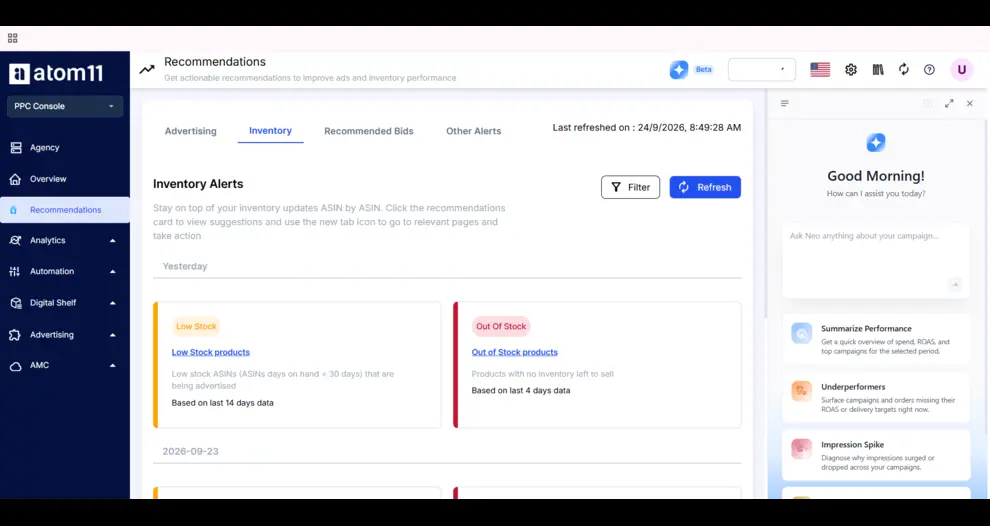
Automation you can audit. The Performance Monitor shows keyword results before and after each automation. There is undo, and version control saves your bids and budgets before events like Prime Day.
Neo, the AI analyst. It compares time periods across 15+ ad and retail signals to explain why sales moved. The MCP Integration also lets you query live account data from Claude, ChatGPT and other MCP clients, with the same permissions as the signed-in user
When Atom11 is the right fit
Strong fit:
10+ accounts, or fewer accounts with large, seasonal catalogs
Inventory-sensitive products where a late pause costs sales
Teams that need before-and-after proof for clients
Probably not needed: one to three small accounts with simple catalogs. The Amazon Ads console plus a manager account may be enough there.
Conclusion
Multi-account Amazon PPC management comes down to five habits. Audit first, write playbooks by account type, use time and retail signals, keep automation auditable, and automate the reporting. The Atom11 client examples show the same pattern. Betterled's efficiency gains came from consistent playbooks and automation, Luum's from dayparting and rule sets, and the US reseller's from a single inventory rule. Results vary by account, but the framework holds.
If you manage 10+ accounts and want to see how this would work on your own data, Book a demo and the Atom11 team will walk you through it.
FAQs
What is multi-account Amazon PPC management?
It is running Amazon Ads campaigns across several advertising accounts, such as client brands, sibling brands or regions. You use a shared system for structure, access, rules and reporting.
How do agencies manage PPC for many clients?
They combine a manager account for access with playbooks, alerts and reporting templates. Software adds bulk rule application and automation on top.
Can I apply the same PPC rules across all my accounts?
Yes, but base rules on each account's target ACoS, margin and CPC ceiling rather than fixed bid changes. Group similar accounts into playbooks.
Does automation replace my PPC specialists?
No. In the Betterled example, the time saved went to strategy and more accounts per manager, not fewer people.
Is managing multiple accounts against Amazon's rules?
Not by itself. Multiple seller accounts need a legitimate business need and good standing, so check current requirements in Seller Central.
