Blog
/
Amazon PPC MCP: Automating PPC Management with AI Agents
Amazon PPC MCP: Automating PPC Management with AI Agents
Nivesh J.
Quick answer: Amazon PPC MCP lets an AI assistant such as Claude read your Amazon Ads data and propose, or in some setups make, changes to bids, negatives and budgets through the Model Context Protocol. It works best when the agent owns the repetitive volume work (finding wasted spend, drafting bid changes, harvesting search terms) and rules own the limits (minimum data, size caps, stock and margin checks). The safe pattern is a five step loop: diagnose, recommend, approve, execute and verify, with a shadow mode test before the agent ever writes to a live account.
Key Takeaways
MCP is access, not judgment. It gives an assistant a route to your data and tools. It does not decide how much data is enough or how large a bid change should be. Those rules are your job.
Add a fifth step to the usual loop. Most guides stop at “approve and execute.” Add a verify step that checks seven days later whether the change worked.
Write an action spec for every job. Each action needs a minimum data rule, a size cap, a cooldown and an owner. The table below gives starting values.
Send exceptions, not tables. An agent that returns 40 proposals is useful. One that returns 200 rows is just a dashboard.
Test in shadow mode first. Run the agent for four weeks with no write access and promote it only when its proposals match an expert’s and none are harmful.
What Can an AI Agent Run in Amazon PPC? Autonomy by Job
Not every PPC job deserves the same freedom. This grid shows where we would start each one.

Figure 1: Suggested starting autonomy for each PPC job.
PPC job | Starting level | Why |
|---|---|---|
Wasted spend and search term review | Draft | Easy to check, and a wrong answer costs only review time |
Negative keyword additions | Apply with approval | Hard to undo if it blocks a good term |
Search term harvesting | Apply with approval | Creates new targets, so it needs a structure check |
Small bid changes | Apply inside caps, after shadow mode | High volume, reversible and well suited to rules |
Budget changes | Apply with approval | A wrong move can starve a launch or overspend |
Pause ads on low stock | Apply inside caps | Reversible, rule based and protects margin |
New campaign structure and strategy | Report or draft only | Needs human judgment about the brand and funnel |
What Is Amazon PPC MCP?
The Model Context Protocol is an open standard that lets AI applications call external tools in a consistent way. In Amazon PPC, an MCP server sits between your assistant and your ad data, so you can ask in plain language and get an answer from live campaigns instead of an exported file.
Amazon moved quickly here. It opened a closed beta of its Ads MCP server on November 13, 2025, and the open beta announced on February 2, 2026 is available to Amazon Ads partners with active API credentials. Most advertisers therefore reach MCP through a platform that already holds that access. Our guides to the Amazon MCP server and to Amazon Ads MCP, API and Agent explain the routes, and our comparison of Amazon MCP servers and AI connectors shows who can use which.
Can Claude Manage Amazon Ads?
“Can Claude manage my ads?” is really three questions, with three different answers.
Can it see my data? Yes, through an MCP connection or an exported report.
Can it propose good changes? Yes, if you give it rules, targets and context such as break even ACOS.
Can it run the account unsupervised? Not safely on its own. It has no built in limits, and a confident wrong answer looks the same as a right one.
So the realistic job for an AI agent in PPC is rule executor and analyst, not strategist. It handles the part of the work that is known and repetitive, and a person keeps the part that depends on context. Our comparison of AI and rule based Amazon PPC explains why hard limits should sit above any model.
The Five Step Agent Loop: Diagnose, Recommend, Approve, Execute, Verify

Figure 2: The loop closes only when you verify.
Diagnose. The agent reads the data and finds what changed. No changes are made.
Recommend. It proposes specific actions with the data behind each one: current value, proposed value and why.
Approve. A person or a rule checks each proposal against limits such as stock cover and break even ACOS.
Execute. Only approved changes are applied, in batches, and each is logged with old and new values.
Verify. Seven days later, the agent checks whether each change did its job.
The fifth step is the one most guides skip, and it matters most. Without it you only know the agent acted, not whether it helped. A simple check is the survival rate: the share of changes not reversed within seven days. If the agent keeps cutting a bid and the next cycle raises it again, it is reacting to noise. Our Amazon Marketing Stream guide explains when faster data is worth using for verification.
The PPC Action Spec: What the Agent Needs Before It Acts
An agent is only as safe as its rules. For each action, write down four things: the minimum data, the size cap, the cooldown and who approves. These starting values are examples, so adjust them to your margins and category.
Action | Minimum data | Size cap | Cooldown | Who approves |
|---|---|---|---|---|
Negate a search term | Clicks of at least 3 ÷ conversion rate, zero orders, 30 day window | Exact negative only | None | Person |
Pause a keyword | Same as above, and not in its first 30 days | One keyword at a time | None | Person |
Lower a bid | At least 3 orders, clicks above the threshold, ACOS above target | 20% per cycle | 3 to 7 days | Rule inside caps, after shadow mode |
Raise a bid | At least 3 orders, ACOS below target, stock cover above lead time | 10% per cycle | 3 to 7 days | Rule inside caps, after shadow mode |
Harvest a search term | At least 2 orders in an auto campaign | Exact target at a set bid, source negative added | None | Person |
Raise a budget | Out of budget before 6 pm, ROAS above break even, stock fine | 20% a step | 3 days | Person |
Pause for low stock | Days of cover below lead time | Pause only, resume after restock | None | Rule |
Formula 1: How many clicks are enough?
Minimum clicks = 3 ÷ conversion rate
At a 10% conversion rate, that is 30 clicks. A keyword that truly converts at 10% still has a 35% chance of showing zero orders in its first 10 clicks, a 21% chance in 15 and a 12% chance in 20. Any rule that pauses on a round number such as 10 clicks will cut good keywords. This is why the first column of the table starts with data, not action. Our guide to search term negation shows the manual version.
Formula 2: A capped bid change
New bid = Current bid × (Target ACOS ÷ Actual ACOS), limited to 20% change per cycle
Example. A keyword bids $2.00 with a 25% target ACOS. Over the lookback window it has 45 clicks, 5 orders and a 32% ACOS.
$2.00 × (25 ÷ 32) = $1.56, a 22% cut. The cap limits it to 20%, so the new bid is $1.60. If ACOS is still high after the cooldown, the next cycle moves it again. The cap protects you from collapsing a bid so far that the keyword stops getting the impressions it needs to recover. See our Amazon Ads API guide for how these changes are batched.
Formula 3: Break even ACOS sets the ceiling
Break even ACOS = (Price minus COGS minus fees minus other variable costs) ÷ Price
Example. Price $30, COGS $9, referral and FBA fees $9, returns and other costs $1.50. ($30 minus $19.50) ÷ $30 = 35%. Your target should sit below that, and your “cut the bid” threshold should too. Industry averages are the wrong source. See the ACOS benchmark guide for context.
An Example: Why Exceptions Beat Tables
Imagine an account with 200 active keywords and a 10% conversion rate, so the minimum is 30 clicks. A thoughtless agent reviews all 200 and returns 200 rows. A well designed one filters first.

Figure 3: The review burden for one account, illustrative.
200 keywords in scope.
72 have at least 30 clicks in the lookback window, so only those can be judged. The other 128 are left alone and listed as “needs more data.”
40 proposals come out: 26 bid cuts where ACOS is above target, 9 pauses with 30 or more clicks and no orders, and 5 harvest candidates.
Review minutes = Proposals × Seconds per proposal ÷ 60
At 20 seconds each, 40 proposals take about 13 minutes. A manual review of 200 keywords at one minute each would take over 3 hours. The saving does not come from the agent being clever. It comes from the data rule throwing out 128 keywords that never deserved a decision. The same pattern scales: a portfolio of accounts is worth reviewing only as a ranked exception list, as in our guide to Amazon MCP for agencies.
Shadow Mode: Prove It Before It Writes
Before giving any agent write access, run it for four weeks in shadow mode. It reads, it proposes, a person decides, and nothing is applied automatically. Track two numbers each week.
Agreement rate: the share of proposals an expert reviewer would have made or accepted unchanged.
Harmful proposals: proposals that would have caused damage, such as raising a bid on a product with low stock, pausing a keyword in a launch or cutting a bid during a Buy Box loss.

Figure 4: Illustrative shadow mode results, with a promotion rule of two weeks in a row at 80% or higher and no harmful proposals.
A reasonable gate is two weeks in a row at 80% agreement or higher with zero harmful proposals. In the illustration, weeks 3 and 4 meet it, so the agent earns write access for the lowest risk actions only, such as small bid steps inside caps and stock based pauses. Everything else stays at draft or approval. This test also exposes bad rules quickly: if the agent keeps making the same wrong proposal, fix the rule, not the model. The write access ladder in our Amazon DSP MCP guide shows how to climb it.
Handle Attribution Lag or the Agent Will Cut Winners
Orders from recent clicks keep arriving after the click, so fresh PPC data always looks worse than it will. An agent that judges yesterday will cut bids on keywords that are about to convert. Three rules help.
Use a settled window for conversion decisions. Exclude the most recent few days from ACOS based bid changes, and re pull at least the last 14 days on each run.
Label recent days as provisional. Ask the agent to show them separately.
Judge spend, impressions and budget pacing daily. Those metrics do not suffer from the same lag.
For how this works in DSP, see our Amazon DSP attribution guide.
Retail Context: The Check Ads Data Cannot Do
Ads data cannot tell an agent that a product has nine days of stock left, that the Buy Box moved or that the price just changed. Before any bid rise or budget increase, the agent should run a pre flight check.
Days of cover = Units available ÷ Average daily units sold
If days of cover are below the replenishment lead time, no increase is allowed and a pause is proposed. This one rule often saves more than any bid algorithm, because no bid helps a product that cannot be bought. Our guide to Amazon MCP for ecommerce teams sets out the profit, stock and ads order in full.
One Owner Per Bid: Agent, Rules or Amazon’s Own Tools
Conflicts are one of the quietest ways to waste budget. If a rule lowers a bid at 6 am and an agent raises it at 8 am, you pay for the argument. Give each job one owner.
Job | Best owner | Notes |
|---|---|---|
Bid changes | One system only, either a rule engine or a model | Never let two systems set bids on the same keyword |
Budget steps and schedules | Rules, including Amazon’s own budget rules | Good for events such as Prime Day |
ROAS guardrails | Amazon’s rule based bidding for Sponsored Products | Native and simple |
Search term analysis and drafting | The agent | Highest value, lowest risk |
Stock based pauses | Rules | Needs retail data and must be fast |
Amazon’s own automation is a fair starting point. The case for an agent grows when you need to combine data sources, explain results and draft changes at a scale that rules alone cannot cover.
Six Ways AI PPC Agents Go Wrong
Failure | What happens | Prevention |
|---|---|---|
Runaway bids on thin data | A bid rises on a keyword with two lucky orders | Minimum clicks and orders, 10% cap |
Killing launches | A new product’s keywords are paused before they have data | Exempt the first 30 days from pauses |
Cutting bids during a stockout | ACOS rises because the product is unavailable, and the agent cuts bids | Check stock and Buy Box before diagnosing |
Oscillation | Bids move up and down every cycle | Cooldown of 3 to 7 days and a survival rate check |
Budget starvation | Budget moves from a launching product to a mature one | Protect launch campaigns by rule |
Context blindness | A deliberate high ACOS during a launch gets “fixed” | Store campaign goals where the agent can read them |
Security, Data and Amazon’s Rules
Keep credentials out of prompts. Use a connection that holds the token, not a pasted key.
Start read only. Add write access only for specific actions after shadow mode.
Keep a log and a way back. Record old and new values for every change, and keep a way to restore an earlier state.
Check what the provider stores. Review data handling before connecting accounts.
Check Amazon’s agent rules. Amazon announced an Agent Policy effective March 4, 2026, and trade coverage says it is unclear whether it reaches Amazon Ads APIs or MCP, so confirm the current text with your provider.
How Atom11 Supports AI Driven PPC Management
The pattern in this guide is AI for analysis and proposals, rules for limits and execution, and a record to verify results. Atom11 is an Amazon Ads Partner platform built on the Amazon Ads API, and it covers each part.
Rules that execute inside your limits
Atom11 automations run as rules you set, so every change follows limits you can read. The bid optimizer raises or lowers bids based on performance, search term harvesting and negation scale targets that work and negate those that do not, budget and portfolio budget rules move budgets by performance, and dayparting schedules bids and budgets by hour and day on Marketing Stream data. These are the rule layer in the action spec above. For the philosophy behind it, see our guide to Amazon Ads automation software.

Retail signals that the ad data does not have
The inventory optimizer pauses ads on low stock and resumes them after restock, and inventory, price, Buy Box and organic rank can feed rules and analysis. That is the pre flight check, built in.
An AI layer to diagnose and explain
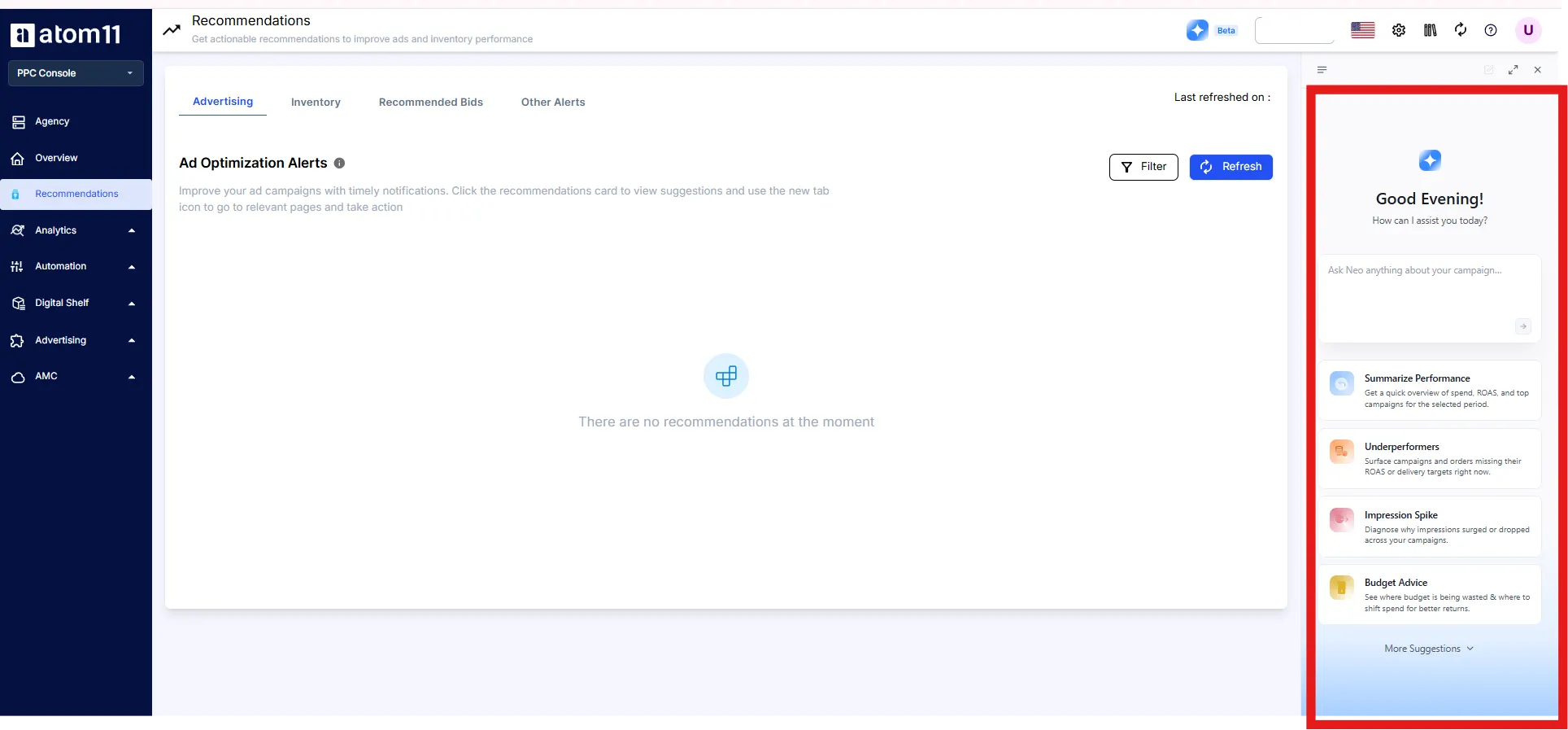
The Atom11 MCP gives AI assistants such as Claude, ChatGPT and Cursor governed access to your ad accounts, your retail signals and the logic behind Neo, Atom11’s AI analyst. Setup takes about five minutes with no terminal, and answers reflect the account when you ask. Neo compares periods across more than 15 ad and retail signals to explain why sales or ACOS moved. That covers the diagnose step, and your assistant can draft proposals for you to review.
A record to verify and a way back
Version control saves bids and budgets so you can roll back, for example after Prime Day or Black Friday. The Performance Monitor shows a before and after record of what each automation changed, which is the verify step in practice. Bulk actions create campaigns, add keywords and negations, and edit many campaigns at once, and the dashboard exports to Power BI, Google Sheets and Looker.
How the loop maps to Atom11
Step in the loop | How Atom11 supports it |
|---|---|
Diagnose | Neo and the MCP, with ad and retail signals together |
Recommend | Your assistant drafts proposals from live data |
Approve | You review proposals, and limits you set, including stock and ACOS conditions, govern what automation does |
Execute | Rule based automation and bulk actions, with caps |
Verify | Performance Monitor and version control |
Pricing
Atom11 PPC pricing is tiered by monthly ad spend, starting at $499 a month under $50K, with the lowest tier excluding Marketing Stream data and AMC. See the pricing page for current inclusions, and our roundup of Amazon PPC software to compare options.
See rule based automation and an AI analyst on your own account. Book an Atom11 demo.
Conclusion
Automating Amazon PPC with AI agents is less about a clever model and more about discipline. Write the action spec, filter before you propose, prove the agent in shadow mode, give each job one owner and verify every change a week later. Do that, and an agent turns hours of keyword review into minutes of decisions. Skip it, and you have a faster way to make the same mistakes. To see rules, retail signals and an AI analyst working together, book an Atom11 demo.
FAQs
What is Amazon PPC MCP?
It is a Model Context Protocol connection that lets an AI assistant read, and in some setups change, your Amazon Ads data. It turns plain language requests into ad account actions, but it does not set the rules for how much data is enough or how big a change should be.
Can AI manage Amazon PPC campaigns?
It can handle the repetitive work: finding wasted spend, drafting bid changes and harvesting search terms. It should not run strategy or unsupervised budget control. The best results come from AI proposals, rules for limits and a person approving the high impact changes.
Can Claude change bids on Amazon?
Only if the connection allows writes. Amazon’s Ads MCP server supports writes for partners, and some platforms offer them with controls. Start read only, run shadow mode and add write access for small, capped actions first.
Is it safe to let an AI agent change my bids?
It is safe when limits sit above the agent: minimum data, size caps, cooldowns, stock checks, a change log and a way to roll back. Without them, a confident wrong answer can spend real money quickly.
How do I test an AI agent before giving it write access?
Run it in shadow mode for four weeks. Track the agreement rate with an expert reviewer and the number of harmful proposals, and promote it only after two weeks in a row at 80% or higher with none.
