Blog
/
Amazon Vendor Central MCP: What Vendors Can Automate with AI
Amazon Vendor Central MCP: What Vendors Can Automate with AI
Nivesh J.
Amazon Vendor Central MCP means connecting an AI assistant such as Claude or ChatGPT to your Vendor Central data and vendor APIs through the Model Context Protocol, so you can ask about purchase orders, fill rate, inventory cover, margin and ad spend in plain language. Vendors can safely automate the reading, comparing and drafting. The writes that move money, such as purchase order acknowledgements, should keep a human in the loop.
Almost every guide to Amazon MCP is written for sellers. Vendors work under different rules: Amazon issues the purchase orders, owns the stock after receipt, sets the retail price and deducts chargebacks. This guide covers what vendors can actually automate, what the vendor APIs expose, a decision rule for the one write you should never automate blindly, and the formulas to check every AI answer. For the basics of vendor versus seller accounts, see our guide to Seller Central vs Vendor Central.
Key Takeaways
Amazon’s own Ads MCP server covers advertising. We could not find an Amazon operated MCP server for Vendor Central, so vendor MCP today runs through third party connectors, community servers or platforms built on the Selling Partner API.
Vendors have rich reporting through the API: sales, inventory, traffic, forecasting, net pure product margin and real time reports. Amazon’s vendor use case directory does not list chargeback disputes or Vendor Central screens, so those still need people.
The best first automations are read only: PO monitoring, fill rate tracking, weeks of cover and margin reviews.
A purchase order acknowledgement is a write that commits you to ship. Automate the recommendation, not the click.
Vendor ad economics are tighter than seller economics. A comparable product can have a break even ACOS of 23.5% as a vendor versus 35% as a seller, so never reuse a seller target.
What Is Amazon Vendor Central MCP?
The Model Context Protocol is an open standard that lets AI applications call external tools in a consistent way. A Vendor Central MCP server wraps Vendor Central reports and the vendor sections of the Selling Partner API so an assistant can fetch and combine them.
What makes vendor data different:
Amazon is your customer. Your key objects are purchase orders, acknowledgements, shipments and invoices, not consumer orders.
Your sales view has two lenses. Sourcing shows what you sold to Amazon. Manufacturing view includes units Amazon bought from others, so it will not match your invoices.
Access is by invitation. Vendor Central has no public application route, and data access for an assistant sits on top of your existing vendor permissions.
If you also sell as a third party seller, read our guide to Amazon Seller MCP, because the two data sets live behind different accounts. Our Amazon MCP guide covers the protocol itself.
What the Vendor APIs Actually Expose
An MCP server can only offer what Amazon exposes. Amazon’s vendor use case directory groups the vendor tools into a few areas.
Area | What it covers | Type |
|---|---|---|
Vendor retail procurement | Vendor Orders, Vendor Shipments, Vendor Invoices and Transaction Status APIs | Read and write |
Vendor direct fulfillment | Inventory, Orders, Shipping, Payments and Transactions APIs | Read and write |
Retail analytics | Sales, net pure product margin, traffic, forecasting and inventory reports, plus real time sales, traffic and inventory reports | Read |
Brand analytics | Search terms, market basket and repeat purchase reports | Read |
Marketing content and catalog | A+ Content, catalog items and listing items | Read and write |
Promotions | Promotion and coupon performance reports | Read |
Two details matter when you plan automation.
The Orders API includes a write. The Vendor Retail Procurement Orders API lets vendors retrieve purchase orders, check status and submit order acknowledgements to accept or reject fulfillment. It is for vendors only, and requires at least one of the Amazon Fulfillment or Inventory and Order Tracking roles.
Some work is not in the list. The directory does not include chargeback dispute filing or Vendor Central screens such as appointment scheduling, so an assistant can analyze those issues from reports but may not be able to act on them.
For how the Selling Partner API relates to the Ads API, see our Amazon Ads API guide.
What Vendors Can Automate with AI: The Five Workflows
We sort vendor work into five workflows. Each lists the trigger, the data, a prompt and what to verify.

Figure 1: The purchase order lifecycle and where AI fits.
Workflow 1: Purchase order monitoring and acknowledgement
Trigger: every new purchase order, and every morning for open ones.
What AI does well: pull open POs, compare requested quantity with your available stock and inbound supply, flag lines you cannot fully confirm and draft the acknowledgement.
The decision rule:
Confirmable quantity = Units available to ship by the due date minus units already committed to other open POs
If the requested quantity is higher than the confirmable quantity, confirm the lower number or decline the line. Amazon may cut POs on ASINs that repeatedly miss confirmation or ship short, so a smaller honest confirmation protects you more than an optimistic one.
Prompt:
“List all open purchase orders due in the next 14 days. For each line, show requested quantity, units available to ship by the due date, units already committed to other open POs, and the confirmable quantity. Flag lines where requested exceeds confirmable. Draft acknowledgements but do not submit them.”
What to verify: the available stock figure against your warehouse system, since Vendor Central cannot see units still in production.
Why a human submits it: an acknowledgement commits you to ship. A wrong confirmation creates a shortage, and shortages feed chargebacks and PO cuts.
Workflow 2: Fill rate and shortage tracking
Formula: Fill rate = Units shipped ÷ Units confirmed
Example: You confirmed 1,000 units and shipped 870. Fill rate is 87%, with 130 units short. Track it per ASIN and per fulfillment center, because one weak ASIN can hide behind a healthy average.
Prompt: “For the last 90 days, rank ASINs by fill rate, show units confirmed, shipped and received by Amazon, and flag ASINs where received is lower than shipped. Separate ship month from receipt month.”
What to verify: receipt month against ship month. Mismatches between the two are a common source of apparent discrepancies, and they are the first thing to rule out before filing a dispute.
Workflow 3: Chargeback and deduction review
AI cannot always file disputes, but it excels at triage, which is the slow part.
Formula: Expected recovery = Disputed amount × Your historical win rate for that deduction type
Prompt: “Group deductions from the last 6 months by type. For each type, show total value, count, and my recovery rate on past disputes. Rank by expected recovery and list the 20 largest unresolved items with the evidence I would need to attach.”
Work the list from the top. A dispute whose expected recovery is below the cost of an analyst’s time can be deprioritized. Keep a human owner for the filing itself.
Workflow 4: Inventory health and forecast review
Vendor reports include sellable on hand units, open purchase order units, sales, and mean and higher percentile forecasts. Combine them into weeks of cover.
Formula: Weeks of cover = Sellable on hand units ÷ Forecast units per week
Worked example. You have 4,800 sellable units. The conservative (P90) forecast is 1,500 units a week, so cover is 3.2 weeks. An open purchase order for 2,000 units is expected in week 4. You run out about 0.8 weeks before it lands, and even after it arrives, the 2,000 units cover only 1.3 weeks. The agent should flag the ASIN and say how many units and how many days sooner the inbound must arrive.
Prompt: “For ASINs with fewer than 4 weeks of cover on the P90 forecast, show on hand units, open PO units and their expected week, and the projected stockout week. List those where the PO lands after the stockout.”
Forecasts are estimates. Treat the P90 line as a planning aid, not a promise.

Figure 2: Weeks of cover with a late inbound purchase order.
Workflow 5: Margin and ad profit review
Vendor reports include net pure product margin, which accounts for Amazon’s costs and allowances. Use it to decide where ads pay off. The next section covers the ad math.
Vendor Ads Have Tighter Math
As a vendor, you earn the wholesale price, but ad sales are reported at the shopper’s price. That makes break even ACOS smaller than most sellers expect.
Formula: Vendor break even ACOS = Net margin per unit ÷ Retail price per unit
Example. A product retails for $40. Amazon pays you $26 wholesale. Cost of goods is $14, and cooperative advertising and other allowances take 10% of the invoice, which is $2.60. Net margin is $26 minus $14 minus $2.60 = $9.40 per unit. Break even ACOS is $9.40 ÷ $40 = 23.5%. A third party seller of a comparable product with a 35% contribution margin breaks even at 35%. Setting a vendor target from a seller benchmark is the most common vendor ad mistake.
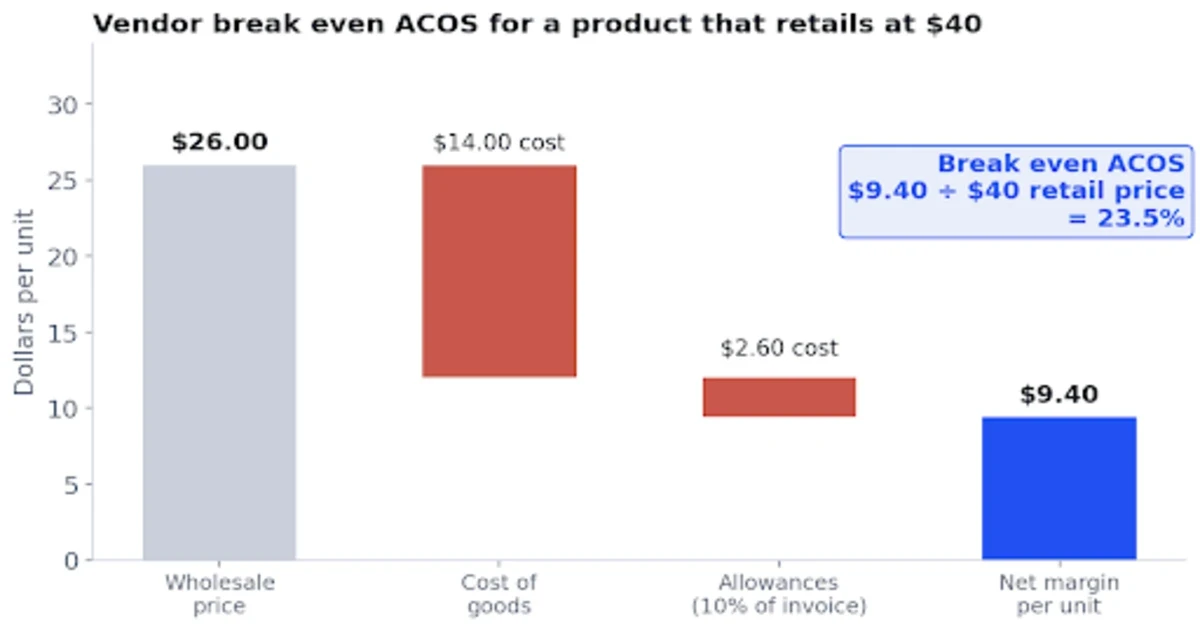
Figure 3: Vendor break even ACOS for a $40 product.
Two more rules:
Pause ads on ASINs with negative net margin. Advertising a product Amazon buys at a loss only pulls forward Amazon owned inventory.
Pause ads before stock runs out. An ASIN with 1.5 weeks of cover and a PO that lands late should not be spending.
Amazon’s advertising guide for vendors lists Sponsored Products and Sponsored Brands as the core vendor ad products, with registration through your Vendor Central or Advantage Central account. Our guides to TACOS and ACOS and ACOS benchmarks explain how to set targets, and the Amazon KPI guide covers the wider metric set.
What to Automate and What to Keep Human
Workflow | Mode | Autonomy level | Why |
|---|---|---|---|
PO monitoring and flagging | Read | Fully automated | No risk |
Weeks of cover and stockout alerts | Read | Fully automated | Alerts only |
Fill rate and shortage tracking | Read | Fully automated | Alerts only |
Chargeback triage and ranking | Read and draft | Automated, human files | Disputes need evidence and judgment |
PO acknowledgement | Write | Draft only, human submits | Commits you to ship |
Shipment notices and invoices | Write | Draft only, human submits | Errors delay payment |
Ad bids and budgets | Write | Small steps inside caps, with rollback | Reversible and bounded |
Pausing ads on low stock | Write | Rule driven | Fast, low regret |

Figure 4: What vendors can automate with AI, by level of control.
For a staged approach to write access, see the ladder in our Amazon DSP MCP guide. For the cross functional view across ads, stock and profit, see Amazon MCP for ecommerce teams.
Five Checks Before You Act on an AI Answer
Which view is it using? Sourcing and manufacturing views give different numbers. Ask it to name the view.
Is it comparing like with like? Ordered units, shipped units and received units are different things. Ask for the definition.
Does it separate ship month from receipt month? Otherwise shortage numbers mislead.
Are recent days provisional? Ad attributed sales keep changing, and some retail reports are revised.
Is it advising a write? If yes, ask for current and proposed values and confirm the stock figure outside Amazon.
Data Privacy and Access for Vendors
Your wholesale terms, allowances and margins are commercially sensitive. Before you connect Vendor Central data to a general AI tool:
Check whether your vendor agreement restricts sharing terms or cost data.
Prefer connections that give governed, read only access you can revoke.
Use only the vendor roles the workflow needs, for example Inventory and Order Tracking for read workflows.
Keep acknowledgements, shipment notices and invoices out of any agent that can write without approval.
How Atom11 Helps Vendors
Atom11 is an Amazon Ads Partner platform built for sellers, vendors and agencies. For vendors, the value sits on the advertising side, where inventory awareness and hard limits matter most.
Retail aware rules. Automations can use inventory, price, Buy Box and organic rank alongside ad metrics, so spend slows when stock is short. Our guide to AI vs rule based Amazon PPC explains why limits belong in rules rather than in a model.
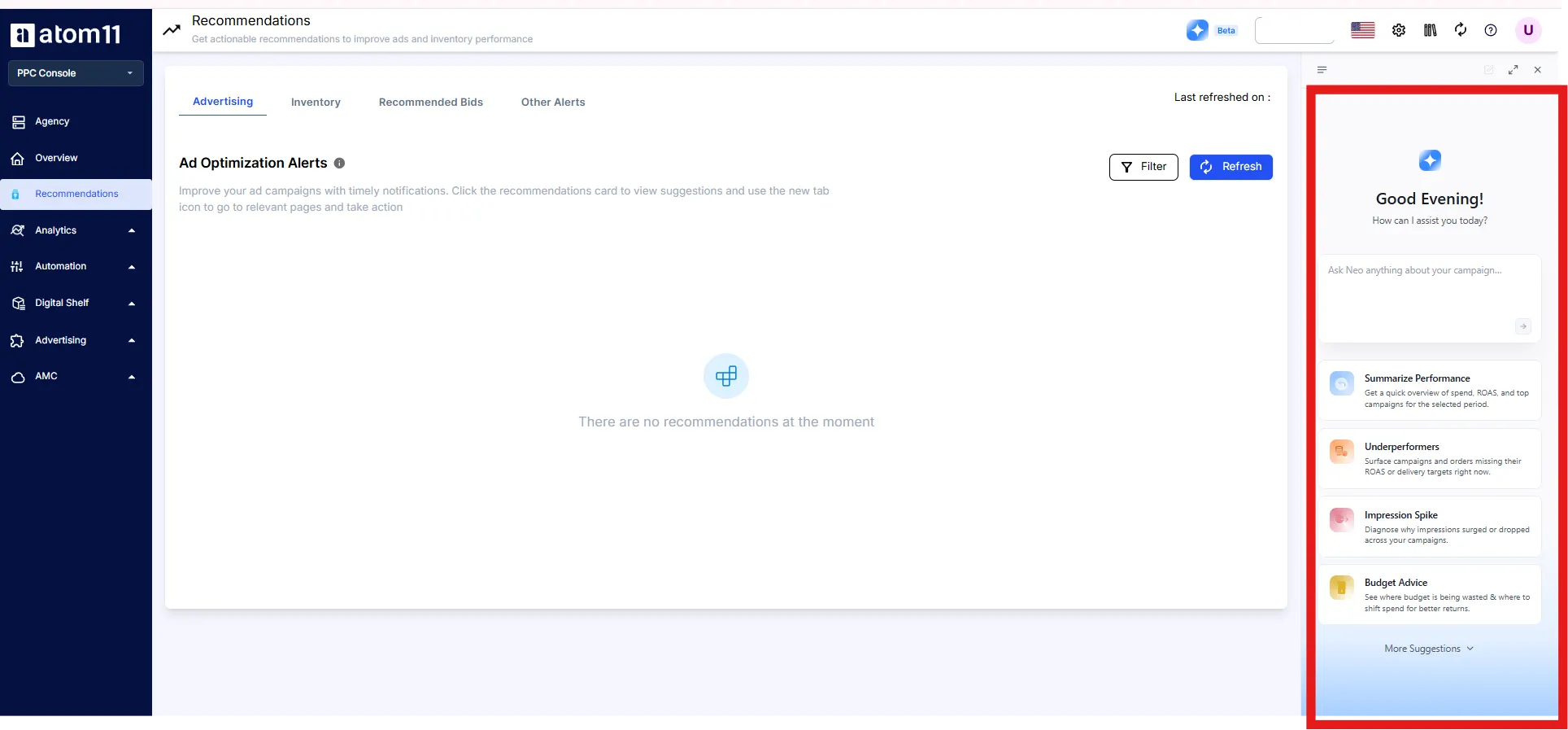
Atom11 MCP. The Atom11 MCP gives AI assistants such as Claude, ChatGPT and Cursor governed access to ad accounts and retail signals, and agencies can manage multiple client accounts through the same connection. Setup takes about five minutes.
Version control and Performance Monitor. Save bids and budgets before big events and roll back afterward, with a before and after record for each automation.
Neo. Atom11’s AI analyst compares periods across more than 15 ad and retail signals to explain why sales or ACOS changed.
DSP and bulk actions. Vendors who run Amazon DSP can bulk create orders, pace across orders and cap frequency per audience in the Amazon DSP module.
Our roundup of Amazon PPC software and the guide to Amazon Ads automation software help you compare options. Atom11 PPC pricing is tiered by monthly ad spend, starting at $499 a month under $50K, with the lowest tier excluding Marketing Stream data and AMC. See the pricing page for current inclusions.
Want ad automation that respects your stock and your margin? Book an Atom11 demo.
Conclusion
Vendor work is a stream of structured, document heavy decisions, which is exactly where AI saves time. Let the assistant watch purchase orders, calculate fill rate and weeks of cover, rank deductions and review margin. Keep people on the commitments: acknowledging orders, sending shipment notices, filing disputes and deciding what ads Amazon’s inventory can support.
Start read only, check every number against the formulas above, and set vendor specific ad targets from net margin rather than a seller benchmark. Done that way, MCP gives vendors back hours every week without adding shortages to the bill.
FAQs
Is there an official Amazon Vendor Central MCP server?
We could not find an MCP server operated by Amazon for Vendor Central. Amazon’s own MCP server covers Amazon Ads. Vendor data reaches AI tools through third party connectors, community servers and platforms built on the Selling Partner API.
Can AI acknowledge Amazon purchase orders automatically?
The vendor Orders API supports submitting acknowledgements, so a server can expose it. We recommend that the AI drafts the confirmation and a person submits it, because it commits you to ship and errors lead to shortages.
Can AI file Vendor Central chargeback disputes?
Amazon’s vendor API directory does not list dispute filing. AI can still rank deductions, summarize evidence and draft the case, while a person files it in Vendor Central.
What vendor data can Claude access?
It depends on the server, but the vendor APIs and reports cover purchase orders, shipments, invoices, sales, net pure product margin, traffic, forecasting and inventory, including real time versions of sales, traffic and inventory.
Do I need Selling Partner API access?
For most vendor data, yes, because the vendor APIs sit in the Selling Partner API. The Orders API requires at least one of the Amazon Fulfillment or Inventory and Order Tracking roles. If you use a connector that already has access, you authorize it instead of building your own.
